Flutter vs React Native comes down to product fit: Flutter is stronger for highly consistent, custom UI across platforms, while React Native is often better for teams already built around React, JavaScript, or TypeScript.
The hard part is choosing without slowing the MVP, increasing hiring risk, or creating maintenance debt.
According to Stack Overflow’s Developer Survey, the report collected 49,000+ responses from developers across 177 countries and 314 technologies. This matters for Flutter vs React Native because developer ecosystem data helps product teams estimate hiring availability, onboarding risk, and long-term framework support.
If you are comparing frameworks before hiring a mobile app development company in Dallas or anywhere in the world, this guide breaks down performance, cost, speed, UI control, and long-term support clearly.
What Is the Difference Between Flutter and React Native?
Flutter vs React Native comes down to how each framework builds mobile apps. Flutter uses Dart and its own widget-based rendering system to create consistent interfaces across iOS and Android. React Native uses JavaScript or TypeScript with React patterns and native platform capabilities, making it easier for React teams to build mobile apps.
Flutter describes itself as a framework for building mobile, web, desktop, and embedded apps from a single codebase, while React Native is built for Android and iOS apps using React and native platform capabilities.
This technical difference affects UI behavior, platform consistency, package selection, native integrations, and how the team maintains the app after launch.
The difference is not only the language. It changes how the app is rendered, how native features are connected, and how development workflows are structured.
Flutter vs React Native Comparison
| Factor | Flutter | React Native |
| Best for | Custom UI, branded interfaces, consistent cross-platform design | React teams, native-like apps, existing JavaScript ecosystems |
| Programming language | Dart | JavaScript or TypeScript |
| UI approach | Uses its own widget and rendering system | Uses native components through the React model |
| Development speed | Fast once the team is comfortable with Flutter and Dart | Fast for teams already experienced with React |
| Hiring pool | Growing, but more specialized | Broader because of the React and JavaScript talent pool |
| Performance | Strong for UI-heavy and animation-focused apps | Strong for many business and consumer apps, especially with modern architecture |
| Maintenance | Easier to keep UI consistent from one codebase | Strong when dependencies and native modules are managed carefully |
| Best business fit | Products needing polished, consistent mobile experiences | Products connected to an existing React or JavaScript ecosystem |
When Flutter Makes More Sense
Flutter makes more sense when the product experience depends on custom screens, motion, and strict design behavior across iOS and Android.
Flutter can work well for:
- Consumer apps with custom interfaces
- Marketplace apps with branded user flows
- Wellness, education, and booking apps
- Apps with animation-heavy experiences
- Products where design consistency is a major business requirement
Flutter’s Impeller renderer strengthens Flutter’s case for visually rich apps. Flutter’s official documentation says Impeller precompiles shaders at engine-build time instead of compiling them at runtime, which helps teams plan smoother animation-heavy experiences.
It can also reduce UI-related inconsistencies because the interface is not fully dependent on platform-native components. That matters when the product team wants the same brand experience across both app stores.
When React Native Makes More Sense
React Native makes more sense when mobile development needs to stay close to an existing React product or frontend workflow.
GitHub’s Octoverse report says TypeScript became the most-used language on GitHub in 2025, overtaking both Python and JavaScript. This matters for React Native planning because many modern React Native teams use TypeScript for typed components, API contracts, shared frontend standards, and safer code reviews.
React Native can work well for:
- SaaS platforms with existing React web apps
- Internal business apps
- Marketplace apps connected to a web dashboard
- Startups with JavaScript-heavy teams
- Products that need faster onboarding for React developers
It is also useful when mobile development needs to stay close to an existing frontend ecosystem. If your team already has React components, TypeScript standards, API patterns, and frontend workflows, React Native may fit more naturally into your engineering process.
When There Is No Single Best Framework
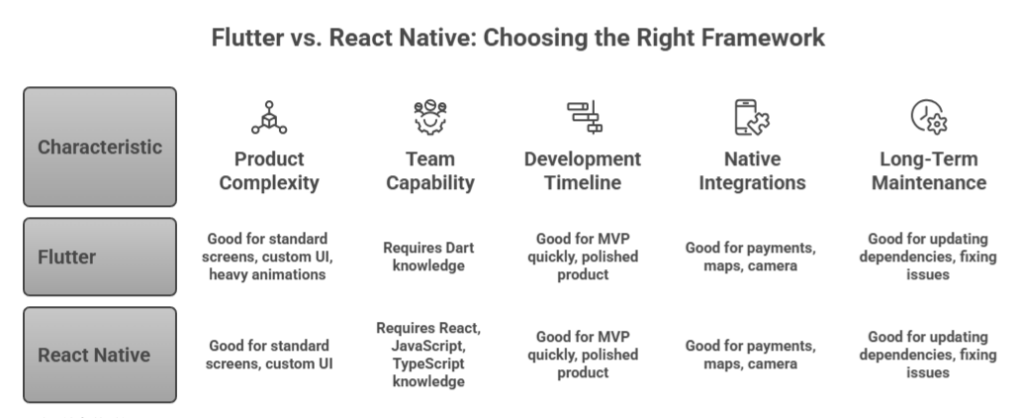
There is no single winner in the Flutter vs React Native debate. Both frameworks can build scalable, production-ready mobile apps. The better option is the one that reduces delivery risk for your specific product.
Before choosing Flutter or React Native, evaluate these areas:
- Product complexity: Does the app need standard screens, custom UI, heavy animations, offline access, or complex native features?
- Team capability: Does your team already know React, JavaScript, TypeScript, Dart, or native mobile development?
- Development timeline: Are you launching an MVP quickly, or building a polished product with a longer roadmap?
- Native integrations: Will the app use payments, maps, camera, Bluetooth, wearables, push notifications, or background services?
- Long-term maintenance: Who will update dependencies, fix platform issues, improve performance, and support new OS releases?
Flutter vs React Native: What Actually Affects App Planning?
Flutter vs React Native affects more than framework preference. The main differences between Flutter and React Native show up during planning: team setup, UI delivery, package selection, native integrations, QA, and long-term maintenance. Both frameworks can build production-ready apps, but they create different execution risks.
How Does the Tech Stack Affect Team Planning?
According to Stack Overflow’s Developer Survey, JavaScript was used by 66% of respondents, TypeScript by 43.6%, and Dart by 5.9%. This matters for team planning because React Native usually benefits from a larger JavaScript and TypeScript hiring pool, while Flutter hiring is more specialized because it requires Dart and framework-specific experience.
React Native usually fits teams that already work with React, JavaScript, or TypeScript. The planning advantage is faster onboarding, easier code reviews, and more overlap between web and mobile engineers.
Flutter needs a more dedicated Flutter/Dart setup. That is not a drawback, but it means the team should plan for Flutter-specific development standards, state management, testing, and release workflows from the start.
“Do not choose based on popularity. Choose based on who will build, review, scale, and maintain the app.”
How Does UI Architecture Affect Product Design?
Flutter gives more control over consistent UI across iOS and Android because the interface is built through Flutter’s widget system. This helps when the app has custom screens, branded flows, animations, or strict design requirements.
React Native uses React patterns with native platform behavior. This can work well for apps that should feel closer to native iOS and Android conventions, but it may require more platform-specific QA when designs must match exactly across devices.
If design consistency is a business requirement, test UI behavior early instead of leaving it for the final QA stage.
How Do Libraries and Packages Affect Delivery Risk?
React Native gives access to a large JavaScript and React ecosystem, but a bigger ecosystem also means more dependency decisions. Teams need to check whether packages are actively maintained, compatible with the current React Native version, and safe for production use.
Flutter has a more focused package ecosystem. That can simplify some decisions, but teams still need to validate plugins for maps, payments, analytics, notifications, camera, and other app-specific features.
“Create a package-risk checklist before development starts. A weak dependency choice can slow releases later.”
How Do Native Features Affect the Roadmap?
Native features can add complexity in both frameworks. Payments, maps, camera access, Bluetooth, biometrics, push notifications, background tasks, and wearable integrations should be mapped before choosing the framework.
The question is not “Can Flutter or React Native do this?” In most cases, both can. The better question is: which framework has the most reliable path for the exact native features your app needs?
“List every native feature in the roadmap and check plugin quality, iOS support, Android support, update history, and whether custom native code is required.”
| Planning Area | What to Check Before Choosing |
| Team setup | Do we have React Native developers, Flutter developers, or both? |
| UI delivery | Does the app need identical UI across platforms or native platform behavior? |
| Package risk | Are the required packages stable, maintained, and production-ready? |
| Native features | Will any feature require custom iOS or Android development? |
| QA scope | Do we need extra testing for animations, device APIs, or platform-specific behavior? |
| Maintenance | Who will handle updates, dependencies, OS changes, and post-launch fixes? |
Flutter vs React Native should be planned around execution risk, not just framework features. The better choice is the one your team can build, test, integrate, and maintain with fewer surprises after launch.
Is Flutter or React Native Better for Mobile App Performance?
Flutter or React Native performance depends on the app type, architecture, and how well the team optimizes the codebase. Flutter often performs well for UI-heavy and animation-focused apps because it controls more of the rendering layer. React Native can also perform strongly, especially with Hermes, JSI, native modules, and the New Architecture.
The wrong question is: “Which framework is faster?”
The better question is: “Which framework can meet this app’s performance needs with the least engineering risk?”
How Does Flutter Handle Performance?
Flutter uses Dart and its own rendering system to control how the interface is drawn across platforms.
Flutter’s official architecture docs explain that the Dart code responsible for painting visuals is compiled into native code and uses Impeller for rendering.
Flutter’s performance guidance explains that Flutter aims for 60fps, or 120fps on devices that support it. At 60fps, each frame has about 16 milliseconds to render before users notice jank. This matters because Flutter performance should be measured through frame timing, rebuild behavior, image optimization, and profiling, not assumed from the framework name alone.
But Flutter performance is not automatic. Poor widget structure, unnecessary rebuilds, heavy images, expensive layouts, and weak profiling can still slow the app down. Teams still need to test scrolling, animation, startup time, memory usage, and device-specific behavior before launch.
How Does React Native Handle Performance?
React Native performance has improved significantly with Hermes and the New Architecture. React Native’s official Hermes documentation says Hermes is optimized for React Native and can improve startup time, reduce memory usage, and decrease app size for many apps compared with JavaScriptCore.
This matters for performance planning because modern React Native performance should be evaluated with Hermes enabled, not based on older assumptions about React Native’s runtime.
React Native’s New Architecture documentation explains that JSI removes the old serialization work from native-JavaScript communication.
This matters for apps with native modules because performance depends on how efficiently JavaScript and native code communicate during rendering, device access, and platform-specific features.
Flutter vs React Native Performance by App Type
| App Type | Better Fit | Why |
| Animation-heavy consumer app | Flutter | Strong UI control and rendering consistency |
| React-backed product ecosystem | React Native | Easier reuse of React patterns and developer skills |
| Data-entry business app | Either | Architecture matters more than framework choice |
| App with many native integrations | Depends | Native module quality and team experience matter |
| MVP with standard screens | Either | Timeline depends more on team familiarity than framework performance |
| Design-heavy branded app | Flutter | Easier to keep visual behavior consistent across platforms |
| Internal tool or SaaS companion app | React Native | Strong fit when the company already uses React or TypeScript |
This is why generic claims like “Flutter is faster” or “React Native is slower” are not useful. A simple business app can perform well in either framework. A poorly built Flutter app can still lag. A well-architected React Native app can still feel fast and stable.
What Do Teams Often Get Wrong About Performance?
Most performance issues do not come from the framework alone. They usually come from weak engineering decisions.
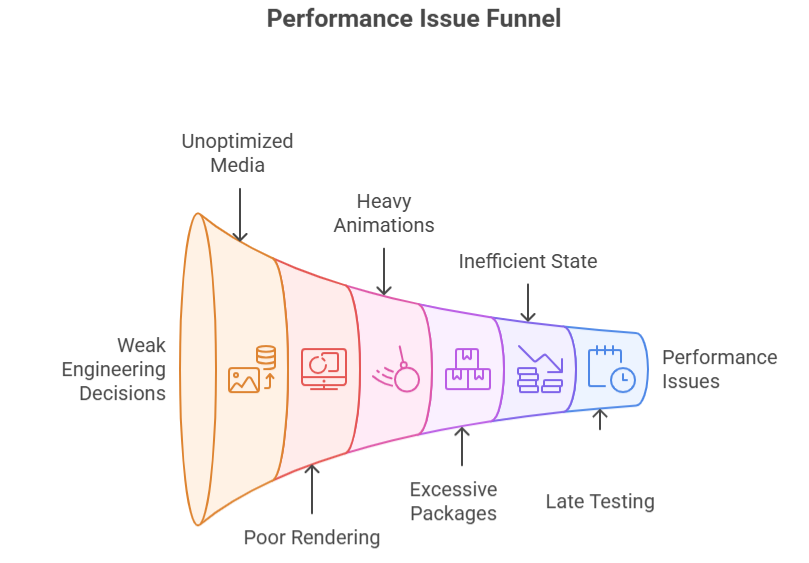
Common causes include:
- Unoptimized images and large media files
- Poor list rendering
- Unnecessary UI rebuilds or re-renders
- Heavy animations without profiling
- Too many third-party packages
- Inefficient state management
- Large JavaScript bundles in React Native
- Expensive layouts in Flutter
- Weak testing on low-end devices
- Late performance testing after most features are already built
Performance should be planned early. Teams should define acceptable startup time, screen load time, animation smoothness, memory usage, crash rate, and device coverage before development starts.
Should Startups Choose Flutter or React Native for an MVP?
Startups should choose Flutter or React Native based on team readiness, MVP scope, UI requirements, and launch timeline. For an MVP, the faster framework is usually the one your team can scope, build, test, and submit with fewer blockers.
Backend readiness, design maturity, integration complexity, and app store preparation affect launch speed more than the framework name.
For an MVP, the goal is not to choose the most popular framework. The goal is to launch a usable product, validate demand, avoid unnecessary rebuilds, and keep the codebase maintainable after the first release.
When Should Startups Choose Flutter for an MVP?
Flutter is a strong choice when the MVP needs a consistent user experience across both platforms from day one. For startups investing in Flutter app development, it can be a good fit when the product depends on:
- Consumer apps with custom onboarding
- Marketplace apps with branded user flows
- Wellness and fitness apps
- Booking and scheduling apps
- Education and learning apps
- Apps with animation-heavy screens
- Products where iOS and Android need to look highly consistent
When Should Startups Choose React Native for an MVP?
React Native is a strong choice when the startup already has React, JavaScript, or TypeScript experience. React Native can be a good fit for:
- Startups with an existing React web app
- SaaS products adding a mobile app
- Internal tools or customer portals
- Marketplace apps connected to a web dashboard
- Teams already using TypeScript
- Products that need shared engineering patterns across web and mobile
Does Flutter or React Native Make MVP Development Faster?
MVP speed depends more on team readiness than framework marketing. A skilled Flutter team can launch faster with Flutter. A skilled React native app development company can launch faster with React Native.
The timeline usually depends on:
- Available developers
- Design system maturity
- Backend and API readiness
- Third-party integrations
- Authentication and user roles
- Payment, map, chat, or notification requirements
- QA coverage across devices
- App Store and Play Store readiness
- Scope discipline
MVP Decision Table for Founders
| Startup Situation | Recommended Direction |
| You already have React developers | React Native |
| You need highly branded UI across iOS and Android | Flutter |
| You need to validate quickly with standard app screens | Either |
| You need a web app and mobile app together | React + React Native, or Flutter with careful web planning |
| You have no internal tech team | Choose based on agency or team capability, not framework popularity |
| Your MVP depends on animations and custom flows | Flutter |
| Your MVP extends an existing React web platform | React Native |
| Your MVP has many native integrations | Depends on package quality and team experience |
Which Is Cheaper to Develop With: Flutter or React Native?
Flutter and React Native apps usually fall in similar cost ranges because both are cross-platform frameworks. A simple MVP can start around $15,000 to $50,000, while complex mobile apps with custom features, integrations, backend logic, and post-launch support can reach $150,000 to $500,000+.
The cheaper option depends less on the framework and more on team skill, feature scope, UI complexity, and maintenance needs.
Flutter vs React Native Cost Range
| App Type | Estimated Cost Range | Cost Notes |
| Basic MVP | $15,000–$50,000 | Login, simple screens, basic API, limited features |
| Medium-complexity app | $50,000–$150,000 | User roles, payments, dashboards, notifications, admin panel |
| Complex app | $150,000–$500,000+ | Custom backend, real-time features, offline mode, advanced integrations, high security |
| Post-launch support | Monthly or ongoing | Bug fixes, OS updates, dependency updates, performance improvements |
What Actually Drives Flutter vs React Native Development Cost?
The framework is only one part of the budget. Most cost comes from scope and delivery complexity.
Key cost drivers include:
- App complexity
- Number of user roles
- Backend and API development
- Third-party integrations
- Offline mode
- Design complexity
- Payment, map, chat, or notification features
- Security and compliance requirements
- QA depth across devices
- App store deployment
- Post-launch support
Where Can Flutter Reduce Development Cost?
Flutter may reduce cost when one UI system lowers repeated design fixes, cross-platform inconsistencies, and platform-specific UI rework.
Since Flutter uses one UI system, the team can often implement the same design more consistently across both platforms.
Flutter may reduce cost when:
- The app needs custom UI
- Brand consistency matters
- Screens must look similar across platforms
- Animations and visual flows are important
- The team already has Flutter experience
- The product is mobile-first
Where Can React Native Reduce Development Cost?
React Native may reduce cost when existing React or TypeScript developers can support mobile work without a separate hiring or onboarding cycle.
In that case, the team does not need to build a separate mobile skill set from scratch. React Native may reduce cost when:
- The startup already has a React web app
- The team already uses TypeScript
- Mobile features share logic with a web product
- The app has standard UI patterns
- The product connects to an existing SaaS platform
- React Native developers are easier to staff for the project
Flutter vs React Native Cost Summary
| Cost Factor | Flutter May Be Cheaper When | React Native May Be Cheaper When |
| Team availability | You already have Flutter developers | You already have React or TypeScript developers |
| UI design | The app needs consistent custom UI | The app uses standard native-like screens |
| Web/mobile alignment | The product is mobile-first | The product already has a React web platform |
| Development speed | The team is experienced with Flutter | The team is experienced with React Native |
| Maintenance | You want consistent UI from one codebase | Your team can manage React Native dependencies well |
| Integrations | Reliable Flutter plugins exist | Reliable React Native libraries or native modules exist |
Flutter vs React Native Decision Checklist
Use this Flutter vs React Native checklist before choosing a framework. The goal is to match the framework with your product scope, team capability, technical risks, and long-term maintenance plan.
Product Fit Checklist
Start with the product requirements. This helps you avoid choosing a framework based only on popularity.
| Question | What It Tells You |
| Do you need iOS and Android at launch? | Both frameworks can work, but cross-platform delivery must be planned from day one. |
| Is the UI highly custom or mostly standard? | Custom, branded UI may lean toward Flutter. Standard app screens can work well in either framework. |
| Will the app need complex native features? | Native feature requirements may affect plugins, modules, and platform-specific development. |
| Does the product require heavy animations? | Animation-heavy apps may benefit from Flutter’s stronger UI control. |
| Will the mobile app connect to an existing web platform? | React Native may fit better if the product already uses React or TypeScript. |
| Do you need offline mode? | Offline sync increases backend, storage, and QA complexity in both frameworks. |
| Are app store releases part of the business model? | Plan release testing, approvals, updates, and rollback handling early. |
| Will the app need frequent UI changes after launch? | Choose the framework your team can update quickly without creating design inconsistencies. |
Team Fit Checklist
The framework should match the people who will build, review, test, and maintain the app.
| Question | Why It Matters |
| Does your team already know React? | React Native may reduce onboarding time and code review friction. |
| Can your team hire Dart or Flutter developers? | Flutter needs dedicated framework knowledge, especially for complex apps. |
| Do you have native iOS and Android support available? | Native support helps when integrations, builds, or platform issues become complex. |
| Who will maintain the app after launch? | Maintenance planning matters as much as MVP development. |
| Do you need staff augmentation or full project delivery? | Staff augmentation works when you have internal direction. Full delivery works when you need strategy, design, development, QA, and launch support. |
Technical Risk Checklist
Technical risk usually appears late when teams skip framework validation. Check these areas before development starts.
| Risk Area | What to Validate |
| Native module availability | Are reliable modules available for payments, maps, camera, biometrics, push notifications, or Bluetooth? |
| Third-party SDK support | Do required SDKs support both iOS and Android in your chosen framework? |
| Backend API readiness | Are APIs stable, documented, and ready for mobile consumption? |
| App performance testing | Will the team test startup time, screen load time, scrolling, memory usage, and animations? |
| CI/CD setup | Can the team automate builds, testing, and releases for both platforms? |
| Crash monitoring | Will the app include crash reporting and production monitoring from launch? |
| Dependency upgrade plan | Who will manage framework updates, package versions, OS changes, and breaking changes? |
Flutter vs React Native Final Decision Matrix
| Choose Flutter If | Choose React Native If |
| You need custom, consistent UI across iOS and Android | You already have a React team |
| You want strong control over cross-platform design | You want to use JavaScript or TypeScript skills |
| You have Flutter expertise available | You have React Native or native mobile support available |
| Your app is animation-heavy | Your app connects closely to React web products |
| You want one branded app experience | You need incremental adoption in an existing native app |
| Your product is mobile-first | Your mobile app extends an existing web platform |
| Your design system needs strict consistency | Your team already has React workflows, tools, and review standards |
Why Choose Software Orca for Flutter and React Native Development?
Software Orca helps you choose the right framework before development starts, so your app is built around product goals, not technology trends. We evaluate your MVP scope, UI complexity, backend readiness, integrations, performance needs, and long-term maintenance plan before recommending Flutter, React Native, or native development.
Whether you need a fast MVP, a scalable cross-platform app, or a mobile product connected to an existing web platform, Software Orca focuses on reducing delivery risk, controlling development cost, and building an app your team can grow after launch.
Closing Thoughts
Flutter vs React Native is not a one-size-fits-all decision. Flutter is the stronger cross-platform framework when your mobile app depends on custom UI, consistent design across iOS and Android, animation-heavy screens, and a mobile-first product experience. React Native is the stronger choice when your team already works with React, JavaScript, or TypeScript and the mobile app needs to stay close to an existing web product.
The right framework is the one that reduces delivery risk across development, performance, integrations, QA, cost, and long-term maintenance.
Before choosing, evaluate your product scope, available developers, native feature requirements, launch timeline, and support plan. That is how product teams choose the framework they can build, test, release, and scale with confidence.
FAQs
Which is better: Flutter or React Native for mobile app development?
Neither Flutter nor React Native is universally better. Flutter is usually stronger when the mobile app needs custom UI, consistent design across iOS and Android, and animation-heavy screens. React Native is often better when the team already works with React, JavaScript, or TypeScript and wants to extend existing frontend workflows into mobile app development.
Is Flutter better than React Native for performance?
Flutter can perform very well for UI-heavy apps because it controls more of the rendering layer. React Native can also deliver strong performance, especially with Hermes, JSI, native modules, and the New Architecture. In practice, performance depends more on app architecture, image handling, state management, list rendering, profiling, and device testing than the framework name alone.
Which is easier to learn: Flutter or React Native?
React Native is usually easier for developers who already know React, JavaScript, or TypeScript. Flutter may be easier for teams willing to learn Dart and work within a widget-based development model. The easier option depends on the team’s current skills, not the framework in isolation.
Which is cheaper: Flutter or React Native?
Neither Flutter nor React Native automatically guarantees lower development cost. Cost depends on app complexity, number of user roles, backend work, third-party integrations, UI requirements, QA depth, app store deployment, and post-launch support. Flutter may reduce cost when one UI system lowers design rework. React Native may reduce cost when existing React or TypeScript developers can support the mobile roadmap.
Should startups use Flutter or React Native for an MVP?
Startups should choose based on MVP scope and team readiness. React Native may be faster when the startup already has React developers or an existing web product. Flutter may be better when the MVP needs a polished, consistent mobile experience across iOS and Android. For simple MVPs with standard screens, either framework can work if the team can build, test, and launch quickly.
Is Flutter better than React for building mobile apps?
Flutter is a cross-platform app development framework, while React is mainly a UI library for building web interfaces. For mobile apps, the better comparison is Flutter vs React Native, not Flutter vs React. React Native uses React patterns to build native mobile apps for iOS and Android.
Can Flutter and React Native be used for enterprise apps?
Yes. Both Flutter and React Native can be used for enterprise mobile apps, but enterprise readiness depends on more than the framework. Architecture, security, authentication, integrations, testing, release governance, monitoring, compliance, and long-term support matter more than choosing a popular technology.
Should I hire Flutter developers or React Native developers?
Hire based on your product stack and roadmap. Choose Flutter developers if the app is Flutter-first, mobile-first, UI-heavy, or depends on consistent cross-platform design. Choose React Native developers if your product already uses React, JavaScript, TypeScript, or a React-based web platform.