Custom vs off the shelf software comes down to business fit, speed, cost, control, and scalability. Off-the-shelf software is faster to deploy and usually cheaper upfront, while custom software is built around your workflows, integrations, security needs, and long-term growth.
For standard business needs, off-the-shelf software is often enough. For complex workflows, competitive differentiation, or deep system integration, working with a custom software development company can be the better long-term choice.
Gartner forecasts worldwide software spending to reach $1.44 trillion in 2026, growing 15.1%, which shows how heavily companies are investing in digital tools.
But higher spending does not always mean better fit. Many businesses still struggle with rigid platforms, rising license costs, disconnected systems, and manual workarounds.
This guide compares both options so you can choose the solution that reduces friction, improves efficiency, and supports long-term growth.
Custom vs Off-the-Shelf Software (Quick Overview)
| Decision Point | Best Choice | Why It Matters |
| Need a fast, low-cost tool for standard tasks | Off-the-shelf software | Works well for accounting, email, CRM, meetings, and project management. |
| Need software built around unique workflows | Custom software | Gives more control over features, integrations, users, and business logic. |
| Concerned about upfront budget | Off-the-shelf software | Lower initial cost and faster setup. |
| Concerned about long-term scale and licensing costs | Custom software | Can reduce seat-based pricing, workarounds, and tool limitations over time. |
| Need deep integrations or compliance controls | Custom software | Better fit for complex systems, security rules, and industry-specific requirements. |
| Not sure whether to build or buy | Hybrid approach | Buy standard tools. Build only where control, efficiency, or differentiation matters. |
Choose off-the-shelf software for standard operations. Choose custom software when the system affects revenue, customer experience, compliance, scalability, or competitive advantage.
What Is Custom Software?
Custom software is software built for a specific business, workflow, team, or customer experience instead of being sold as a ready-made product for the mass market. It is designed around your company’s processes, data rules, integrations, security needs, and long-term growth goals.
What Custom Software Usually Includes
Custom software can be a full product, an internal platform, a customer portal, a mobile app, an automation system, or even a custom module added to an existing system. It usually includes:
- Business-specific workflows
- Custom user roles and permissions
- Integration with existing tools and databases
- Custom dashboards and reporting
- Security controls based on business or industry needs
- Architecture that can support more users, data, and features over time
- Features designed around real users, not generic assumptions
Custom Software Examples
Common custom software examples include:
| Custom Software Example | Where It Adds Value |
| Custom CRM for a real estate brokerage | Manages agents, leads, listings, buyer journeys, and follow-ups around the brokerage’s exact sales process |
| Logistics dispatch and fleet tracking system | Connects load requests, driver assignment, route tracking, delivery proof, and carrier communication |
| Healthcare patient management portal | Supports appointment flows, patient records, secure messaging, billing, and role-based access |
| Custom ERP for manufacturing operations | Connects inventory, procurement, production planning, quality control, and reporting |
| AI-powered internal reporting dashboard | Pulls data from multiple systems and turns it into usable business insights |
| Custom marketplace platform | Manages buyers, sellers, payments, reviews, listings, and platform-specific rules |
| Custom SaaS product | Turns a business idea into a scalable software product that customers can subscribe to |
In short, custom software is best when a business needs control over workflows, integrations, user roles, data structure, security, and long-term scalability.
What Is Off-the-Shelf Software?
Off-the-shelf software is a ready-made software product built for a broad market instead of one specific business. It comes with standard features, predefined workflows, vendor-managed updates, and pricing plans. Businesses usually buy a subscription or license, configure the software, and start using it without building a system from scratch.
What Off-the-Shelf Software Usually Includes
Off-the-shelf software can be a CRM, accounting tool, project management platform, communication app, email system, design tool, or ERP platform. It usually includes:
- Ready-made processes for common operational tasks
- Prebuilt features and templates
- User roles and access settings
- Built-in support documentation
- Integration options with popular business tools
- Limited customization through settings, add-ons, or third-party apps
Off-the-Shelf Software Examples
Common off-the-shelf software examples include:
| Off-the-Shelf Software Category | Examples | Where It Adds Value |
| CRM | Salesforce, HubSpot, Zoho CRM | Helps teams manage leads, contacts, sales pipelines, follow-ups, and customer communication using ready-made CRM workflows |
| Accounting | QuickBooks, Xero | Supports invoicing, expense tracking, payroll, tax records, and financial reporting without custom development |
| Communication | Slack, Microsoft Teams, Zoom | Helps teams manage messaging, meetings, collaboration, and internal communication through standard workplace tools |
| Project Management | Asana, Trello, Monday.com | Helps teams assign tasks, track deadlines, manage projects, and monitor progress using predefined boards and workflows |
| Gmail, Outlook | Provides business email, calendars, contacts, storage, and communication tools with minimal setup | |
| Design | Adobe Photoshop, Canva | Supports image editing, graphic design, marketing creatives, and brand assets through ready-made design features |
| ERP | Odoo, NetSuite, Microsoft Dynamics | Helps businesses manage finance, inventory, sales, procurement, operations, and reporting through configurable enterprise modules |
In short, off-the-shelf software is best when a business needs a fast, proven, lower-cost tool for routine operations that do not require deep customization.
Custom vs Off the Shelf Software
The main difference between custom vs off the shelf software is control versus convenience. Custom software gives businesses more control over how critical systems work. Off-the-shelf software is ready-made, faster to launch, and better suited for standard business processes.
| Factor | Custom Software | Off-the-Shelf Software |
| Best for | Unique workflows, complex operations, and competitive differentiation | Standard business processes and common team needs |
| Upfront cost | Higher because it requires discovery, design, development, testing, and deployment | Lower because the product is already built and sold through licenses or subscriptions |
| Long-term cost | Can be lower when scale, automation, and licensing control matter | Can increase with users, add-ons, premium features, and integrations |
| Deployment speed | Slower because it must be planned, built, tested, and launched | Faster because businesses can configure and use it quickly |
| Customization | Full control over features, workflows, roles, integrations, and user experience | Limited to vendor settings, templates, add-ons, and available integrations |
| Scalability | Built around future growth, custom architecture, and business-specific expansion | Depends on vendor limits, pricing tiers, and product roadmap |
| Integration | Can be deeply integrated with internal systems, databases, APIs, and third-party tools | May require connectors, middleware, paid integrations, or workflow workarounds |
| Ownership | Business owns the product, roadmap, data structure, and IP | Vendor owns the platform, feature roadmap, and core product logic |
| Maintenance | Managed by an internal team or software development partner | Managed by the vendor through updates, patches, and support plans |
| Risk | Scope creep, budget overruns, unclear requirements, or poor development partner selection | Vendor lock-in, limited flexibility, feature gaps, rising costs, or poor workflow fit |
The simplest rule is to buy software for standard processes and build software for workflows that directly affect revenue, customer experience, operational efficiency, or competitive advantage.
When Should You Choose Off-the-Shelf Software?
Choose off-the-shelf software when the problem is already solved well by existing tools.
That is usually the honest answer. Not every business function needs custom development. If you need accounting, email, meetings, task tracking, HR records, or a basic CRM, building from scratch usually creates more cost than value. In those cases, a proven tool is the smarter move.
For example,
A strong off-the-shelf example is Xero for accounting.Forbes Advisor notes that International Outsourcing Group chose Xero because its native integrations helped invoices sync automatically, payments reconcile without manual matching, and revenue become visible without logging into multiple systems. This is exactly when off-the-shelf software makes sense: the business need is important, but not unique enough to justify building accounting software from scratch.
Off-the-shelf software makes sense when speed matters more than deep control. You can set it up faster, train the team quicker, and avoid the risk of building something custom for a process that is not unique to your business.
Choose off-the-shelf software if you need:
- Fast setup for a common business function
- Lower upfront cost than custom development
- Standard CRM, accounting, HR, email, or project management features
- Vendor-managed updates and support
- Existing documentation and onboarding resources
- Marketplace integrations with tools you already use
- Minimal technical involvement from your internal team

Buy software for standard operations. Build software only when the workflow is too specific, too valuable, or too important to force into a generic tool.
When Should You Choose Custom Software?
Choose custom software when the workflow is too specific, too valuable, or too complex to fit inside a ready-made tool. If the software directly affects revenue, customer experience, compliance, operational efficiency, or competitive advantage, building a custom system can make more sense than forcing the business into fixed features.
A real example is UPS ORION, a proprietary route-optimization software built for UPS’s delivery network. It uses package-level data, customized maps, fleet telematics, and advanced algorithms to help drivers choose more efficient routes. UPS expected ORION to reduce 100 million miles annually, save 10 million gallons of fuel, and cut 100,000 metric tons of CO₂ each year after full U.S. deployment.
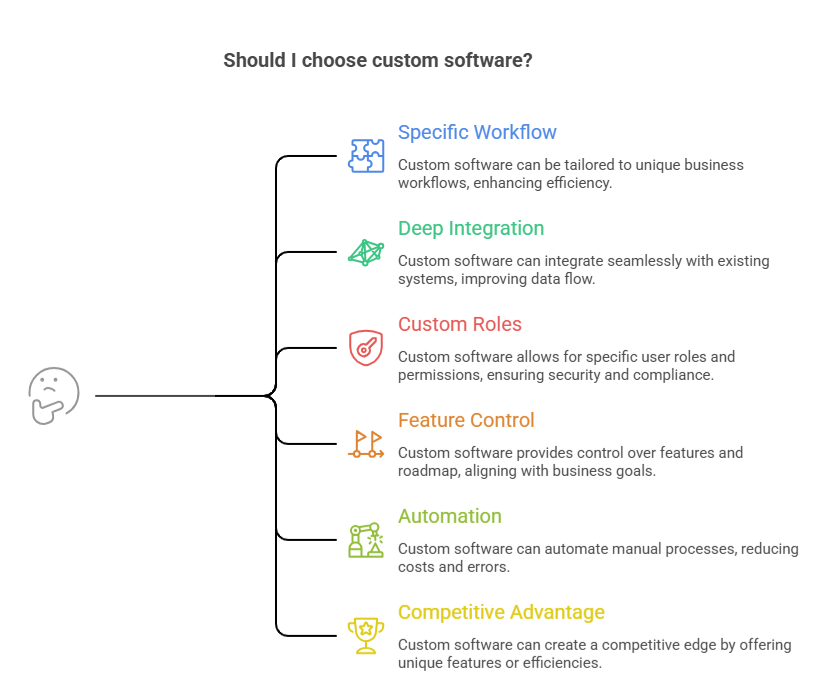
Choose custom software if you need:
- A workflow unique to your business
- Deep integration with existing systems
- Custom user roles, permissions, or compliance rules
- Control over product features and roadmap
- Automation for manual or high-cost processes
- Software that creates operational or competitive advantage
Build custom software when the process is not just a support function, but a business-critical system that needs control, scale, and measurable impact.
Cost of Custom vs Off-the-Shelf Software
Custom software usually starts in the five-figure range and can move into six or seven figures depending on scope. Many reviewed software projects fall between $10,000 and $49,000, with many software development companies charging $24–$49 per hour. More complex builds can cost much more, especially when they include custom integrations, advanced security, AI features, mobile apps, dashboards, or enterprise workflows.
A practical range looks like this:
- Simple internal tool or MVP: $10,000–$50,000+
- Custom business app or customer portal: $50,000–$150,000+
- Complex platform, ERP, marketplace, or SaaS product: $150,000–$500,000+
- Enterprise-grade custom software: $500,000–$1M+
Off-the-shelf software costs less upfront because the product already exists. A business usually pays a subscription, license, setup fee, configuration cost, or onboarding cost. For example, Microsoft 365 Business Basic starts at $6/user/month, Asana Starter starts at $10.99/user/month billed annually, Slack Pro is listed at $8.75/user/month, Salesforce Starter Suite starts at $25/user/month, and QuickBooks plans show entry pricing around $38/month before discounts.
Custom vs Off-the-Shelf Software Long-Term Cost
The long-term cost is where off-the-shelf software can become less cheap than it looks.
A $25/user/month CRM may look affordable for a 10-person team. But at 100 users, that becomes $2,500/month or $30,000/year, before add-ons, integrations, support upgrades, migration, automation limits, or premium reporting.
Custom software has a higher build cost, but it may become more cost-effective when the business has many users, expensive seat-based pricing, complex workflows, or repeated manual work caused by software limitations.
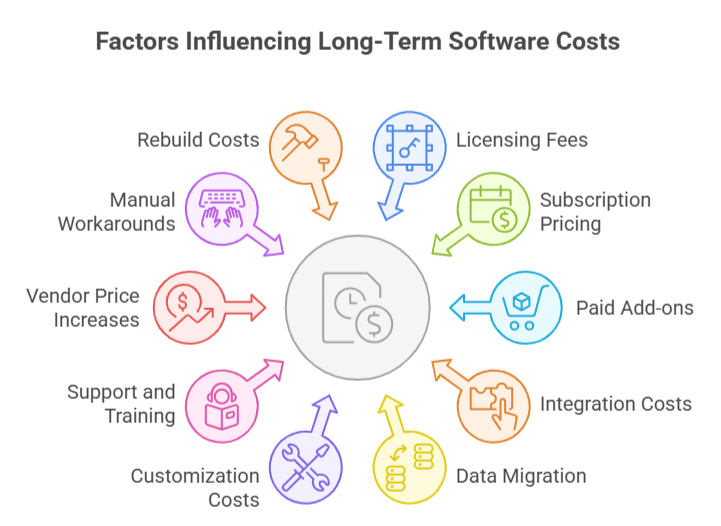
Long-term cost usually includes:
- Licensing fees
- Per-user subscription pricing
- Paid add-ons
- Integration costs
- Data migration
- Customization or configuration costs
- Support and training
- Vendor price increases
- Manual workarounds
- Rebuild or replacement cost
TCO Comparison: Custom vs Off-the-Shelf Software
| Cost Type | Custom Software | Off-the-Shelf Software |
| Initial build/setup | Higher; often $10,000–$150,000+ depending on scope | Lower; often starts from monthly or annual subscriptions |
| Subscription fees | Usually none unless hosted or managed as SaaS | Recurring monthly or annual fees |
| Per-user cost | No standard vendor seat pricing | Often increases as the team grows |
| Customization | Built into the product scope | Limited, paid, or dependent on vendor options |
| Integration | Planned during development | May need connectors, middleware, or third-party tools |
| Maintenance | Internal team or software partner responsibility | Vendor-managed within platform limits |
| Migration | Needed during build or system replacement | Often needed when moving from old tools |
| Switching cost | Depends on code quality, hosting, and documentation | Can be high due to vendor lock-in and data dependency |
Off-the-shelf software is cheaper when the workflow is standard and the team is small. Custom software becomes more practical when user-based pricing, integrations, manual workarounds, or platform limits start costing more than the build itself.
For detailed cost estimation guide, read custom software development cost.
Pros and Cons of Custom Software
Custom software is growing because companies want systems that match their workflows, not generic templates. Grand View Research estimates the global custom software development market is projected to reach $146.18 billion by 2030. But execution quality matters.
| Area | Pros of Custom Software | Cons of Custom Software |
| Business fit | Built around exact business requirements, workflows, roles, and operating rules. | Requires detailed discovery before development starts. |
| Workflow efficiency | Reduces manual steps, duplicate data entry, spreadsheet dependency, and process gaps. | Poorly defined workflows can lead to rework and delays. |
| Control | Full control over features, user experience, integrations, and product roadmap. | More responsibility for planning, updates, and technical decisions. |
| Differentiation | Helps create features, portals, dashboards, or customer experiences competitors cannot easily copy. | Not worth it if the process is standard and already solved by existing tools. |
| Scalability | Architecture can be designed for future users, data volume, departments, and product growth. | Weak architecture can create technical debt as the system grows. |
| Integration | Can connect deeply with CRMs, ERPs, payment systems, databases, APIs, and internal platforms. | Complex integrations can increase cost and timeline. |
| Ownership | Business owns the source code, product logic, IP, and roadmap. | Ownership also means maintaining the system over time. |
| Security and compliance | Security rules, access controls, audit trails, and compliance workflows can be built around the business. | Requires continuous monitoring, patching, and security updates. |
| Cost and timeline | Can become cost-effective when licensing, scale, or workflow inefficiency becomes expensive. | Higher upfront cost and longer development timeline than off-the-shelf software. |
Pros and Cons of Off-the-Shelf Software
Off-the-shelf software is popular because it is faster to adopt and easier to budget at the start. Gartner projected worldwide end-user SaaS spending will surpass $300 billion in 2026.
| Area | Pros of Off-the-Shelf Software | Cons of Off-the-Shelf Software |
| Speed | Faster to implement because the product is already built, tested, and available. | May not fit the exact way your business works. |
| Upfront cost | Lower initial cost through monthly or annual subscriptions. | Long-term cost can rise with users, add-ons, premium plans, and renewals. |
| Ease of use | Teams can start with existing templates, workflows, dashboards, and documentation. | Teams may need to adjust their process around the software. |
| Maintenance | Vendor handles updates, patches, hosting, and product improvements. | Vendor controls roadmap, feature releases, pricing, and product changes. |
| Support | Comes with help centers, tutorials, onboarding resources, and community knowledge. | Support is limited to the vendor’s product boundaries and service plan. |
| Integrations | Often connects with popular tools through app marketplaces and built-in connectors. | Deeper or industry-specific integrations may need middleware or workarounds. |
| Customization | Good for basic configuration, templates, permissions, and settings. | Limited customization when workflows, data rules, or UX need more control. |
| Scalability | Can scale quickly through plan upgrades and user additions. | Scaling can become expensive through per-user pricing and higher-tier plans. |
| Risk | Lower build risk because the software already exists. | Higher risk of vendor lock-in, feature gaps, unused features, and poor workflow fit. |
Can You Use Both Custom and Off-the-Shelf Software?
Yes. Many businesses use a hybrid software approach: off-the-shelf software for standard functions and custom software for workflows that are unique, revenue-critical, or difficult to manage with generic tools.
This approach works because not every system needs to be built from scratch. A company can use ready-made tools for email, accounting, CRM, or project management, while building custom software for customer portals, billing logic, reporting dashboards, fulfillment workflows, or partner systems.
| Off-the-Shelf Layer | Custom Layer |
| Salesforce CRM | Custom customer portal |
| QuickBooks | Custom billing workflow |
| Microsoft Teams | Custom internal operations dashboard |
| Shopify | Custom inventory or fulfillment system |
| HubSpot | Custom lead scoring or partner portal |
Custom vs Off-the-Shelf Software: Decision Framework
Use this checklist to decide whether your business should build custom software, buy off-the-shelf software, or combine both. The goal is not to choose the cheaper option first. The goal is to choose the option that fits the workflow, cost structure, integration needs, and long-term business value.
Use This 7-Point Checklist
Choose custom software if you answer “yes” to 4 or more of these questions:
| Question | Yes/No |
| Is this workflow unique to your business? | |
| Does the software affect revenue or customer experience? | |
| Do you need deep integration with existing systems? | |
| Are current tools forcing manual workarounds? | |
| Will user-based licensing become expensive at scale? | |
| Do you need custom compliance, permissions, or security? | |
| Do you need ownership of the software or IP? |
Choose off-the-shelf software if you answer “yes” to 4 or more of these questions:
| Question | Yes/No |
| Is your process standard? | |
| Do you need the tool quickly? | |
| Is the upfront budget limited? | |
| Can your team adapt to existing workflows? | |
| Are integrations already available? | |
| Is vendor-managed support enough? | |
| Is the software not central to your competitive advantage? |
If the answers are split, a hybrid approach is usually the safest choice. Buy software for standard functions like accounting, email, CRM, or project management. Build custom software for workflows that affect revenue, customer experience, operational efficiency, compliance, or competitive advantage.
5 Common Mistakes Businesses Make When Choosing Software
Choosing between custom vs off-the-shelf software becomes risky when the decision is based only on price, speed, or feature lists. The better question is how the software will affect operations, users, cost, and growth over the next few years.
Choosing Off-the-Shelf Software Only Because It Is Cheaper
Low upfront cost can hide long-term expenses. Licenses, user seats, add-ons, premium features, integrations, and vendor price increases can make a ready-made tool expensive over time. If the software also creates manual workarounds, the business pays twice: once for the tool and again through lost productivity.
Building Custom Software Without Clear Requirements
Custom software becomes risky when the business has not defined workflows, user roles, integrations, priorities, and success metrics. Unclear requirements lead to scope creep, delayed timelines, budget overruns, and features that do not solve the real problem.
Ignoring Integration Requirements
Software rarely works alone. A CRM may need to connect with accounting, inventory, customer support, analytics, payment systems, or internal databases. Ignoring integrations early can create disconnected data, duplicate entry, reporting gaps, and expensive fixes later.
Not Calculating 3–5 Year TCO
The real cost is not just the build price or subscription fee. Businesses should compare total cost of ownership, including setup, licenses, users, maintenance, integrations, migration, support, training, workarounds, and replacement risk.
Treating Software as an IT Purchase Instead of a Business Decision
Software affects how teams work, how customers interact, how data moves, and how fast the business can scale. The right decision should involve operations, finance, leadership, technical teams, and actual users, not just IT.
Wrapping it Up
Choosing between custom vs off-the-shelf software depends on how critical the software is to your business. Off-the-shelf software is the better choice when you need a fast, affordable solution for standard processes like accounting, email, CRM, or project management. Custom software makes more sense when your workflows are unique, your systems need deeper integration, or the software directly affects revenue, customer experience, compliance, or long-term scalability.
If your current tools are creating workarounds, disconnected data, or scaling limits, Software Orca can help you decide whether custom software, off-the-shelf software, or a hybrid approach fits your business best.
FAQs
What is the main difference between custom and off-the-shelf software?
The main difference is fit and control. Custom software is built for one company’s specific workflows, users, integrations, and business goals. Off-the-shelf software is a ready-made product built for many businesses with common needs, standard features, and limited customization.
Is custom software better than off-the-shelf software?
Custom software is better when your business needs unique workflows, deep integrations, scalability, IP ownership, or a system that supports competitive advantage. Off-the-shelf software is better when your needs are standard, your budget is limited, and your team needs a fast, affordable solution.
Is off-the-shelf software cheaper than custom software?
Off-the-shelf software is usually cheaper upfront because the product already exists and is sold through subscriptions or licenses. However, long-term costs can increase through per-user pricing, add-ons, premium features, integrations, vendor price changes, migration costs, and workflow inefficiencies.
What are examples of off-the-shelf software?
Common off-the-shelf software examples include Salesforce and HubSpot for CRM, QuickBooks and Xero for accounting, Slack, Microsoft Teams, and Zoom for communication, Gmail and Outlook for email, Asana and Trello for project management, and Adobe Photoshop or Canva for design.
What are examples of custom software?
Common custom software examples include custom CRMs, logistics dispatch systems, healthcare patient portals, real estate listing platforms, custom ERPs, AI-powered reporting dashboards, marketplace platforms, SaaS products, customer portals, internal automation systems, and workflow tools built around company-specific operations.
Can a business use both custom and off-the-shelf software?
Yes. Many businesses use a hybrid approach. They use off-the-shelf software for standard needs like email, accounting, CRM, or project management, and custom software for specialized workflows, integrations, dashboards, customer portals, fulfillment logic, or revenue-critical operations.
When should a company avoid custom software?
A company should avoid custom software when requirements are unclear, the workflow is standard, the budget is too limited, or an existing product already solves the problem well. Custom development becomes risky when there is no clear business case, ownership plan, or long-term maintenance strategy.
When should a company avoid off-the-shelf software?
A company should avoid off-the-shelf software when it creates too many workarounds, limits scalability, lacks required integrations, causes vendor lock-in, or cannot support critical workflows. If the software directly affects revenue, customer experience, compliance, or operational advantage, custom software may be better.