Here’s the uncomfortable truth about most AI chatbot projects: the technology was never the hard part. The hard part is everything around it, the messy business data, the vague success metrics, the “let’s just launch it and see” mentality that quietly wrecks the ROI everyone promised the board.
According to Grand View Research, the global chatbot market is projected to grow to $41.2 billion by 2033. As demand grows, more businesses are evaluating AI chatbot development services, but choosing the right approach still depends on solving the right business problem first.
If you’re trying to figure out how to build an AI chatbot from scratch, you’ve probably already noticed the gap between what vendors pitch and what actually ships.
This guide closes that gap: how the architecture works, what tech stack actually makes sense for your size of company, where the money goes, and where teams keep tripping over the same mistakes.
What Is an AI Chatbot?
An AI chatbot today is a system that reads what a user actually means, pulls in relevant information, and generates a response on the fly using a large language model. That’s the whole shift in one sentence: from “match the keyword” to “understand the intent.”
Rule-based bots still exist because they’re cheap and predictable, but they snap the second someone phrases a question differently than the designer expected. AI chatbots handle that variation because they reason probabilistically instead of matching scripts, at the cost of needing careful guardrails so they don’t go off the rails.
Before You Start: Define Your Chatbot Strategy
Most failed chatbot projects failed here, at the planning stage, before anyone touched a keyboard. Here are the things to consider before building an AI chatbot.
1. Nail Down the Actual Business Problem First
“We want an AI chatbot” isn’t a project brief, it’s a wish. “We want to cut average resolution time on order status and password reset tickets from 11 minutes to under 2” is a project brief. The second one tells your team exactly what data to prepare, what to test for, and what “done” looks like.
2. Decide Build, Buy, or No-Code, Honestly
No-code tools like Intercom or Voiceflow are the right call when your use case is narrow and your timeline is short. Custom builds make sense when you need proprietary data integration or conversation logic that off-the-shelf platforms simply can’t replicate. A lot of mid-sized teams land somewhere in between: a no-code frontend sitting on top of a custom retrieval backend.
3. Set Your Success Metrics Before Launch, Not After
Containment rate, resolution time, cost per conversation, whatever matters to your business. Here’s why this step actually matters more than people think: MIT’s Project NANDA found that 95% of organizations saw no measurable financial return from their generative AI pilots, with only about 5% capturing real value at scale.
The gap between the two groups wasn’t the technology. It was whether they defined success and scoped the use case tightly before building.
How to Build an AI Chatbot? The 8-Step Process
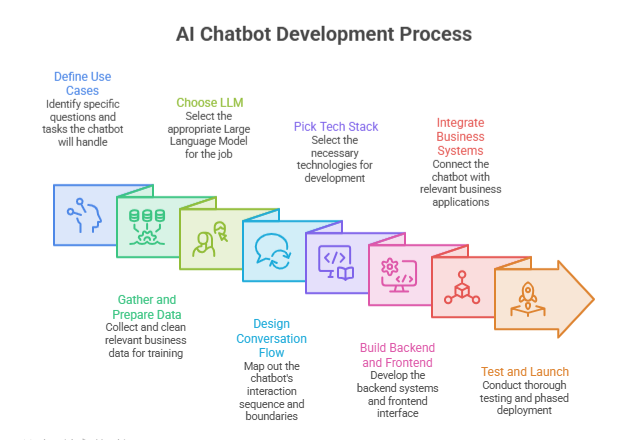
Building an AI chatbot from scratch follows eight sequential stages: defining use cases, preparing business data, selecting an LLM, designing conversation flows, choosing a tech stack, developing backend and frontend systems, integrating business applications, and testing before a phased deployment.
Each stage depends on decisions made in the one before it, which is why skipping ahead usually causes rework later.
Step 1: Define the Use Cases
Write down the actual questions and tasks your chatbot needs to handle, ranked by how often they come up and how much they cost you today. This list becomes your knowledge base structure and your test plan later. Skip it, and you’ll end up with something technically impressive that doesn’t answer the questions your users actually ask.
Step 2: Gather and Prepare Your Business Data
Your AI chatbot is only as smart as what you feed it. Pull together help center articles, product docs, past support transcripts, and structured data from your CRM or database, then clean it.
Delete the outdated stuff, merge the duplicates, fix the formatting.
Messy source data is the number one reason chatbots give confidently wrong answers, and it has nothing to do with which model sits behind them.
Step 3: Choose the Right LLM
Match the model to the job. Complex, multi-step troubleshooting justifies a higher-reasoning, higher-cost model. Simple, high-volume queries (order lookups, FAQ answers) run fine on smaller, faster, cheaper models.
Most production setups now route between the two: cheap model for the easy stuff, expensive model when the conversation gets complicated. It’s the difference between a $200 monthly API bill and a $20,000 one, for the same volume of traffic.
Step 4: Design the Conversation Flow
Even LLM-powered bots need guardrails. Map out how the bot should ask clarifying questions when input is vague, what it should say when it genuinely doesn’t know the answer, and exactly when it hands off to a human. This isn’t scripting every possible reply, it’s defining the boundaries the model operates inside. Bots without this structure tend to bluff their way through questions they shouldn’t answer confidently.
Step 5: Pick Your AI Chatbot Tech Stack
This decision is architectural, not just a shopping list. Will retrieval run on a managed vector database, or will you self-host? Will you write custom orchestration logic, or lean on a framework like LangChain? Actually, there’s no universal “best” stack. There’s the right stack for your stage, budget, and compliance needs.
Here’s how the pieces usually come together:
| Layer | Common Options |
| Frontend | React, Next.js, Vue |
| Backend | Node.js (Express, Fastify), Python (FastAPI, Django) |
| AI Frameworks | LangChain, LlamaIndex, Semantic Kernel |
| LLM Providers | OpenAI API, Anthropic API, Google Gemini API, self-hosted open-weight models |
| Databases | PostgreSQL, MongoDB |
| Vector Databases | Pinecone, Weaviate, Qdrant, pgvector |
| Cloud Platforms | AWS, Google Cloud, Azure |
| Monitoring | Datadog, LangSmith, Helicone, Grafana |
If you’re an early-stage startup: Next.js frontend, a Node.js or FastAPI backend, one LLM provider, and pgvector, so you’re not paying for a separate vector database service. Minimal moving parts, fast to ship, easy to change your mind later.
If you’re a mid-sized business: React frontend, Python backend with LangChain handling orchestration, a managed vector database like Pinecone, tiered model routing, and real monitoring through LangSmith or Datadog. This is where most teams land once volume actually matters.
If you’re an enterprise: Custom frontend built into your existing product, a microservices backend, self-hosted or hybrid vector infrastructure for data residency, multi-model routing with fallback providers, and a dedicated compliance layer with proper audit logging.
Step 6: Build an AI Chatbot Backend and Frontend
The backend carries the real weight: authentication, session handling, retrieval, prompt construction, the actual LLM calls, and cleaning up the response before a user sees it.
The frontend is just the window into all of that. A common mistake here is polishing the chat widget while the backend still gives wrong answers half the time. Users forgive plain design. They don’t forgive wrong answers.
Step 7: Integrate the Business Systems That Matter
An AI chatbot that can only answer questions is a search bar with extra steps. The value shows up when it can pull a real order status, check a real account balance, or process a real return.
Most integrations run through REST APIs, and increasingly through the Model Context Protocol (MCP), which lets an LLM call external tools in a standardized way instead of a custom wrapper for every single system. This is also where a lot of projects hit a wall: industry surveys put the share of banks reporting real difficulty integrating chatbots with legacy core systems at 63%.
If your infrastructure is old, budget extra time here. Don’t find out the hard way, three weeks before launch.
Step 8: Test, Launch, and Actually Keep AI Chatbot Improving
Testing an AI chatbot means more than checking if buttons work. Try to break it with ambiguous phrasing and edge cases. Run it against a labeled set of real customer questions and score the accuracy. Load-test it.
Then launch in phases: internal team first, a small slice of real traffic next, full rollout last, with monitoring turned on the whole way. After launch, your conversation logs are the single best source of what to fix next.
What’s Actually Happening Inside an AI Chatbot’s Architecture
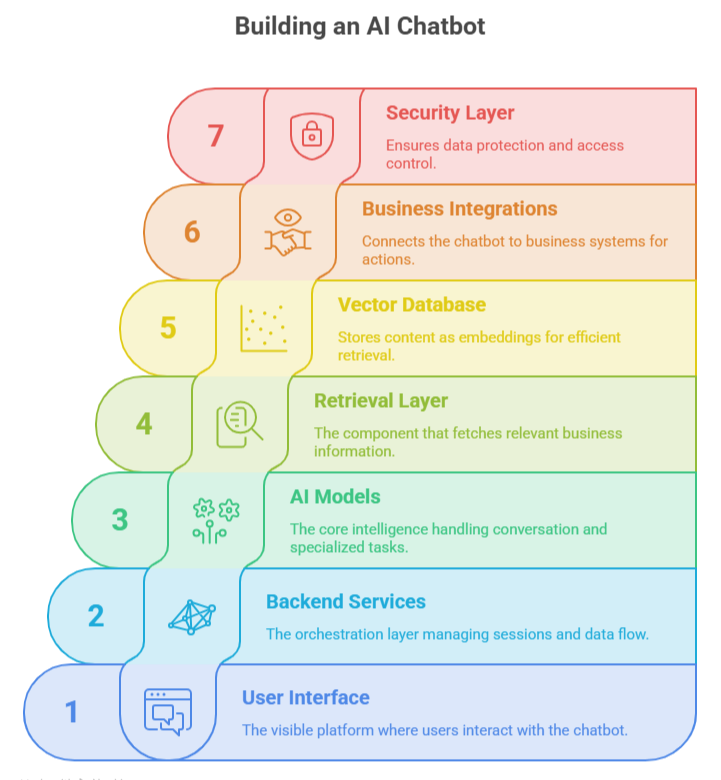
An AI chatbot’s architecture is the framework that receives user input, retrieves relevant information, processes it through an LLM, and returns an accurate response while securely connecting with your business systems. Every production-ready AI chatbot relies on the same seven core components working together.
1. User Interface
The widget, app, or voice channel where the conversation actually happens. Least technically complex layer, most visible to the user.
2. Backend Services
The orchestration layer. It manages sessions, calls the retrieval layer, builds the prompt, sends it to the model, and cleans up what comes back before the user sees it.
3. AI Models
Usually more than one. The main LLM handles conversation, but smaller specialized models often handle intent classification or content moderation faster and cheaper than routing everything through the big model.
4. Retrieval Layer (RAG)
This is what lets your bot answer accurately about your business specifically, instead of generic knowledge from the model’s training data. It searches your indexed content and hands the relevant pieces to the LLM before it generates a reply.
5. Vector Database
Stores your content as embeddings so the retrieval layer can find conceptually related information, not just exact keyword matches. Pinecone, Weaviate, Qdrant, or pgvector if you’d rather stay inside Postgres.
6. Business Integrations
The connective tissue to your CRM, order system, or ticketing platform. This is what turns your bot from “here’s how to request a refund” into “I’ve just processed your refund.”
7. Security Layer
Authentication, role-based access, encryption, audit logging. Not a bolt-on. It needs to be part of the design from day one, especially if the bot ever touches personal, financial, or health data.
RAG vs Fine-Tuning: Which Should You Use?
Here’s the short version: use RAG to keep your chatbot factually current without retraining anything. Use fine-tuning to lock in a specific tone or reasoning pattern. Most serious deployments end up using both.
Rag Wins When Your Information Changes Often
Updating a RAG-based chatbot means updating the documents it retrieves from, not retraining a model. It’s also the better choice when you need to trace where an answer came from, which matters a lot in regulated industries.
Fine-Tuning Wins When Consistency Matters More Than Freshness
If you need the same tone and format across thousands of responses, or you’re teaching the model a domain-specific reasoning pattern retrieval alone can’t capture, fine-tuning earns its cost. Just know it needs retraining whenever the underlying facts shift, which makes it more expensive to maintain long-term than RAG.
Combining Both Is Increasingly The Norm
Fine-tune for tone and instruction-following, layer RAG on top for facts. You get consistency without losing the ability to update your knowledge base on the fly.
One number worth knowing here: a review of production RAG deployments found that standalone LLMs answering domain-specific questions hallucinate at a rate of 20 to 40%, while well-implemented RAG systems bring that down to under 5% in enterprise production environments.
That gap is the entire argument for grounding your chatbot in real data instead of trusting the model’s memory.
How to Train AI Chatbot on Your Own Data
Training a chatbot on business data primarily means building a retrieval pipeline: collecting and cleaning internal content, chunking it appropriately, generating embeddings, and indexing it in a vector database so the chatbot can retrieve accurate, current information at query time rather than relying on the model’s general knowledge.
Prepping your internal data
Break documents into chunks of a few hundred words, small enough to fit in the retrieval window but large enough to keep the meaning intact. Tag each chunk with metadata (source, date, category) so retrieval can filter properly. Fix contradictions before indexing. A retrieval system will surface an outdated policy just as confidently as the current one.
Connecting your actual systems
Help centers, wikis, PDFs, CRMs, and databases all need to feed into the same ingestion pipeline. CRM and database connections should run through live APIs, not static exports, so a chatbot answering “where’s my order” is actually looking at today’s data, not last month’s export.
Keeping it secure
If your knowledge base includes customer PII or internal business data, the ingestion pipeline needs the same access controls as the rest of your infrastructure. Segment your knowledge bases by access level at the retrieval layer itself, so a customer-facing bot literally cannot pull internal-only documents, even if someone asks it to.
Essential Features Every Modern AI Chatbot Should Have
A production-ready AI chatbot needs context awareness across a conversation, persistent memory for returning users, a clear human handoff path, authentication for sensitive actions, analytics for measuring performance, multilingual support, file upload handling, and increasingly, voice interaction, each addressing a specific gap that basic FAQ bots leave open.
- Context awareness: tracking what’s been discussed earlier in the same conversation so users don’t repeat themselves.
- Memory: recalling relevant details across sessions for returning users, where appropriate and consented to.
- Human handoff: a defined trigger and smooth transition when the bot reaches the edge of its competence. Klarna’s public reversal in 2025 demonstrated what happens when this path is under-resourced.
- Authentication: verifying identity before exposing account-specific or sensitive information.
- Analytics: tracking containment rate, satisfaction, and failure patterns to guide ongoing improvement.
- Multilingual support: serving global user bases without maintaining separate bots per language.
- File uploads: letting users share documents, screenshots, or receipts relevant to their query.
- Voice capability: an increasingly common channel, particularly for phone-based customer service automation.
Security and Compliance in AI Chatbot Development
A chatbot handling customer data carries the exact same legal obligations as any other system touching that data. The conversational interface doesn’t lower the bar, it just makes it easier to forget the bar exists.
Authentication and Access Control
- Verify identity before the bot exposes account details or takes action on a user’s behalf
- Use role-based access control so a support agent’s bot access differs from an admin’s
- Apply the same rule to the bot itself: it should only be able to reach the data its specific use case requires
Encryption and Data Handling
- Encrypt data in transit and at rest, no exceptions
- Segment knowledge bases by sensitivity level at the retrieval layer
- Avoid logging full conversation content that includes sensitive fields unless you have a specific, justified retention policy
Audit Logging
- Log not just what the user asked, but what data the bot retrieved and what action it took
- Make those logs reviewable, regulators and internal security teams increasingly expect this level of traceability from automated systems, not just from humans
Regulatory Frameworks to Plan Around
- GDPR if you have any EU users, regardless of where your company is based
- HIPAA if you’re anywhere near healthcare data
- SOC 2 if you’re selling to enterprise customers who will ask for it during procurement
Healthcare and financial services chatbots need legal and compliance review before launch, not after an incident forces the conversation.
How Long Does AI Chatbot Development Actually Take?
A basic FAQ chatbot can be built in 2–4 weeks, a customer support chatbot with integrations typically takes 2–4 months, and an enterprise-grade chatbot with custom architecture, compliance review, and multiple system integrations generally takes 4–9 months. Depends entirely on scope, and the honest range is wider than most sales decks admit.
| Chatbot Type | Realistic Timeline |
| Basic FAQ bot, no integrations | 2 to 4 weeks |
| Customer support bot with RAG and escalation | 2 to 4 months |
| Enterprise system with compliance review and multiple integrations | 4 to 9 months |
How Much Does AI Chatbot Development Cost?
AI chatbot development costs typically range from $5,000–$15,000 for a basic no-code deployment, $30,000–$100,000 for a custom RAG-based support chatbot, and $150,000 or more for enterprise systems with deep integrations and compliance requirements, with ongoing costs for LLM API usage, hosting, and maintenance continuing well beyond launch.
Here’s a realistic breakdown:
| Chatbot Type | Typical Cost Range | Main Cost Drivers |
| Basic no-code chatbot | $5,000 to $15,000 | Platform licensing, minimal setup |
| Custom RAG-based support chatbot | $30,000 to $100,000 | Data prep, integrations, conversation design |
| Enterprise chatbot with compliance | $150,000+ | Multi-system integration, compliance review, custom architecture |
That’s the build cost. The bill doesn’t stop there. LLM API usage scales with volume and model choice, a tiered routing strategy that sends easy queries to cheaper models can cut this meaningfully without hurting quality on the hard ones.
Then there’s ongoing maintenance: knowledge base updates, conversation log reviews, and the occasional model swap when a provider ships something better.
Teams that budget for launch and forget maintenance are the ones who end up with a chatbot that quietly gets worse every quarter.
5 Common Mistakes to Avoid While Building an AI Chatbot
The most common AI chatbot development mistakes are choosing an LLM based on hype, launching with an incomplete or poorly maintained knowledge base, writing vague prompts without clear guardrails, skipping post-launch monitoring, and treating security as an afterthought rather than a design requirement from day one.
Picking The Model Based On Hype, Not The Actual Task
Paying for a frontier model’s reasoning power on queries that a smaller, cheaper model handles just fine, or the opposite: under-provisioning for genuinely complex questions and wondering why customers are frustrated.
Launching With A Half-Finished Knowledge Base
No model, however capable, fixes retrieval pulling from outdated or incomplete content. This is the most common root cause of a chatbot giving confidently wrong answers.
Writing Vague Prompts With No Real Guardrails
If you haven’t defined tone, escalation triggers, and refusal behavior explicitly, the bot will improvise, and it won’t always improvise well.
Skipping Post-Launch Monitoring
More than half of Generative AI development projects get abandoned after proof of concept, largely due to poor data quality, weak risk controls, or unclear business value that nobody caught early because nobody was watching the metrics.
Treating Security As A Phase 2 Problem
Bolting on authentication and access control after launch is how chatbots end up closer to sensitive data than anyone realized, and it’s the mistake most likely to turn into an actual incident.
Why Businesses Choose Software Orca for Building An AI Chatbot
Building an AI chatbot is only part of the equation. The real value comes from creating a solution that fits your workflows, integrates with your existing systems, and continues delivering measurable results as your business grows.
That’s where Software Orca stands out. Its team combines AI engineering, product strategy, and custom software development services to build secure, scalable chatbots powered by modern LLMs, Retrieval-Augmented Generation (RAG), and enterprise-grade integrations.
Whether you’re automating customer support, streamlining internal operations, or launching an AI-powered product, we build chatbots around your business goals rather than forcing your business to fit a template.
As a trusted AI, software, and mobile app development company in Dallas, and beyond, Software Orca also creates AI-powered mobile experiences that connect seamlessly with web applications, CRMs, ERPs, and cloud platforms, helping businesses deliver faster, smarter, and more personalized customer interactions.
Wrapping it Up
Building an AI chatbot from scratch isn’t really one big technical decision, it’s a series of smaller ones: what problem you’re actually solving, how clean your data is, which architecture fits your scale, and whether you keep watching it after launch instead of walking away.
The teams getting real value out of this technology in 2026 aren’t the ones with the fanciest model. They’re the ones who scoped tightly, grounded their bot in real data, and treated security and monitoring as part of the build, not an afterthought bolted on when something went wrong.
FAQs
What happens when the chatbot gives a customer a wrong answer?
It will happen occasionally, no production system is immune. What matters is whether you have monitoring in place to catch it, a feedback loop to fix the underlying retrieval gap, and an escalation path so the customer isn’t stuck arguing with a bot that’s already confused.
Should a small business build its own chatbot or just use a no-code platform?
If your use case is narrow (FAQ, basic order status), a no-code platform will get you 90% of the value for a fraction of the cost and time. Custom builds earn their price when you need proprietary data integration or a competitive product experience no platform template can replicate.
Is it risky to launch fast and iterate, or should I over-engineer the first version?
Launch narrow and real, not fast and sloppy. A tightly scoped bot solving one well-defined problem, with clear metrics from day one, consistently outperforms a broad, ambitious build that tries to do everything and ends up doing nothing particularly well.
Can I build an AI chatbot without coding?
Yes, for narrower use cases. No-code platforms like Intercom or Voiceflow can handle common support scenarios quickly, though they offer less control over proprietary data integration and custom logic than a custom-built system.
Which AI model should I use?
Match the model to the task: high-reasoning models for complex, multi-step queries; smaller, faster models for high-volume simple queries. Many production systems route between multiple models based on query complexity.
What is RAG?
Retrieval-Augmented Generation is a technique where a chatbot retrieves relevant information from an indexed knowledge base and includes it in the prompt sent to the LLM, grounding responses in accurate, current data rather than relying solely on the model’s training knowledge.