Real estate software development is the process of designing, building, and maintaining software that supports property workflows: listing, searching, leasing, managing, closing, and investing.
Businesses usually build one of five things: a real estate CRM, a property management system, a listings marketplace, a transaction management platform, or an investment analytics tool. Each has different users, data sources, and compliance needs. The type of software you choose therefore shapes its features, architecture, integrations, cost, and timeline more than any other decision.
This guide covers the main types of real estate software, the features worth building, an eight-step development process, architecture and technology choices, MLS integration, planning ranges for cost and timeline, common challenges, and how to evaluate a development partner.
Real Estate Software Development (Quick Overview)
Most real estate software fails before launch, because teams pick the wrong type, skip MLS rules, or bolt on security last.
- Pick one of five types: CRM, property management, marketplace, transaction management, or investment analytics. Building more than one in v1 kills focus.
- The 8-step order is non-negotiable: requirements → type → MVP → data/integrations → architecture → UX → build/test → deploy. Data decisions constrain everything after.
- Real estate software development cost: $25K–50K MVP | $50K–130K mid-market | $130K+ enterprise. Complexity, not screen count, drives cost.
- Timeline reality: 2–4 months MVP | 4–8 months mid-market | 8–12+ months enterprise. MLS and vendor approvals run on their own schedule.
- MLS integration is where projects stall: licensing, display rules, normalization, and sync that survives deletions. It’s not one API call.
- Security is day-one, including roles, permissions, encryption, audit trails. Average breach cost hit $4.99M in 2026.
- Top real estate software development mistakes: overbuilt MVP, ignoring MLS rules, tech before requirements, late security, AI without a metric.
What Is Real Estate Software Development?
Real estate software development is the creation of software that digitizes property workflows, such as searching and listing homes, managing tenants, closing transactions, and analyzing investments. It spans planning, design, engineering, integration with property data sources, testing, and ongoing maintenance.
The workflows it supports are broad:
- Buying and selling: search, lead capture, showings.
- Listings: publishing and syndication.
- Leasing: applications, screening, lease signing.
- Property management: rent collection, maintenance requests, owner statements.
- Transactions: documents, deadlines, commissions.
- Investment and analytics: underwriting, portfolio tracking, pricing, pipeline reporting.
Custom real estate software development makes sense when off-the-shelf tools force you to bend your process around the product. The motivation is usually time.
In NAR’s Technology Report, 81% of agents said saving time was their main reason for adopting technology, up from 66% in 2025.
How Real Estate Software Differs From General Business Software
Real estate software looks like ordinary business software until you examine the data and the rules around it. Property records carry hundreds of fields and a status history. Location is central, so maps, boundaries, and polygon search are core features. Listing data often arrives from MLS feeds that come with someone else’s rules.
A single product may serve agents, brokers, owners, tenants, vendors, and buyers, each with different visibility. Add money (deposits, rent, commissions), sensitive documents (contracts, IDs, disclosures), and third-party integrations. Permissions and security then become design problems from day one, not finishing touches.
What Types of Real Estate Software Can You Build?
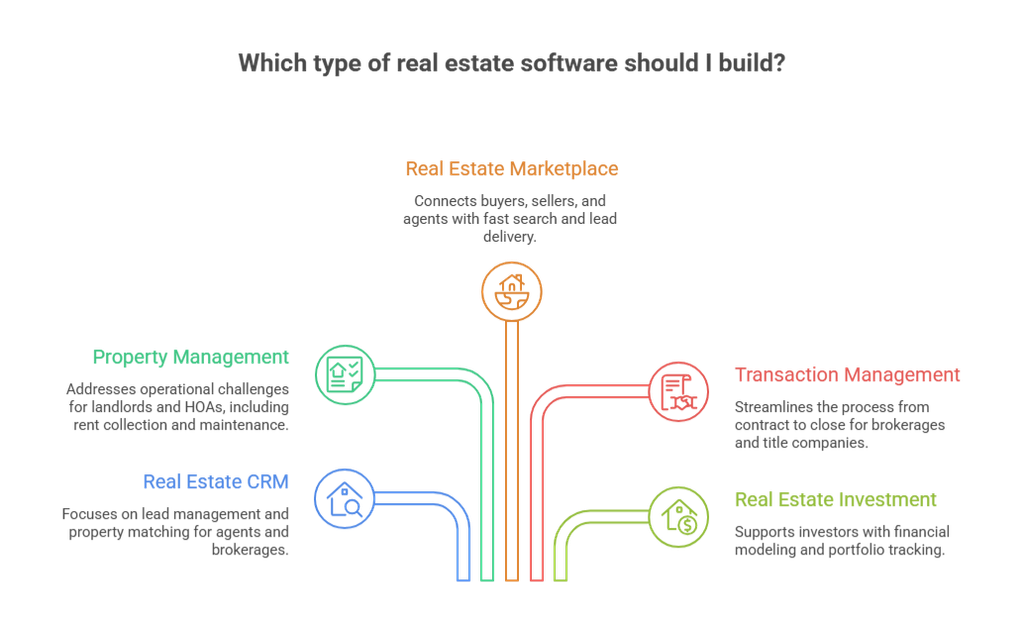
You can build five main types: CRM, property management, marketplace, transaction management, and investment software. Pick the one that matches your primary user and the most expensive problem that user has today.
1. Real Estate CRM Software
Agents, teams, and brokerages use it to capture leads, route them, and follow up. A real estate CRM differs from a generic one because it understands properties: matching buyers to listings, tracking inquiries per property, and handling IDX registrations. Follow Up Boss is a well-known example of the category.
2. Property Management Software
Landlords, property managers, and HOAs use it to run leases, rent collection, maintenance, owner statements, and accounting. The core problem is operational: fewer spreadsheets, fewer missed payments, faster maintenance turnaround. AppFolio and Buildium show how broad this category can get.
3. Real Estate Marketplace Software
Marketplaces connect buyers, renters, sellers, and agents, as Zillow does. The hard parts are listing supply, fast map-based search, lead delivery, and a business model that works for both sides. Data and search architecture drive most of the engineering effort.
4. Real Estate Transaction Management Software
Brokerages, title companies, and escrow teams use it to move a deal from contract to close. It handles checklists, deadlines, document collection, e-signatures, and compliance. Dotloop and SkySlope are familiar examples.
5. Real Estate Investment Software
Investors, funds, syndicators, and lenders use it for underwriting, portfolio tracking, investor reporting, and deal pipelines. The challenge is accurate financial modeling and reporting, not listing display.
What Features Should Real Estate Software Have?
Your features should come from the workflows of the roles you serve, starting with a small core and adding capability only when a real user need justifies it.
1. Core Real Estate Software Features
- Authentication and user accounts, with sign-up, login, and password recovery.
- Role-based access. A tenant sees their own lease, an agent sees their own leads, and a broker sees the team.
- Property and listing management: fields, photos, status, and history.
- Search and filtering: price, bedrooms, map area, saved searches.
- Dashboards tailored to each role.
- Notifications by email, SMS, and push.
- Document management with access control and versioning.
2. Business and Workflow Features
These turn a listing tool into an operating system for a business:
- Lead management and CRM.
- Tenant and owner management.
- Transaction milestones and commission tracking.
- Payments for rent, deposits, and fees.
- Reporting and analytics.
3. Advanced Features
AI-powered natural-language search, listing recommendations, automated lead qualification, workflow automation, and predictive analytics (valuation, churn, maintenance forecasting) can add real value.
Adoption among users is growing as approx 23% of agents use AI daily and another 25% weekly. This includes most common uses such as listing descriptions and email follow-ups. Treat advanced features as opt-in. Most products do not need all of them, and few need them in version one.
How to Build Real Estate Software (8-Step Real Estate Software Development Process)
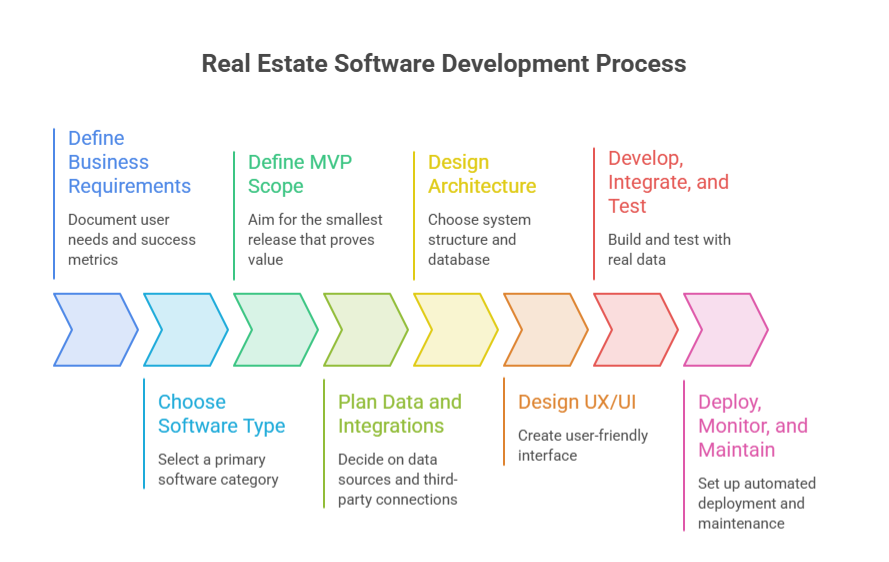
The real estate software development process has eight steps: define requirements, choose the software type, scope the MVP, plan data and integrations, design the architecture, design the UX, build and test, then deploy and maintain. The order matters because data and integration decisions constrain everything after them.
1. Define the Business Requirements
Document who will use the product, which job it does for them, and how you will measure success (days to close, lead response time, occupancy rate). If you skip this, the team builds features nobody asked for.
2. Choose the Type of Real Estate Software
Commit to one primary category. Ideas like “marketplace plus CRM plus property management” tend to produce a shallow first release. Choose one core product and integrate the rest.
3. Define the MVP Scope
Aim for the smallest release that proves value to one user group, ideally one workflow in one market. The field is well funded.
CRETI recorded 231 proptech funding rounds totaling $4.53 billion in the first half of 2026.
In a funded field, a narrow wedge usually beats a broad, shallow product. An overbuilt MVP delays launch and buries feedback.
4. Plan Property Data and Integrations
Decide where property data comes from (MLS, public records, vendors, user input), what licenses you need, and which third-party systems must connect. Do this before architecture. Discovering a licensing or data-format problem late can force a redesign of the data model.
5. Design the Real Estate Software Architecture
Choose how the system is structured: monolith or services, database, search layer, hosting. Match complexity to the team. Microservices on day one slow a small team, while a design with no tenant separation blocks growth later.
6. Design UX/UI Around Real Estate Workflows
Design around how people actually work. Agents are on their phones between showings, and property managers batch maintenance tickets. Adoption is a real risk.
63% of agents in NAR’s survey named the learning curve as their biggest barrier to new technology, and 59% named cost.
A product that needs training loses users.
7. Develop, Integrate, and Test
Build in short iterations, connect to integration sandboxes early, and test with messy real data: missing photos, odd statuses, duplicate records. Run permission tests and load tests on search. The common failure is a demo that works on clean data and breaks in production.
8. Deploy, Monitor, and Maintain
Set up automated deployment, logging, monitoring, backups, and patching. Plan for MLS rule changes and API version updates. If you neglect this, syncs fail silently and sold homes keep showing as active.
What Should Real Estate Software Architecture Look Like?
Real estate software architecture is usually layered:
Users → Frontend → API/Application Layer → Business Logic → Database/Data Layer → External Integrations.
Authentication, authorization, logging, monitoring, and cloud infrastructure run alongside every layer.
Web and mobile clients present the interface. The API layer receives requests, verifies identity, and enforces permissions. Business logic holds the rules: commission splits, lead routing, lease renewals.
The data layer typically combines a relational database for transactions, a search index for listings, and file storage for photos and documents. Keep integrations behind their own layer so replacing an MLS vendor or payment provider does not ripple through the product.
Architecture Considerations for Scalable Real Estate Software
- Roles and permissions: model them explicitly. Retrofitting them is painful.
- Data normalization: map each source’s fields to one internal schema.
- MLS synchronization: use incremental updates, handle deletions and status changes, and retry failures.
- Geospatial search: use spatial indexes (PostGIS or search-engine geo queries) for map and polygon search.
- Multi-tenancy: if you serve many brokerages or management firms, decide early between shared tables with tenant IDs and separate databases.
- High-volume search: use a dedicated search index so heavy queries do not slow transactions.
- Data consistency: a search index can lag by seconds, but payments and ledgers cannot.
- Audit trails: record who changed contracts, payments, and permissions.
- Security: It is the most important thing to consider. IBM’s 2026 report puts the global average cost of a data breach at $4.99 million, a record.
What Technology Stack Is Used for Real Estate Software Development?
Common real estate software technology stacks combine React or Next.js on the frontend, Node.js, Python, .NET, or Java on the backend, PostgreSQL for data, Elasticsearch or OpenSearch for search, and AWS, Azure, or Google Cloud for hosting. None of these is universally best.
| Layer | Common options | When it fits |
| Frontend | React, Next.js | Next.js server rendering helps public listing pages get indexed |
| Mobile | Flutter, React Native | One codebase for iOS and Android |
| Backend | Node.js, Python, .NET, Java | Choose by team skill; Python suits data and AI work |
| Database | PostgreSQL, MySQL, MongoDB | PostgreSQL with PostGIS for location; relational for money |
| Search | Elasticsearch, OpenSearch | Fast filtered and map search at listing scale |
| Cloud | AWS, Azure, Google Cloud | Existing contracts, compliance, team familiarity |
| APIs | REST, GraphQL | REST fits most MLS feeds; GraphQL suits varied client data needs |
| AI | ML models, LLM APIs | Hosted LLM APIs for search and summaries; custom ML when you have training data |
Choose technology after you understand your requirements: integrations, data volume, security needs, scalability, platforms, and the skills of the team that will maintain it. A familiar stack your team can maintain beats a fashionable one it cannot.
What Integrations Does Real Estate Software Need?
It depends on the product, but typical integrations include MLS and IDX data, maps, CRM, payments, accounting, e-signature, communications, identity verification, property-data APIs, and AI services.
- MLS and IDX: listing data and rules for displaying it.
- Maps and geolocation: geocoding, boundaries, and directions (Google Maps Platform, Mapbox).
- CRM: two-way sync with Salesforce or HubSpot.
- Payment gateways: card and ACH payments (Stripe, for example), including PCI scope.
- Accounting: QuickBooks or Xero for owner statements and ledgers.
- E-signature: DocuSign or Dropbox Sign.
- Communication: SMS, email, and voice (Twilio is common).
- Identity verification: tenant screening and KYC.
- Property-data APIs: tax, ownership, and valuation data (ATTOM is one provider).
- AI APIs: language and prediction models.
MLS Integration for Real Estate Software
MLS integration is not one API call. It is a combination of feeds or APIs, access agreements, licensing, display rules, data normalization, and ongoing synchronization, and each MLS differs. MLS remains central. RESO standards help.
The RESO Web API handles transport, and the RESO Data Dictionary defines more than 1,700 fields and 3,100 lookups.
Even so, MLSs differ in local fields, update frequency, media handling, access approval, and display requirements such as attribution and disclaimers. Aggregators such as Bridge Interactive and Trestle can simplify access, but licensing and rules still apply.
Plan for normalization and for sync that survives deletions, status changes, and outages.
Real Estate API Integration
Identify every integration during discovery. Each one affects the data model, security review, rate limits, vendor approval time, sandbox access, and cost. Finding a critical dependency halfway through development is one of the most common reasons projects slip.
How Much Does Real Estate Software Development Cost?
Real estate software development cost for a focused MVP is roughly $25,000–50,000, a mid-market platform $50,000–130,000, and an enterprise platform $130,000 and up. Your quote will depend on scope and context.
Cost drivers include:
- Software type.
- Number of user roles.
- Feature scope.
- MLS and property-data integrations.
- Third-party APIs.
- Web and mobile platforms.
- AI components.
- Security and compliance requirements.
- Scalability targets.
- Team composition.
- Testing depth.
- Maintenance after launch.
Complexity matters more than screen count. Take two products with twenty screens each. A listing site that displays normalized MLS data is mostly read-only, while a property management platform with rent collection, owner ledgers, and audit trails needs payment flows, accounting rules, and permissions behind those screens. The visible interface is similar, but the engineering effort is not.
Budget beyond launch as well: cloud hosting, API and data fees, MLS access costs, monitoring, security updates, and support all continue. A custom real estate software development estimate that ignores them is incomplete.
What Are the Biggest Challenges in Real Estate Software Development?
The biggest challenges are fragmented property data, integrations, permissions, data accuracy, security, location search, scale, and complex workflows. Each has a practical technical response.
- Fragmented property data. Sources use different fields and formats. Build a normalization layer mapped to one internal schema, ideally aligned with RESO.
- MLS and third-party integrations. Rules and reliability vary. Isolate integrations behind adapters and monitor them.
- Multiple roles and permissions. Model roles, teams, and ownership explicitly, and test access rules automatically.
- Synchronization and accuracy. Stale listings erode trust. Use incremental syncs, reconciliation jobs, and alerts.
- Security and privacy. Products hold identities, financials, and contracts. Cybersecurity and data privacy ranked as the top challenge for commercial real estate portfolios in JLL’s 2026 outlook, cited by 47% of respondents. Use encryption, least-privilege access, and logging from the start.
- Geospatial and search needs. Use spatial indexes and a search engine tuned for filters.
- Scalability. Separate search from transactions, cache aggressively, and load-test before launch.
- Complex workflows. Leases, closings, and approvals have many exceptions. Model them as explicit states with clear transitions.
How to Choose a Real Estate Software Development Company
Choose the best software development company that has shipped property-data-heavy products, explains architecture trade-offs in plain language, and supports the product after launch. Capability matters more than a polished pitch.
Look for real estate or PropTech experience, hands-on MLS and data integration work, and API integration skill. Ask how they handle security practices, what development methodology they follow, and how clearly they communicate technical decisions.
Request case studies you can verify, ideally with a reference call, and confirm what real estate software development services continue after launch: monitoring, fixes, and updates.
Questions to Ask a Real Estate Software Development Company
- How have you handled MLS or property-data synchronization, and what went wrong the last time?
- What architecture would you propose for our user roles, and why?
- How would you scope an MVP for our budget, and what would you postpone?
- How do you handle third-party API limits, failures, and vendor approvals?
- What security practices do you follow, and how do you test permissions?
- What happens after launch: support terms, monitoring, and ownership of code and infrastructure?
7 Common Real Estate Software Development Mistakes
Most real estate software projects fail for predictable reasons, like bad sequencing. Teams overbuild the MVP, skip MLS rules, pick tech too early, and treat security as a final step. Here are the seven mistakes to avoid, and what to do instead.
- Building too much into the MVP. Launch one workflow for one user group, then expand.
- Ignoring MLS and data requirements. Confirm access, licensing, and display rules before design.
- Choosing technology before requirements. Pick the stack after you know integrations, data volume, and team skills.
- Underestimating integrations. Budget time for approvals, sandbox work, and edge cases.
- Treating security as a late-stage task. Design permissions, encryption, and audit logging from the first sprint.
- Building AI without a measurable use case. Define the metric first, such as response time or qualified leads, then test whether AI moves it.
- Failing to plan for scale. Separate search from transactions and load-test early.
Wrapping it Up
Successful real estate software development starts with the business workflow, not the technology. The sequence is logical: business problem, software type, users and workflows, MVP development, data and integrations, architecture, technology, development, testing, launch, and scaling. Skipping or reordering steps is where budgets and timelines slip.
If you are planning a project, begin with a discovery session to define workflows, data sources, and integrations. That one step tells you more about real cost and risk than any generic estimate.
Related Guides
- Software Development Outsourcing: Strategic operational frameworks covering dedicated engineering teams, offshore/nearshore cost models, vendor selection, and IP protection.
- Custom vs. Off-the-Shelf Software: A comparative evaluation analyzing total cost of ownership, long-term licensing fees, scalability constraints, and build vs. buy decision matrices.
- Enterprise Software Development in Dallas: An industry guide on Dallas engineering capabilities, high-volume architecture design, regional talent pools, and compliance for enterprise software builds .
- How to Choose a Software Development Company: A step-by-step evaluation guide covering technical due diligence, code quality audits, communication protocols, and contract structure red flags.
- Top Custom Software Development Companies in Dallas: A comparative analysis of leading regional software development agencies, detailing their technical specialties, engagement models, and market reputations.
FAQs
What programming languages are commonly used for real estate software?
JavaScript or TypeScript (React, Next.js, Node.js) is common across web products. Python is popular for data and AI work, and Java and C# (.NET) are common in enterprise systems. Dart (Flutter), Swift, and Kotlin appear in mobile development. Pick based on team skills and ecosystem fit.
How does MLS data get integrated into real estate software?
You obtain access through the MLS or an authorized data provider, usually via a RESO Web API feed. You then map fields to your schema, run initial and incremental syncs, and follow the MLS’s display rules. Access approval and licensing happen before development can finish.
Can real estate software integrate with an existing CRM or accounting system?
Yes, usually through the other system’s API or an integration platform. Define which system owns each record and how conflicts are resolved. Two-way sync needs more design than one-way export.
How do you keep real estate software secure?
Combine role-based access, encryption in transit and at rest, secure authentication, audit logs, dependency updates, and regular testing. For payments, use a compliant processor to limit PCI scope. Review permissions with every new feature.
Can real estate software scale as the number of properties and users grows?
Yes, if designed for it. Use a dedicated search index, caching, background jobs for syncs, and cloud infrastructure that scales horizontally. Load-test with realistic data volumes before launch.
How Long Does It Take to Build Real Estate Software?
A focused MVP takes about 2–4 months, a mid-market platform 4–8 months, and an enterprise platform 8–12 months or more. Timelines move with scope, the number of integrations, MLS and data requirements, web and mobile targets, team size, testing depth, and security reviews. Approvals matter more than most people expect: MLS access, payment provider onboarding, and app store review run on other people’s schedules.