Enterprise software development is the process of designing, building, and maintaining software systems that run core business operations across departments, data sources, and user groups.
Unlike a standalone app, enterprise software has to work inside an existing technology environment: legacy systems, security requirements, compliance obligations, and long operational lifespans that stretch years or decades. Integrations, data governance, and access control aren’t optional add-ons; they shape the architecture from the start.
Dallas has become a hub for this kind of work, with a mix of established enterprises, healthcare and financial services organizations, and a growing base of technology talent.
This article walks through what enterprise software development actually involves, how it’s built, what it costs, and how to choose a software development company in Dallas for the job.
Enterprise Software Development (Key Takeaways)
- Enterprise software development powers finance, HR, operations, and compliance, with integrations, RBAC, and data governance shaping architecture from day one.
- 47% of unsuccessful enterprise projects fail because of inaccurate requirements management.
- Enterprise software is built in 8 stages, from system audit and architecture to security, testing, and phased deployment.
- Enterprise software development in Dallas costs $50K to $1M+ and takes 6 to 18+ months.
- 73% of organizations run hybrid cloud environments, making cloud, on-premises, and hybrid decisions central to enterprise architecture.
- The average data breach costs $4.99 million, and AI-driven attacks rose 56% year over year.
- 50% of analyzed code falls below recommended architecture ratings, while stronger architecture cuts issue-resolution time by 30%.
What Is Enterprise Software Development?
Enterprise software development is the practice of building software that supports an entire organization, not just one team or task. It serves employees, partners, and sometimes customers across finance, operations, HR, sales, and compliance.
Enterprise-grade software integrates with ERPs, CRMs, and identity providers; enforces role-based access control; maintains data governance and audit trails; and stays reliable and maintainable over a long lifespan. Examples include ERP, CRM, supply chain, HIPAA-regulated healthcare platforms, compliance-heavy financial systems, and internal portals.
These systems often outlive their builders: a CRM or ERP implemented today may still run, modified, a decade later.
An industry report found the average ERP is 6.4 years old with 5.3 years of remaining life. That timeline shapes architecture, documentation, and maintainability decisions from day one.
Why Enterprise Software Development Is Different
Enterprise software development is different because the software has to serve multiple departments, integrate with legacy systems, and meet security and compliance standards that ordinary applications don’t face. These constraints shape decisions at every stage, from architecture to deployment.
A consumer app or small business tool typically serves one user type and can be built and shipped with fewer dependencies. Enterprise systems rarely have that luxury.
A single feature might touch finance, HR, and customer service simultaneously, each with different workflows and permission requirements. That reality pushes architecture toward clearer service boundaries and more deliberate access control from the start.
Identity and access management also becomes more demanding. Enterprise systems typically need to support multiple identity providers, department-specific permissions, and audit logging for compliance. Security and compliance requirements, whether HIPAA, SOC 2, PCI DSS, or industry-specific mandates, influence architecture decisions well before a single line of code is written.
Data consistency and availability matter more too. If a system goes down or produces inconsistent data, the impact isn’t limited to one team, it can halt operations across the organization.
That’s why enterprise projects favor phased deployment over a single “big bang” launch, and why long-term maintenance planning is built into the project from the outset rather than treated as an afterthought.
Enterprise Software Development in Dallas: What to Decide Before Building
Before development starts, a Dallas organization needs to define the business problem it’s solving, who will use the system, and what already exists that the new software has to work with or replace. Getting these decisions wrong early is the most common cause of enterprise projects running over budget or timeline.
According to DesignRush, 47% of unsuccessful projects failed to meet their goals because of inaccurate requirements management.
Start with the business problem and the outcome you expect.
“We need a new system” isn’t a requirement; “we need to cut order processing time by half” is. From there, identify the departments and user groups who’ll actually use the software, since their workflows will shape functional requirements.
Next, inventory existing applications and legacy systems. Understanding what’s already running, and what data and logic lives inside it, determines whether you’re building something new, integrating with what exists, or modernizing a legacy system in place.
From there, work through:
- Required integrations with third-party systems, ERPs, or CRMs.
- Data ownership and where systems of record will live.
- Compliance requirements specific to your industry.
- Deployment environment, whether cloud, on-premises, or hybrid.
- Internal engineering capacity to support the system after launch.
- Whether to build custom software, buy commercial software, or modernize what exists.
- Realistic budget and timeline expectations.
- Who will own and maintain the system long-term.
These decisions don’t need to be finalized before talking to a development partner, but organizations that have thought through them tend to get more accurate estimates and avoid scope changes mid-project.
How to Build Enterprise Software
Enterprise software is built through eight interconnected stages, starting with defining the business problem and ending with a system that’s deployed, monitored, and continuously improved.
Each stage produces decisions that constrain the ones that follow, which is why skipping ahead, especially past the audit and architecture stages, tends to create expensive rework later.
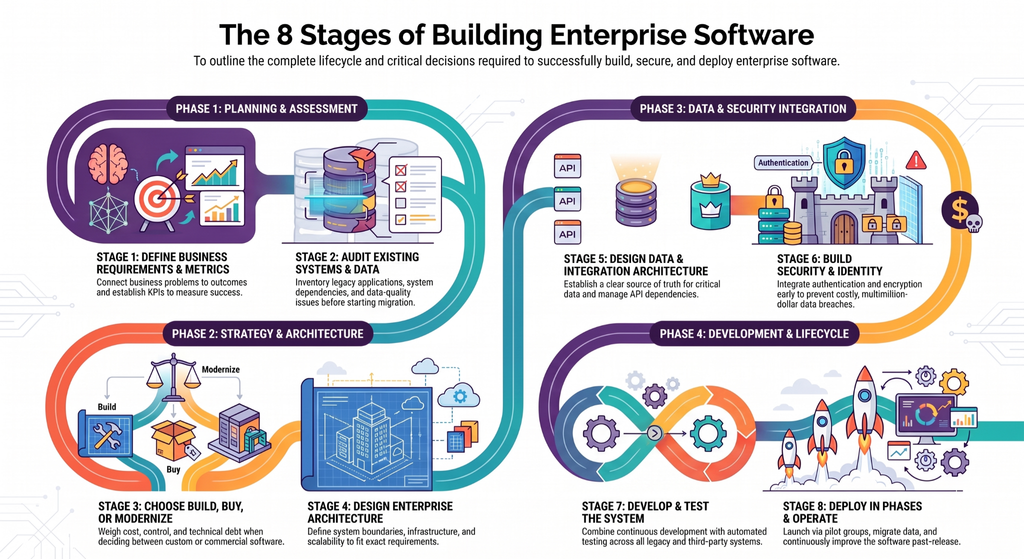
Stage 1: Define Business Requirements and Success Metrics
Requirements should describe the business problem the software needs to solve, not just a list of features. A feature list tells developers what to build; the business problem explains why, which matters when tradeoffs arise during development.
This stage should define business goals, users and workflows, functional requirements, and non-functional requirements such as performance, uptime, scalability, and security. It should also establish KPIs and acceptance criteria so the team can measure whether the finished system actually solves the intended problem.
That focus on outcomes is becoming more common in enterprise technology management. More than 45% of organizations use unit economics to connect technology costs with business outcomes.
Stage 2: Audit Existing Systems and Data
An audit inventories the applications, databases, APIs, and third-party systems the new software must work with or replace. It should identify legacy infrastructure, data-quality issues, duplicated records, system dependencies, and integration constraints.
This stage directly affects architecture and migration decisions. If customer data exists across several systems with inconsistent formats, that problem needs to be addressed before migration rather than discovered after development has started.
The audit should also identify systems that cannot be replaced immediately and dependencies that may affect the new platform.
Stage 3: Choose Build, Buy, or Modernization
The organization must decide whether to build custom software, purchase commercial or SaaS software, extend an existing platform, or modernize a legacy system.
None is universally better. Custom development provides greater control and can support unique workflows, but requires more development and long-term ownership. Commercial software can deliver established functionality faster but may limit customization and create vendor dependencies.
Modernization can preserve valuable business logic while avoiding a full replacement, but requires careful management of technical debt.
The decision should consider cost, control, integration requirements, business differentiation, migration risk, ownership, and ongoing maintenance.
Stage 4: Design Enterprise Architecture
Architecture defines how the application is structured, including service boundaries, APIs, deployment models, scalability, availability, observability, and disaster recovery. It also determines whether cloud, on-premises, or hybrid infrastructure best fits the requirements.
Hybrid environments are already common in enterprise IT.
Flexera found that 73% of organizations operate hybrid cloud environments. That does not make hybrid cloud the right choice for every project, but it shows why enterprise architecture often needs to account for multiple infrastructure environments.
Microservices are also not automatically better than a modular monolith. A modular monolith can be easier to develop, test, and operate, while microservices may make sense when services need independent scaling or ownership by separate teams. Architecture should follow requirements, not trends.
Stage 5: Design Data and Integration Architecture
This stage defines how data moves between systems through data models, APIs, event-driven patterns where appropriate, ETL/ELT processes, synchronization, and migration.
It should also establish systems of record and ownership for critical data. If two applications both treat themselves as the source of truth for customer information, conflicts can eventually affect reporting, billing, or customer service.
Third-party integrations need similar attention. External APIs can introduce rate limits, authentication requirements, downtime, and breaking changes, so these dependencies should be considered in the architecture rather than treated as simple development tasks.
Stage 6: Build Security and Identity Into the Architecture
Security should be designed into the system from the beginning rather than added immediately before launch. This includes authentication, authorization, RBAC, identity-provider integration, encryption, secrets management, and audit logging.
The financial consequences of weak security can be significant.
IBM’s report found that the global average cost of a data breach reached $4.99 million, while AI-driven attacks increased 56% year over year.
That does not mean every enterprise application carries a multimillion-dollar breach risk. It reinforces why least-privilege access, security testing, auditability, and applicable requirements such as HIPAA, PCI DSS, or SOC 2 need to influence architecture early.
Stage 7: Develop and Test the System
Development should happen alongside continuous testing rather than treating testing as a final phase. This includes CI/CD, automated testing, integration testing, security testing, performance testing, user acceptance testing, and regression testing.
Enterprise testing must also cover workflows that cross multiple systems. A feature can work correctly in isolation but fail because of a legacy dependency, permission boundary, data synchronization issue, or third-party API limitation.
Testing should therefore validate both functional requirements and the non-functional requirements established at the beginning of the project.
Stage 8: Deploy in Phases and Operate the Software
Enterprise systems are often deployed in phases, beginning with a pilot group before expanding across the organization. This gives teams an opportunity to identify workflow, integration, performance, and training issues before they affect every user.
Deployment also includes data migration, monitoring, incident response, support processes, SLAs, and ongoing maintenance. After launch, the software must be measured against its original business objectives and updated as requirements, technologies, and integrations change.
Enterprise software development therefore does not end with the first production release. Operation, maintenance, and continuous improvement are part of the system’s lifecycle from the beginning.
How Much Does Enterprise Software Development Cost in Dallas?
Enterprise software development in Dallas can cost anywhere from roughly $50,000 for a smaller custom system or mvp development to $1 million or more for complex enterprise platforms. The final cost depends on scope, integrations, legacy modernization, security, data migration, infrastructure, and the number of systems and users involved.
As per Clutch listings, top custom software development companies in Dallas project across a broad range, from $10,000–$49,000 for smaller engagements to $200,000–$999,999 and even $1 million–$9.99 million for larger projects.
Enterprise Software Development Cost by Project Scope
| Project type | Typical cost range | What it may include |
| Focused custom system | $50K–$120K | Core business workflows, web application, database, user roles, limited integrations |
| Mid-market enterprise system | $120K–$250K | Multiple workflows, third-party integrations, advanced permissions, reporting, cloud infrastructure, extensive testing |
| Complex enterprise platform | $250K–$1M+ | Multiple departments, legacy integrations, data migration, advanced security, complex architecture, extensive APIs and infrastructure |
What Drives Enterprise Software Development Cost in Dallas?
The biggest cost variables are:
- Number of users and departments.
- Number and complexity of integrations.
- Legacy-system modernization.
- Data migration and cleanup.
- Security and compliance requirements.
- Custom workflows and business logic.
- Cloud or hybrid infrastructure.
- AI functionality.
- Testing and quality assurance.
- Development team structure.
- Post-launch support and maintenance.
How Long Does Enterprise Software Development Take?
Enterprise software development typically takes 6 to 18 months, with simpler single-system projects falling toward the lower end and large platforms involving multiple integrations, legacy systems, migration, and compliance extending beyond a year.
The timeline depends more on scope, dependencies, and organizational readiness than on the software label itself.
According to GoodFirms’ survey, enterprise projects take 12–24 months when budgets exceed $200,000. The actual timeline can be shorter or longer depending on integrations, data migration, compliance requirements, scope changes, and organizational readiness.
| Enterprise software scope | Typical timeline | Main timeline drivers |
| Focused enterprise application | 6–9 months | Core workflows, limited integrations, standard security |
| Multi-department system | 9–12 months | Multiple user roles, integrations, reporting, broader QA |
| Complex enterprise platform | 12–18+ months | Legacy systems, data migration, compliance, complex integrations |
Build vs. Buy vs. Modernize Enterprise Software
Choosing between building custom software, buying a commercial product, or modernizing an existing system depends on how unique the organization’s workflows are, how much control it needs, and the condition of what’s already in place.
None of the three approaches is the right answer in every situation.
When to Build Enterprise Software
Custom development makes sense when an organization has workflows that don’t map well to existing commercial products, needs functionality that differentiates it from competitors, requires significant control over the system’s direction, or needs deep, non-standard integrations. It typically costs more and takes longer than buying, but it avoids the compromises that come with fitting business processes into someone else’s software.
When to Buy Enterprise Software
Buying commercial or SaaS software fits situations where requirements are fairly standard, mature products already exist in the category, speed to deployment matters, and heavy customization isn’t necessary. This is often the faster and lower-cost path, but it can limit flexibility and create dependency on a vendor’s roadmap and pricing decisions.
When to Modernize Enterprise Software
Modernization is the right approach when existing business logic still holds value, when replacing the system entirely carries high risk, when legacy infrastructure is creating operational constraints, and when an incremental migration path is realistic. It reduces the risk of a full rebuild but requires careful handling of accumulated technical debt.
Each option carries different tradeoffs across cost, speed, control, integration complexity, technical debt, migration risk, and long-term ownership. The right choice comes out of the audit and requirements stages, not a general preference for one approach over another.
Enterprise Software Architecture and Technology Stack
Enterprise software architecture determines how an application’s components, data, integrations, infrastructure, and security controls work together. The right architecture depends on workload, integration requirements, scalability, security, and the organization’s ability to operate the system over time.
How to Choose the Right Application Architecture
One of the most important decisions is whether the application should use a modular monolith or microservices.
A modular monolith keeps the application in a single deployable unit while separating business functions into clearly defined modules. This can simplify development, testing, deployment, and operations when the system does not require independently scaling services.
Microservices divide the application into separately deployable services. They can make sense when different business capabilities need independent scaling, release cycles, or team ownership. However, they also introduce additional requirements for service communication, monitoring, deployment, security, and failure handling.
This decision has a measurable impact on long-term maintenance.
Software Improvement Group’s report analyzed more than 30,000 systems and found that 50% of code fell below its recommended architecture rating. The report also found that stronger architecture was associated with a 30% reduction in issue-resolution time.
The practical choice is therefore not “monolith versus microservices” in isolation. It is the architecture that gives the organization the required scalability and separation without adding operational complexity it cannot justify or support.
Select Infrastructure Based on the Workload
Enterprise applications can run on public cloud, private infrastructure, on-premises environments, or a combination of these. The choice should account for existing systems, regulatory requirements, data location, performance, availability, integration dependencies, and operating costs.
The CNCF report found that 88% of backend developers work in standardized DevOps and platform environments.
For enterprise software, infrastructure should therefore be selected alongside the team’s operating model. A cloud-native architecture that requires platform engineering expertise may be inappropriate for an organization that lacks the people and processes to run it reliably.
Build the Technology Stack Around the Architecture
The technology stack should support the architecture rather than dictate it. Depending on the system, an enterprise application may include:
| Layer | Common technologies or approaches |
| Frontend | React, Angular, Vue, native mobile frameworks |
| Backend | .NET, Java, Python, Node.js |
| Database | PostgreSQL, SQL Server, MySQL, MongoDB |
| APIs | REST, GraphQL, API gateways |
| Messaging | Kafka, RabbitMQ, cloud messaging services |
| Infrastructure | AWS, Azure, Google Cloud, on-premises |
| Deployment | Docker, Kubernetes, CI/CD |
| Security | SSO, OAuth 2.0, OpenID Connect, IAM |
| Operations | Logging, monitoring, tracing, observability |
According to Deveops’, a survey of 712 IT professionals found that open-source adoption was concentrated across programming languages and frameworks (49%), databases and data technologies (46%), DevOps/GitOps/DevSecOps tooling (39%), and cloud and container technologies (38%).
These technologies do not all belong in every enterprise system. A transactional application may need a relational database and conventional APIs without event streaming, Kubernetes, or a distributed microservices architecture.
The strongest enterprise architecture is the one that provides the required capabilities without creating unnecessary operational burden.
Where AI Fits Into Enterprise Software Development in 2026
AI is becoming a practical component of enterprise software, particularly for document processing, intelligent search, workflow automation, forecasting, employee copilots, and multi-step task execution.
McKinsey’s State of AI research found that 44% of organizations report scaling AI across their enterprise, up from 38% previously.
The important question is where AI improves an existing workflow. An enterprise application might use AI to extract information from documents, answer questions across internal knowledge, summarize records, predict demand, or assist employees inside existing business systems.
More advanced implementations can use AI agents to execute defined tasks across multiple applications.
Enterprise AI also creates requirements that conventional software may not. Models need controlled access to data and user permissions, outputs need evaluation, and organizations need policies for monitoring, human review, security, and model selection. Integration matters as well because an AI capability is limited by the data and systems it can access.
AI should therefore be treated as an architectural and business decision, not a default feature. If a conventional search, rules engine, workflow, or reporting system solves the problem more reliably and economically, adding AI may add complexity without enough benefit.
How to Choose an Enterprise Software Development Company in Dallas
Choosing an enterprise software development company in Dallas means evaluating three things: experience with systems of similar scope, approach to architecture and integration, and whether they explain tradeoffs or only promise a perfect solution.
Look for enterprise-scale experience, not general software development. Ask about their system architecture approach, their experience integrating with legacy systems like yours, and their security and compliance practices.
Cloud and DevOps capability determines long-term operability. Technical leadership strength and communication clarity matter throughout the project. Evaluate post-launch support during vendor selection, not after.
Ask directly: who owns the source code and intellectual property after the project is complete, what documentation will be delivered, and how the internal team collaborates with the vendor during and after development.
Warning signs include:
- Vague or unusually fast cost estimates with no clear scoping process.
- Unrealistic timelines that ignore integration or migration complexity.
- No clear migration strategy for legacy data or systems.
- Weak or generic security and testing explanations.
- Unclear terms around code and IP ownership.
- Inability to explain why they’d choose one architectural approach over another for your situation.
An enterprise software development partner who can only describe benefits, without discussing tradeoffs, usually hasn’t done the scoping work required to give an honest answer.
Why Software Orca Is the Best Enterprise Software Development Company in Dallas
Software Orca builds systems for finance, HR, operations, and compliance. Dallas has become a hub for this work, with healthcare, financial services, and a growing technology talent base, and Software Orca sits at that intersection.
The company starts with a business problem. It audits legacy systems, maps integrations, and tells Dallas organizations honestly whether to build, buy, or modernize before they commit a dollar.
Software Orca handles multi-department workflows, ERP and CRM integrations, RBAC and identity-provider setup, HIPAA/SOC 2/PCI DSS compliance, legacy modernization, and data migration. Architecture follows requirements, not trends.
Because enterprise systems outlive their projects, Software Orca hands over clean documentation, full source code and IP ownership, and a real post-launch support plan. No lock-in, no black box.
Conclusion
Successful enterprise software development depends on the same fundamentals regardless of industry or company size: clear requirements, sound architecture, thoughtful data and integration design, security built in from the start, disciplined development and testing, phased deployment, and a real plan for long-term operation. Skipping any of these stages tends to show up later as cost overruns, integration failures, or systems that don’t hold up under real operational demands.
For organizations in Dallas, cost and timeline will always depend on the specific scope, systems, and compliance requirements involved, not a generic industry average.
The most useful next step is a scoping conversation that defines the actual business problem and constraints before committing to an architecture, a vendor, or a budget.
Related Guides
- Software Development Outsourcing — Strategic operational frameworks for delegating engineering projects, covering dedicated team models, offshore/nearshore rates, vendor selection, and IP protection.
- Software Development Methodologies — A breakdown of core delivery frameworks, comparing Agile, Scrum, Kanban, and Waterfall to determine the optimal workflow for your build.
- Custom vs. Off-the-Shelf Software — A comparative evaluation of build vs. buy decisions, analyzing total cost of ownership, long-term scalability, and proprietary IP ownership.
- Custom Software Development Cost — A practical financial breakdown detailing hourly developer rates, complexity tiers, hidden maintenance fees, and realistic budgeting models.
- How to Choose a Software Development Company — A step-by-step buyer’s guide for evaluating technical agencies, assessing code quality standards, verifying client references, and structuring contracts.
FAQs
Who owns the source code after enterprise software development?
Source code ownership depends entirely on the contract terms agreed to before development begins. In most custom development engagements, the client owns the code, but this should be explicitly stated in the agreement, not assumed. Organizations should confirm IP ownership terms before signing, particularly for any third-party libraries or proprietary frameworks used during development.
What happens to enterprise software after it goes live?
Launch is the beginning of the operational phase, not the end of the project. Systems require ongoing monitoring, bug fixes, security patching, performance tuning, and periodic feature updates. Most enterprise software also needs a longer-term modernization plan, since the technology landscape and business requirements around it will continue to change over the system’s operational life.
How are enterprise software APIs managed and secured?
API security typically involves authentication (often via OAuth or API keys), rate limiting to prevent abuse, versioning to manage changes without breaking existing integrations, and monitoring for unusual usage patterns. APIs connecting to sensitive data also need encryption in transit and logging for audit purposes, particularly in regulated industries.
Can legacy enterprise software integrate with modern applications?
Yes, in most cases, though the method depends on the legacy system’s architecture. Options include building API wrappers around legacy systems, using middleware to translate between old and new data formats, or gradually migrating specific functions to modern services while the legacy system continues operating. The right approach depends on the audit findings from early in the project.
What documentation should an enterprise software project include?
At minimum, documentation should cover system architecture, API specifications, data models, deployment procedures, and operational runbooks for common issues. This documentation matters most when transferring knowledge to an internal team or a different vendor down the line, since undocumented systems become harder and more expensive to maintain over time.
What happens if the original development company stops supporting the software?
This risk is why code ownership, documentation quality, and use of standard (rather than proprietary) technologies matter so much during the build phase. A well-documented system built on common frameworks and infrastructure can typically be handed off to a new development team, though the transition is smoother when documentation and architecture decisions were made with that possibility in mind from the start.