Yoga-Go is free to download. That part is simple. But, the core content, like personalized plans, Pilates, Tai Chi, Chair Yoga, and progress tracking, sits behind a subscription. Depending on the plan, the platform, and whatever promo is running that week, you’ll pay somewhere between $4.99 and $69.99 a month.
The annual plan works out to about $4.42 a month, which is the cheapest way in.
This guide breaks down every pricing variable, what the subscription actually includes, what reviewers say about value, and what it would cost a business to build something comparable.
Yoga Go App Pricing Explained
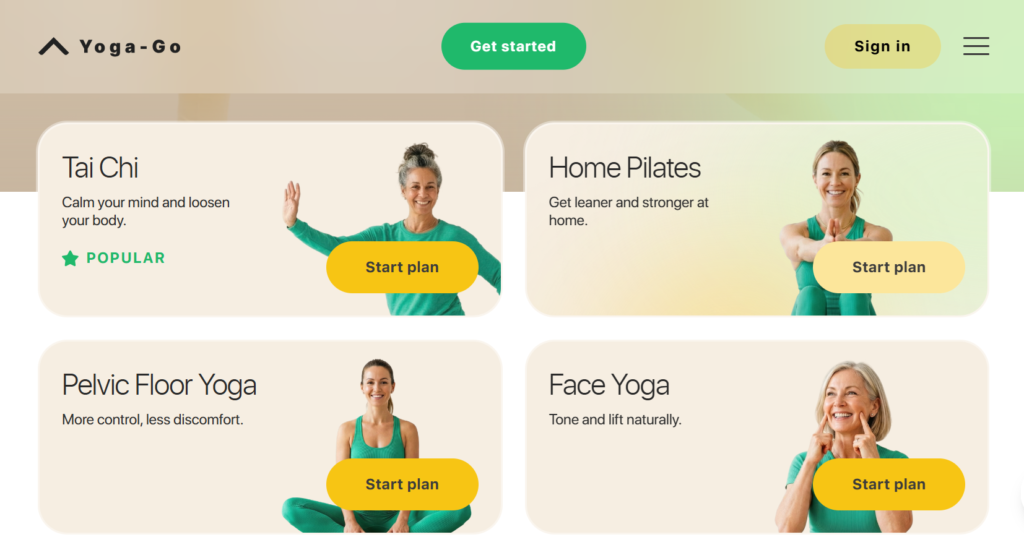
Yoga-Go runs three main plans: monthly at $19.99, quarterly at $34.99, and annual at $52.99, or about $4.42 a month. Some users also see a cheaper $4.99 basic monthly tier with fewer features. The exact price you’re shown depends on your region, your device, and the promo running when you sign up.
The Plans You’ll Actually See
Most new users are shown a discounted first period, often a reduced-price first week or month, before the plan renews at full price. Renewal happens automatically 24 hours before the current period ends, which is standard practice across both the App Store and Google Play.
This is also why the price a person remembers seeing at sign-up may not match what later shows up on a bank statement: the discount applied only to the introductory period, not the ongoing subscription.
Monthly vs. Annual: Which Is Actually Worth It
Do the math and the annual plan wins by a wide margin. $52.99 for twelve months beats paying $19.99 every single month by more than $180 a year. If you know you’ll actually use the app past week three, annual pays for itself in under three months.
Why Your Price Isn’t Your Friend’s Price
Yogo-Go pricing depends on your app store region, whether you’re a returning subscriber (returning users don’t get the new-user discount), the plan length you pick, and seasonal promos around January and September, when fitness apps compete hardest for new sign-ups.
This isn’t a Yoga-Go quirk. Every subscription app on Apple and Google’s billing systems works this way.
Is Yoga-Go Free or Do You Have to Pay?
Yoga-Go is free to install and free to try in a limited way. You can complete onboarding and sample a handful of intro workouts at no cost. Everything past that, personalized plans, Pilates, Tai Chi, Chair Yoga, Somatic Yoga, sits behind a paid subscription. It’s a freemium app, not a free one.
Free Version
The free tier gets you through onboarding and a short list of general workouts. That’s enough to judge whether you like the coaching style. It’s not enough to follow an actual program. The app’s own store listing confirms this directly: download is free, further use requires a subscription.
Free Trial
Trial length changes by platform and promo, so don’t expect a fixed number of days. What’s more consistent is a 30-day money-back guarantee mentioned in a recent review, which gives you a real out if the app doesn’t fit.
Premium Features
Paying unlocks the full library, reported at over 300 workouts and 2,000-plus exercises across yoga, Pilates, and Tai Chi, plus age- and level-based personalization, offline playback, and Apple Health, Google Fit, and Fitbit syncing.
Meal plans and specialty guides are often sold separately as one-time purchases, not bundled into the subscription. Read the fine print before you tap “continue.”
What Does a Yoga-Go Subscription Include?
A paid subscription gets you personalized plans, a multi-discipline library covering yoga, Pilates, Tai Chi, and stretching, automatic progress tracking, and a daily recommended session. It’s built to hand you a plan, not make you build one yourself.
Personalized Workout Plans
After onboarding, the app doesn’t dump a library on you. It maps you into a plan based on your age, fitness level, and goals, then adjusts as you go. That’s not a nice-to-have. It’s the retention strategy. Give someone a decision (“do today’s session”) instead of a search problem (“find something to do”) and they’re far more likely to actually open the app.
Yoga & Stretching Programs
Beyond standard yoga, you get Somatic Yoga, Chair Yoga (built for seniors and limited-mobility users), Wall Pilates, Sofa Yoga, and Tai Chi. Sessions run roughly 7 to 30 minutes, so there’s a fit whether you want a quick reset or a full practice block.
Progress Tracking
You get session history, estimated calories burned, and streaks, plus sync with Apple Health, Google Fit, and Fitbit if you already track activity elsewhere.
The App Picks Your Next Session
Instead of choosing a new workout every day, you’re shown a recommended next session based on what you’ve already done. It sounds small. It’s the reason a lot of people finish week two instead of quitting on day four, since the biggest cause of churn in this category is just forgetting to open the app.
Yoga-Go Reviews: Is It Worth the Price?
Store ratings look strong: 4.4 stars on Google Play and 4.7 stars from over 231,000 App Store reviewers. But dig into Trustpilot, Reddit, and the BBB, and a second, rougher story shows up, almost entirely about billing.
Where Users Are Genuinely Happy
Trustpilot shows Yoga-Go at a 4-star rating from nearly 12,800 reviewers, and the praise there is consistent: it’s beginner-friendly, the pace doesn’t overwhelm new users, and the app is easy to navigate. One 69-year-old reviewer said Yoga-Go felt like exactly what she needed to bring some calm into her life.
Reviewers with no prior yoga experience frequently say the variety, especially finding Pilates alongside yoga, kept the routine from getting boring.
Where It Falls Apart: Billing
This is the recurring complaint, and it’s not minor. The Better Business Bureau lists Yoga-Go at a B- rating. On Reddit, the same complaint shows up: users say they were charged twice or more without clear warning, and that disputing it got them nowhere with support.
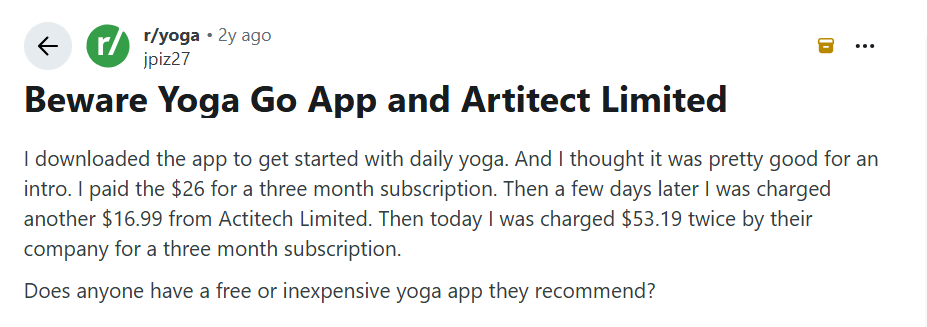
Several reviewers also allege the on-screen instructors are AI-generated avatars rather than the real people shown in the app’s ads, and that canceling requires digging into your Apple or Google account settings rather than a simple in-app button.
So Is It Worth It?
If you’re a beginner who wants hand-holding and won’t mind setting a calendar reminder to cancel before renewal, most reviewers say yes. Advanced practitioners looking for depth, and anyone who hates chasing customer support over a billing dispute, should look elsewhere.
Reviewers comparing Yoga-Go against Down Dog, Glo, and Alo Moves generally rank it ahead on beginner accessibility, and behind on advanced content and live instruction.
How to Build an App Like Yoga-Go
Building an app like Yoga-Go app means picking a specific fitness niche, designing onboarding that actually personalizes the first session, and shipping a core feature set built around plans and billing, not just a video library.
The category rewards focus over breadth, such as apps that try to serve every fitness goal typically retain worse than apps that own one clear positioning
Pick Your Niche First
Yoga-Go didn’t try to serve everyone. It went after beginners, older adults, and people who want low-impact movement. That’s a deliberate bet, not an accident. Chasing advanced practitioners instead means different pacing, harder content, and a different marketing playbook entirely. Pick one before you write a line of code.
Make Onboarding Do the Work
The onboarding questionnaire isn’t a formality. It’s what lets the app hand someone a plan instead of a search bar. Get this wrong and your free-to-paid conversion suffers, because that first session is what decides whether someone upgrades before the trial ends.
The Features You Actually Need
At minimum: user profiles and onboarding logic, a searchable workout library with video playback, a personalization engine that turns user inputs into a plan, progress tracking with calories and streaks, subscription billing wired into App Store and Google Play, and push notifications for people who go quiet.
These capabilities have become standard requirements for businesses working with a healthcare app development company to build personalized wellness platforms, especially those targeting long-term user engagement.
Launch an MVP, Then Prove It Works
Start with a content-light MVP development to answer one question: do people finish onboarding and convert to paid? Expand the library and personalization once retention data backs the investment.
Test subscription flow and video playback harder than anything else. Those were the two biggest complaint categories in Yoga-Go’s own reviews, and both are cheaper to fix before launch than after.
How Much Does It Cost to Build an App Like Yoga Go App?
Budget $30,000 to $60,000 for a lean MVP, $60,000 to $120,000 for a mid-level build, and $120,000 to $250,000 or more for an advanced version with AI personalization and wearable integration. Cost is driven by content production and video infrastructure, not by how the app looks.
Estimated Cost Breakdown of Building an App Like Yog Go
| Complexity | Estimated Cost | What’s Included |
| MVP | $30,000 to $60,000 | Onboarding, limited content library, basic billing |
| Mid-Level | $60,000 to $120,000 | Expanded content, progress tracking, personalization, health app syncing |
| Advanced | $120,000 to $250,000+ | AI personalization, wearable integration, offline mode, multi-platform content ops |
What Actually Moves the Price
- Platform choice. Native iOS and Android app development costs more upfront but handles video and animation better than cross-platform frameworks. Businesses often evaluate these decisions with a mobile app development company in Dallas or similar development partners to understand the trade-offs between performance, budget, and scalability.
- Onboarding complexity. A personalization-driven flow costs more than a static browse-and-pick library, but it’s what drives conversion.
- Video streaming. Adaptive bitrate streaming and offline caching are usually the biggest line items once you scale past a few thousand users.
- AI personalization. A recommendation engine that adapts as users progress is a multi-month build, not a bolt-on feature.
- Wearable integrations. Apple Health, Google Fit, and Fitbit each need separate integration work, and each one breaks a little every time the platform updates its API.
- Third-party APIs. Payment processing, push notifications, and analytics all carry their own licensing and integration cost.
- Ongoing maintenance. Budget 15 to 20 percent of your original build cost every year for updates and bug fixes. Most founders underestimate this line badly.
Key Technologies Used to Build a Yoga App Like Yoga-Go
A Yoga-Go-style app typically runs on a cross-platform client, a cloud backend for user data and personalization, a dedicated video CDN, and native in-app billing. Each piece is chosen for a reason, not by default.
The technology stack selected for a wellness app also influences development timelines and costs, whether the product is built in-house or through app development services in Houston or elsewhere.
Cross-Platform vs. Native
Cross-platform frameworks cut the initial build cost by sharing code across iOS and Android. Native development costs more but plays video and handles animation more smoothly, which is why some apps switch to native once they’ve proven the concept.
The Backend and Storage
User profiles, plan logic, and analytics live on managed cloud infrastructure. Video content lives somewhere else entirely, in dedicated cloud storage, because video assets scale nothing like structured user data and need their own handling.
Video Streaming
Almost nobody self-hosts video at this scale. A dedicated CDN already solves adaptive bitrate playback and offline caching, which would otherwise take months to build in-house.
Payments
Subscription billing runs through Apple’s and Google’s native in-app purchase systems, not third-party processors, because both platforms require it for digital subscription content sold inside their apps.
Analytics and Notifications
Analytics and push notification services close the loop, feeding the re-engagement logic that decides whether a lapsed user comes back before their subscription lapses too.
Why To Consult Software Orca for Health and Wellness App Development
Software Orca is an AI, software, and mobile app development company with over a decade of experience building production apps for healthcare and wellness clients. This includes health monitoring tools that integrate wearable devices and real-time data to help users track vitals, medication schedules, and fitness goals.
Every project starts with a discovery sprint that maps out scope, timeline, and technical architecture before development begins, and the team builds and maintains work in-house across iOS, Android, Flutter, and React Native rather than routing it through subcontractors.
For a founder weighing an MVP against the cost ranges above, that discovery-first process is exactly what prevents the two most common failure points covered in this guide: a confusing subscription flow and content that doesn’t hold up past the first month.
Wrapping it Up
Yoga-Go’s price depends on which plan you’re shown, where you live, and whether a promo happens to be running. The annual plan is the clear value winner across every source that publishes real numbers.
Where the app struggles isn’t the content. It’s billing transparency. If you’re building something similar, that’s the exact place to spend your engineering time first.
Frequently Asked Questions
Can you cancel a Yoga-Go subscription anytime?
Yes, but not from a simple in-app button in every case. Several reviewers report needing to go into their Apple ID or Google Play account settings directly to stop auto-renewal, since canceling inside the app alone doesn’t always work.
Does Yoga-Go offer refunds if you’re unhappy?
A 30-day money-back guarantee has been reported by at least one reviewer, but BBB data shows a meaningful number of users say refund requests were denied or ignored, particularly after an unexpected renewal charge.
Is Yoga-Go better than free yoga videos on YouTube?
For structure and personalization, yes. For raw content and zero cost, no. Yoga-Go’s edge is a plan that adapts to you instead of making you pick a video every day, which is the exact feature YouTube’s free library doesn’t offer.
Does Yoga-Go work without an internet connection?
Offline playback is included with a paid subscription, so downloaded sessions can run without a live connection. The free tier does not include this.
Is Yoga-Go a good fit for weight loss specifically?
It’s positioned that way, and the exercise-and-weight-loss category is the largest segment of the fitness app market for a reason. But Yoga-Go is low-impact by design, so it works best paired with other activity rather than as a standalone weight-loss plan.
How is Yoga-Go different from Down Dog or Alo Moves?
Reviewers consistently place Yoga-Go ahead on beginner accessibility and format variety (Pilates, Tai Chi, Chair Yoga in one app), and behind on advanced-level depth and live instructor sessions, which competitors like Alo Moves offer.
Is Yoga-Go safe for someone with an injury or limited mobility?
Chair Yoga and Somatic Yoga were built specifically for this. That said, no app-based program replaces a conversation with a doctor or physical therapist if you’re recovering from an injury.
What happens if you forget to cancel before renewal?
You get charged the full plan price automatically, since renewal happens 24 hours before the current period ends. This is the single most common complaint across Trustpilot, Reddit, and BBB reviews, so a calendar reminder is worth setting the day you subscribe.