SaaS software development is the process of designing, building, and operating software that customers access online through a subscription, rather than installing and running it on their own servers.
Because one codebase and one infrastructure layer serve every customer at once, SaaS software development requires different architectural and operational decisions than traditional software: multi-tenant data design, subscription billing, continuous deployment, and ongoing security and scaling work that never really finishes.
This guide covers how to build a SaaS product step by step, along with what matters most when planning SaaS software development in Dallas and how to evaluate a local development company.
SaaS Software Development in 2026 (Quick Overview)
- SaaS software development in Dallas starts at $25,000 and can exceed $250,000 for enterprise platforms. Most business SaaS products cost $50,000 to $120,000.
- A focused SaaS MVP takes 3–4 months. Complex or enterprise platforms take 6–12+ months.
- The development process runs requirements and MVP scope, architecture and tenancy, technology stack, user experience, core functionality and billing, security and authentication, testing, deployment, and post-launch scaling.
- Architecture follows one of three models: multi-tenant, single-tenant, or hybrid, decided before development begins.
- Tenant isolation testing verifies that no tenant can access another tenant’s data, and it is the most commonly skipped SaaS-specific test.
- SaaS development cost continues after launch. Hosting, APIs, payments, monitoring, security, maintenance, and support are monthly operating costs.
- When evaluating a SaaS development company in Dallas, check for multi-tenant architecture, tenant isolation, billing, security, and post-launch scaling.
What Is SaaS Software Development?
SaaS software development means building software that is hosted centrally by the provider and delivered to users over the internet, typically through a web browser and a recurring subscription.
Instead of shipping a program that customers install locally, SaaS product development produces a single hosted application that many customers use at the same time, with updates pushed out from one central codebase rather than distributed to each installation.
Most SaaS applications share four traits:
- Cloud hosting instead of on-premise installation
- Subscription or usage-based pricing instead of one-time licensing
- Centralized updates instead of customer-managed upgrades
- Support for many organizations (tenants) inside one application instance.
That last trait, multi-tenancy, is what most separates SaaS application development from earlier models of software delivery, because the application, database, and infrastructure all have to account for multiple customers running on shared resources at once.
SaaS Software Development vs. Traditional Software Development
The differences between SaaS software development and traditional software development show up across deployment, access, and long-term maintenance:
| Factor | SaaS Software Development | Traditional Software Development |
| Deployment | Centrally hosted by the provider | Installed on the customer’s device or servers |
| Hosting | Cloud infrastructure managed by the vendor | On-premise or customer-managed servers |
| Updates | Pushed continuously to all users at once | Installed manually by each customer |
| User access | Browser or API access over the internet | Local installation required |
| Architecture | Usually multi-tenant, shared infrastructure | Usually single-instance, per-customer |
| Scalability | Infrastructure scales across all tenants together | Each installation scales independently |
| Maintenance | Ongoing, centralized, vendor-managed | Periodic, customer-managed |
| Pricing model | Subscription or usage-based | One-time license or perpetual fee |
SaaS Software Development Process (How to Build SaaS Software)
Building SaaS software follows a repeatable sequence: define requirements and MVP scope, choose an architecture and tenancy model, select a technology stack, design the user experience, build core functionality and billing, implement security, test thoroughly, deploy, and then maintain and scale the product after launch.
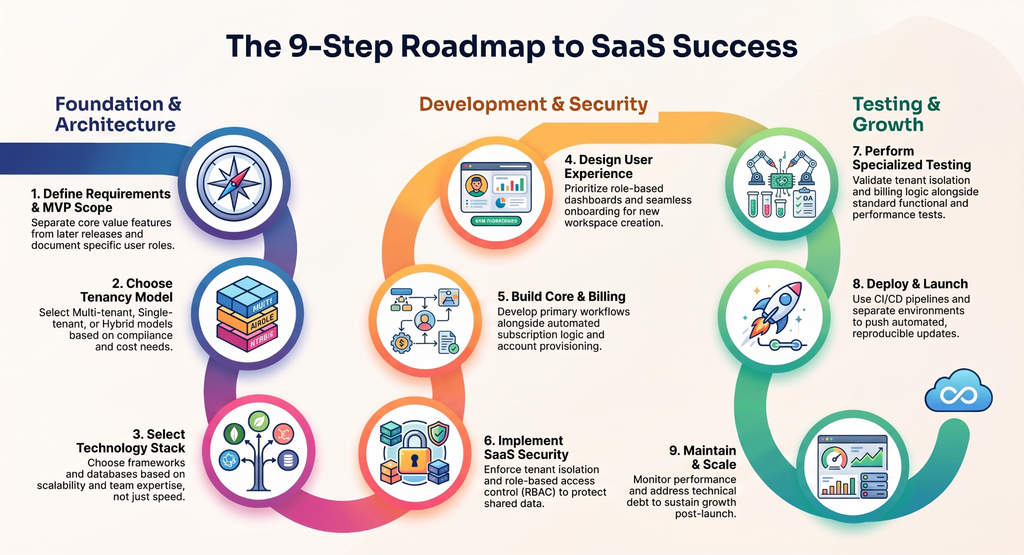
The stages below outline what each step actually involves for teams building a SaaS product from scratch.
1. Define SaaS Product Requirements and MVP Scope
SaaS product development starts by defining what the product does, who uses it, and what the first release must include. This means documenting business requirements, user roles (such as admin, member, and billing owner), and the core workflows the product must support on day one.
MVP scope should separate what is required to deliver the product’s core value from what can wait for a later release. Functional requirements describe what the software does; non-functional requirements describe how well it does it, including response time, uptime targets, and data limits.
Scalability and security or compliance requirements, such as data residency or encryption standards, should be defined at this stage too, since they affect architecture decisions made in the next step, not just later engineering work.
2. Choose SaaS Software Architecture and Multi-Tenancy
SaaS software architecture decisions center on tenancy: how customer data and resources are separated from one another inside a shared system.
There are three common models:
a. Multi-Tenant Architecture
Multi-tenant architecture runs all customers on shared application infrastructure and a shared or logically separated database, which lowers infrastructure cost per customer and simplifies updates, but requires strict tenant isolation in the data layer and application logic.
b. Single-Tenant Architecture
Single-tenant architecture gives each customer a dedicated instance or database, which increases isolation and can suit customers with strict compliance needs, but raises infrastructure cost and complicates updates across many separate instances.
c. Hybrid
Hybrid tenancy mixes the two; shared infrastructure for most customers, with dedicated resources for enterprise or regulated customers.
The right model depends on customer profile, compliance requirements, and expected scale, and it should be decided before development begins, since retrofitting tenancy into an existing data model is expensive.
3. Select the SaaS Technology Stack
The SaaS technology stack spans frontend frameworks, backend services, a database layer, APIs, cloud infrastructure, DevOps tooling, and monitoring systems.
Common choices include frameworks like React or Vue for the frontend; Node.js, Python, Java, or .NET for the backend; PostgreSQL or MySQL for relational data, sometimes paired with a document store; REST or GraphQL APIs; and cloud platforms such as AWS, Google Cloud, or Azure for hosting.
Case study
Whally, a multi-tenant SaaS built on Azure Cosmos DB. A 2026 Microsoft Learn session documented how Whally built its platform from scratch with tenant partitioning, secure multi-tenant operation, and real-time data streaming. The case shows why partitioning and tenant data modeling belong in the initial architecture phase. Retrofitting a tenancy model after launch costs far more than deciding it before development.
Stack selection should be driven by criteria:
- How well each option scales under multi-tenant load.
- What security controls it supports natively.
- How quickly the team can build and iterate in it.
- Whether the team already has expertise in it.
- What it needs to integrate with.
- How easy it is to maintain years after launch.
A stack chosen for short-term development speed alone often creates scaling or security problems later.
4. Design the SaaS User Experience
SaaS user experience design starts with onboarding and account or workspace creation, since this is usually a new user’s first interaction with the product.
From there, navigation and dashboards need to reflect role-based access; an admin and a standard user should see different controls and data, based on the roles defined during requirements gathering.
Because SaaS products are accessed across devices and often by non-technical users inside a customer’s organization, interfaces need to be responsive and accessible by default, not adjusted after launch.
Consistent navigation patterns across roles also reduce support requests once the product has real customers.
5. Develop SaaS Core Functionality, Billing, and Integrations
Core functionality is the part of the product that delivers its primary value, like the workflows defined during requirements gathering. Billing and subscription logic are built alongside it, not after: this includes subscription plans, payment processing, usage limits, entitlements (what each plan allows a tenant to do), and logic for upgrades and downgrades between plans.
Account provisioning, automatically creating a new tenant’s workspace, default settings, and access permissions when they sign up, needs to work reliably without manual setup, since SaaS products are expected to be self-service.
Third-party integrations, APIs for customers to connect their own systems, and webhooks for real-time event notifications typically round out this stage. Billing and provisioning logic are frequently underestimated in SaaS product development, even though they directly affect revenue and customer onboarding.
Case study: Synthesia
Synthesia reached $40M ARR without enforced billing, relying on an honor system. The team built a custom billing system in roughly three months, migrating $40M in usage onto it, then scaled to $140M ARR. Decoupling billing from business entities through an intermediary account layer let new customer types be added without rebuilding billing logic.
Can your SaaS Software handle 10x tenants without a rewrite?
If you don’t know the answer, that’s the problem.
6. Implement SaaS Security, Authentication, and Authorization
Authentication confirms who a user is, while authorization determines what that user is allowed to do once identified. SaaS software needs both, plus role-based access control (RBAC) to manage permissions across the user roles defined earlier.
Tenant isolation must be enforced at the application and database layer so that one customer’s data is never accessible to another, even in a shared multi-tenant environment.
Data protection requires encryption in transit and at rest, secure API design, and proper secrets management for credentials and API keys. Compliance requirements vary by industry and customer base.
Healthcare and financial customers may require specific certifications, but not every SaaS product needs the same compliance posture, so requirements should be based on the actual customer base and data handled. Audit logging is often necessary for enterprise customers who need visibility into account activity.
7. Test the SaaS Software
SaaS testing covers more ground than testing a standalone application, because a single bug can affect every tenant simultaneously rather than one installation. Functional and integration testing confirm the product works as intended; API testing confirms third-party and internal integrations behave correctly under real conditions.
Performance testing checks how the system behaves under concurrent load from many tenants at once, and security testing looks for vulnerabilities in authentication, authorization, and data handling. Cross-browser and cross-device testing confirm the interface works across the range of environments actual customers use.
Two tests are specific to SaaS: tenant isolation testing, which confirms one tenant truly cannot access another’s data, and billing and subscription testing, which confirms plan limits, upgrades, and payment logic behave correctly before real transactions run through them.
Case study: Shared-Schema Tenant Isolation
A 2026 study combined tenant resolver, RBAC, tenant filtering, row-level security, and tenant-level AES-256-GCM encryption with RSA-OAEP. Testing against subdomain manipulation, header forgery, access-rights abuse, and foreign-key decryption produced a 0% error rate, though encryption added latency. Isolation is layered, and each layer must be tested against deliberate cross-tenant access.
8. Deploy and Launch the SaaS Software
Deployment for SaaS software typically relies on cloud infrastructure and CI/CD pipelines that push updates to production automatically once code passes testing. Separate environments, including development, staging, and production, let teams test changes without affecting live customers, and infrastructure configuration should be reproducible rather than set up manually each time.
Database deployment needs its own migration process, since schema changes affect live tenant data. Monitoring, logging, and backup and recovery systems should be running before launch, not added afterward, so the team has visibility into production issues and a way to recover data if something goes wrong.
9. Maintain and Scale SaaS Software
SaaS software development doesn’t end at launch. Ongoing maintenance is part of the product’s operating cost, not a separate phase. Performance monitoring and observability tools track how the system behaves in production, which informs infrastructure scaling and database optimization as usage grows.
Security updates, bug fixes, and new feature releases continue on a regular cycle, and capacity planning should anticipate growth rather than react to it. Technical debt accumulated during rapid early development needs to be addressed periodically, or it slows down every future release.
Teams that treat maintenance as ongoing engineering work, rather than occasional cleanup, keep SaaS products stable as their customer base grows.
SaaS Software Development Features: What Should a SaaS Product Include?
SaaS software development features fall into two categories: features the end user interacts with directly, and infrastructure capabilities that make the product work as SaaS in the first place. A complete SaaS product typically needs both, but they get built and evaluated differently.
Essential SaaS Software Features
Most SaaS products need:
- User authentication and account management
- Organization or workspace management
- Role-based access control
- The product’s core functionality (the reason customers use it)
- Subscription management and billing/payment integration
- Usage limits and entitlements tied to subscription plans
- Dashboards and reporting
- Notifications
- Analytics on product usage
- Admin controls for managing users and settings
- APIs and integrations with other tools
Multi-tenancy, tenant isolation, account provisioning, and usage metering are not user-facing features in the usual sense. They are SaaS architecture and infrastructure capabilities that make the features above possible.
A customer never directly interacts with tenant isolation, but every other feature depends on it working correctly.
SaaS MVP Features vs. Full-Scale Product Features
An MVP needs enough functionality to deliver its core value to a first set of customers: authentication, core functionality, basic billing, and enough admin controls to operate the product. A business-ready SaaS product typically adds more complete role management, deeper integrations, and more detailed analytics.
Enterprise-scale SaaS adds capabilities like advanced audit logging, granular permissions, dedicated support, and sometimes single-tenant or hybrid deployment options for customers with stricter requirements.
Not every SaaS MVP needs every feature listed above — the goal is validating the product’s core value, not building a complete platform on the first release.
How Much Does SaaS Software Development Cost in Dallas?
SaaS software development cost typically ranges from $25,000 for a narrow MVP to $250,000 or more for an enterprise-grade platform, though actual pricing depends heavily on scope, architecture, and team composition.
The ranges below are planning ranges, not verified Dallas market averages. They’re a starting point for budgeting, not a quote.
| SaaS Project Type | Planning Range |
| Focused SaaS MVP | 25,000–50,000 |
| Business SaaS Product | 50,000–120,000 |
| Complex SaaS Platform | 120,000–250,000+ |
| Enterprise SaaS | $250,000+ |
Actual SaaS software development cost in Dallas, or anywhere else, depends on scope, architecture, integrations, security and compliance requirements, and overall product complexity, not on location alone.
What Affects SaaS Software Development Cost?
Cost is driven by:
- Product complexity and number of core workflows
- Architecture and tenancy model
- Number of user roles and permission levels
- Third-party integrations
- Security requirements
- Compliance obligations (healthcare, finance, and similar industries add cost)
- AI functionality, if included
- UX design requirements
- Cloud infrastructure choices
- QA and testing scope
- Development team composition and location
- Post-launch support commitments
SaaS Development Cost vs. Ongoing Operating Cost
Development cost covers building the product; it doesn’t cover running it. Ongoing operating costs include cloud hosting, third-party API fees, payment processing fees, monitoring and observability tools, security tooling, maintenance, customer support, and infrastructure scaling as usage grows.
A SaaS product with a $60,000 development cost can still carry meaningful monthly operating costs once it has real customers, so budgeting for SaaS software development should account for both the build and what it costs to keep the product running afterward.
SaaS Software Development Timeline: How Long Does It Take?
SaaS software development timeline typically runs 3–4 months for a focused MVP, 4–6 months for a mid-complexity product, and 6–12 months or more for a complex or enterprise SaaS platform. These are planning ranges, not fixed timelines. Actual duration depends on scope, team size, and how many stages run concurrently.
| Project Type | Typical Planning Timeline |
| Focused SaaS MVP | 3–4 months |
| Mid-complexity SaaS | 4–6 months |
| Complex/Enterprise SaaS | 6–12+ months |
SaaS Software Development Timeline by Stage
Rough stage ranges for a mid-complexity SaaS product:
- Requirements and planning: 2–4 weeks
- UX/UI design: 3–6 weeks
- Architecture and environment setup: 2–4 weeks
- Core development: 8–16 weeks
- Testing and security review: 3–6 weeks
- Deployment: 1–2 weeks
These stages typically overlap. UX design often continues while architecture is being set up, and testing usually starts before development is fully complete. Because of this, stage-level durations should not simply be added together to estimate the total timeline.
What Can Increase SaaS Software Development Time?
Timelines extend due to complex third-party integrations, enterprise requirements, multi-tenant architecture built late in development, security and compliance work, AI functionality, integration with legacy systems, scope changes mid-project, complex workflows, and dependencies on third-party vendors outside the development team’s control.
How to Choose a SaaS Software Development Company in Dallas
Choose a SaaS software development company in Dallas by verifying SaaS-specific capability, not general software development experience. Ask how they handle multi-tenant architecture, tenant isolation, subscription billing, security, and post-launch scaling. The ten items and eleven questions below give you a structured way to run that evaluation.
What to Look for in a SaaS Software Development Company
- Direct SaaS development experience, not just general software projects.
- SaaS architecture expertise, including multi-tenant and hybrid models.
- Multi-tenancy experience specifically, including tenant isolation.
- Security expertise covering authentication, authorization, and data protection.
- Cloud infrastructure and DevOps capability.
- API and third-party integration experience.
- Established QA and testing practices.
- A portfolio that includes comparable SaaS products.
- Clear terms on source code and intellectual property ownership.
- Post-launch maintenance and support offerings.
Questions to Ask a SaaS Software Development Company
- What SaaS architecture would you recommend for this product, and why?
- How will tenant data be isolated from other customers?
- How will the architecture scale as usage grows?
- Which technology stack would you recommend, and what drives that choice?
- How will authentication and authorization be implemented?
- How will security be handled across the application and infrastructure?
- How will billing and subscription logic work?
- How will third-party integrations be handled?
- What testing will be performed before launch?
- Who owns the source code and intellectual property after the project is complete?
- What post-launch support is included, and for how long?
Software Orca works with founders and technical teams on SaaS software development in Dallas, from initial architecture through launch and post-launch support.
Teams evaluating a development partner can use the questions above as a starting point for that conversation, whether or not Software Orca is one of the options under consideration.
Wrapping it Up
SaaS software development is not a one-time build. It is an architecture decision, a billing system, a security posture, and an operating commitment that continues after launch. The teams that get it right decide tenancy early, treat billing as product infrastructure rather than an afterthought, and test tenant isolation as deliberately as they test features.
Whether you build in Dallas or elsewhere, the capability that matters is SaaS-specific experience, not general software development alone.
SaaS software development in Dallas, with engineers you actually meet
No offshore handoff. No time zone lag. No communication tax.
Related Guides
- Software Development Outsourcing — Strategic operational models for engineering delegation, covering dedicated team structures, offshore/nearshore rate benchmarks, vendor vetting, and IP protection.
- Software Development Methodologies — A comparative technical breakdown of delivery frameworks, contrasting Agile, Scrum, Kanban, and Waterfall to align workflows with project complexity.
- Custom vs. Off-the-Shelf Software — A financial and architectural evaluation of build vs. buy decisions, analyzing total cost of ownership, integration limits, and long-term scalability.
- Custom Software Development Cost — A practical budgeting guide detailing cost drivers, hourly rate tiers, scope estimation, and technical debt prevention.
- How to Choose a Software Development Company — A vetting framework for evaluating technical capabilities, code architecture standards, communication protocols, and contract structures.
- Top Custom Software Development Companies in Dallas — A regional market analysis evaluating top-rated Dallas engineering partners, specialization areas, local rate benchmarks, and selection criteria.
FAQs
Does Every SaaS Product Need Multi-Tenant Architecture?
No. Multi-tenant architecture is common because it lowers infrastructure cost per customer, but it isn’t a requirement. Products serving a small number of large customers, or customers with strict data isolation requirements, sometimes use single-tenant or hybrid architecture instead.
Can SaaS Software Use a Single-Tenant Architecture?
Yes. Single-tenant architecture gives each customer a dedicated instance or database, which can make sense for regulated industries, large enterprise customers, or products where strict data isolation outweighs the cost savings of shared infrastructure.
What Is Tenant Isolation in SaaS Software?
Tenant isolation is the set of application and database controls that keep one customer’s data inaccessible to another customer, even when both are running on shared infrastructure inside a multi-tenant system.
Can AI Be Integrated Into SaaS Software?
Yes, commonly through API calls to a third-party model provider, embedded within existing product workflows such as search, summarization, or recommendations. AI integration adds its own testing, cost, and data-handling considerations rather than functioning as a separate development track.
Can an Existing Application Be Converted Into SaaS Software?
Yes, though it usually requires re-architecting the data model for multi-tenancy, adding subscription billing and provisioning, and rebuilding authentication and authorization around per-tenant access rather than a single-installation user base.
Should SaaS Billing Be Built From Scratch?
Usually not for standard subscription billing, since third-party billing platforms handle payment processing, plan management, and compliance more reliably than custom-built systems. Custom billing logic becomes necessary when pricing models are unusually complex, such as detailed usage-based metering across multiple product dimensions.