AI in software development statistics show one clear shift: AI is now part of daily software delivery, but adoption alone does not guarantee faster releases, better code, or stronger ROI.
Google’s DORA research reports that 90% of software development professionals use AI at work, with teams spending a median of two hours per day working with AI tools.
That means AI is already inside planning, coding, documentation, testing, and delivery workflows.
For businesses evaluating a custom software development company, this makes AI adoption less of a future trend and more of an operational reality.
But the risk is just as real. Tricentis’ Quality Transformation Report says 60% of enterprises are shipping untested code as AI accelerates software development.
That is why the real business value of AI comes from pairing speed with architecture, QA, security review, governance, and experienced product engineering.
Top AI in Software Development Statistics for Businesses in 2026
| What to know | Quick business takeaway |
| 90% AI adoption among software development professionals. | Businesses need AI usage rules, not just AI tool access. |
| 80%+ of developers say AI improved productivity. | The real test is whether faster work becomes faster, stable releases. |
| 51% of professional developers use AI tools daily. | AI is already part of engineering behavior, so leadership needs governance and measurement. |
| 90% of the Fortune 100 use GitHub Copilot. | AI-assisted development is becoming standard in large engineering organizations. |
| About 45% of AI-generated code contains security flaws. | AI-generated code still needs secure review, testing, and validation before release. |
How Widely Are Businesses Using AI in Software Development?
AI is already widely used in software development, but most businesses are still learning how to turn adoption into measurable delivery value.
The shift is clear: AI has moved from side experiments into coding, documentation, product workflows, and enterprise engineering environments.
AI Is Already Inside the Business, Not Waiting Outside Engineering
According to McKinsey’s State of AI survey, 88% of organizations regularly use AI in at least one business function. For software leaders, this matters because AI is now affecting IT, product operations, customer platforms, internal systems, and development workflows, not just innovation labs.
Developers Are Using AI Before Leadership Finishes the Policy
JetBrains’ Developer Ecosystem research found that 62% of developers rely on at least one AI coding assistant, agent, or AI-powered code editor.
This means AI is already shaping how teams write code, understand existing systems, refactor modules, and handle repetitive engineering tasks.
The Enterprise Signal Is Hard to Ignore
Microsoft reported that GitHub Copilot reached 20 million users, Copilot Enterprise customers grew 75% quarter over quarter, and 90% of the Fortune 100 now use GitHub Copilot.
That level of adoption shows large companies are moving beyond trials and connecting AI tools to real codebases, developer environments, and engineering workflows.
For CTOs and founders, the risk is unmanaged usage, inconsistent review, unclear ownership, and weak QA around AI-generated output. Businesses that connect AI with code review, QA, security checks, and delivery metrics are more likely to turn adoption into real product velocity.
Is AI Actually Improving Software Development Productivity?
Yes, AI is improving software development productivity, but mostly at the task level. It helps developers move faster on coding, refactoring, documentation, and repetitive work. The business value only shows up when that speed turns into reviewed, tested, production-ready software.
The Speed Gain Is Real, But It Starts at the Developer Level
A controlled GitHub Copilot study found that developers using an AI pair programmer completed a JavaScript coding task 55.8% faster than developers without it. That is a meaningful productivity signal, especially for scoped tasks where the goal is clear and the developer can quickly validate the output.
GitHub’s developer research also found that more than 90% of developers completed their tasks faster with Copilot, especially repetitive tasks.
In the same research, developers said AI helped them stay in flow and spend less effort on boilerplate work.
More Code Does Not Always Mean Better Delivery
This is where business leaders need to be careful. Faster coding does not automatically mean faster product delivery. Stack Overflow’s Developer Survey found that 66% of developers are frustrated by AI solutions that are “almost right, but not quite,” and 45.2% say debugging AI-generated code is more time-consuming.
That matters because software productivity is not just about writing code faster. It is about reducing rework, keeping quality stable, and moving features safely into production.
What This Means in a Real Business Setting
For a startup, AI can help a small team move faster on MVP development features, API scaffolding, documentation, test drafts, and UI logic. But if every AI-generated change still needs heavy debugging, the time saved in coding can disappear during QA.
For an enterprise, the productivity opportunity is bigger but more complex. AI can help developers understand large codebases, generate internal documentation, and speed up routine changes.
But without review standards, automated testing, and security checks, AI can also increase the volume of code that teams need to inspect.
What Is the Business ROI of AI in Software Development?
The ROI of AI in software development comes from reduced engineering effort, faster modernization, shorter delivery cycles, and better use of senior technical time. But AI tool adoption alone is not ROI. The return appears only when AI reduces real delivery friction.
ROI Starts Where Engineering Time Is Wasted
McKinsey estimates that AI could improve software engineering productivity by 20% to 45% of current annual software engineering spending, mainly by reducing time spent on code drafts, refactoring, root-cause analysis, and system design support.
For businesses, that is where ROI becomes measurable: fewer manual hours, faster issue resolution, and less time spent on repetitive development work.
The Strongest Case Is Modernization
A good business example is Amazon’s Java modernization work with Amazon Q Developer. AWS reported that Amazon used the tool to migrate tens of thousands of production applications to Java 17, saving more than 4,500 developer years of work and generating $260 million in annual cost savings from performance improvements.
That story matters because modernization is usually one of the hardest software investments to approve. It is expensive, slow, and often invisible to customers. AI changes the equation when it can automate dependency upgrades, generate migration plans, update code, and support testing without removing engineering control.
Time Savings Are Not Enough
Atlassian’s developer experience research found that 99% of developers report time savings from AI, with 68% saving more than 10 hours per week. But the same report found that 50% lose 10+ hours per week and 90% lose 6+ hours because of organizational inefficiencies across the software development lifecycle.
That is the ROI trap. A company can save coding time and still lose delivery speed through unclear requirements, weak documentation, slow approvals, poor QA, or fragmented tools.
For businesses, AI ROI should also be compared against long-term custom software development cost, especially when AI reduces rework, modernization effort, QA delays, and manual engineering time.
Business Takeaway
The real ROI of AI in software development should be measured through cycle time, modernization backlog reduction, defect rates, review effort, release frequency, infrastructure savings, and customer-facing features shipped. AI creates business value when it removes friction from the full delivery system, not when it simply helps developers produce more code.
What Are the Biggest Risks of AI-Generated Code?
The biggest risks of AI-generated code are insecure logic, hallucinated output, weak testing, shallow code review, and technical debt that becomes expensive after release.
For businesses, the risk is treating AI-generated code as production-ready before engineers validate it.
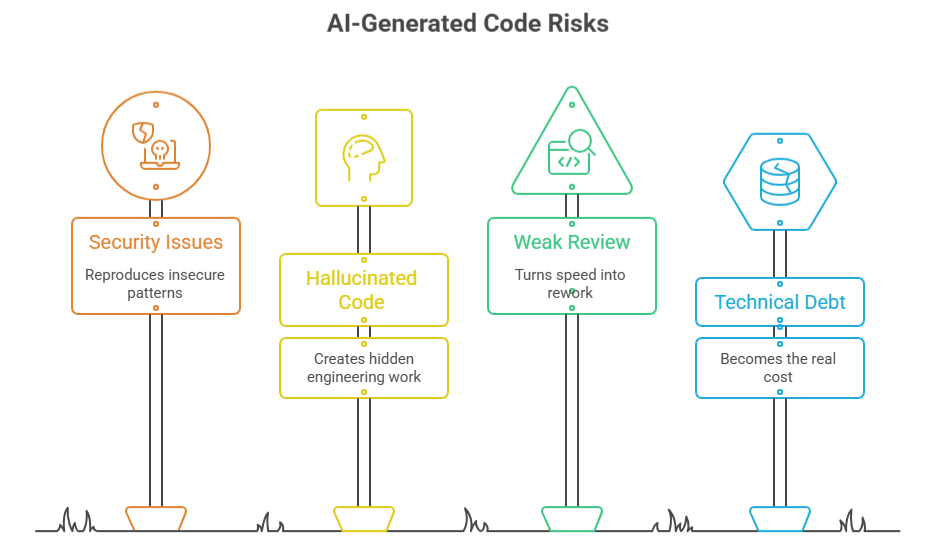
1. Security Issues Can Enter the Codebase Faster
AI coding tools can generate useful code quickly, but they can also reproduce insecure patterns. Veracode’s analysis found that 45% of AI-generated code samples contained security flaws, including issues mapped to the OWASP Top 10.
That means AI-generated code still needs secure coding review, dependency checks, and automated scanning before it reaches production.
2. Hallucinated Code Creates Hidden Engineering Work
AI can suggest libraries, functions, APIs, or implementation paths that look correct but do not actually exist or do not fit the system. A research paper on package hallucinations found that code-generating models can recommend non-existent software packages, creating dependency confusion and supply-chain security risks.
This is where teams lose time. The code may compile after quick fixes, but the deeper issue is trust. Every AI-generated dependency, API call, and security-sensitive function needs verification.
3. Weak Review Turns Speed Into Rework
AI can increase the volume of code moving through pull requests, but more code does not mean better delivery. If reviewers only check whether the code “looks right,” teams can miss edge cases, performance issues, authorization gaps, and maintainability problems.
This is where businesses need more than tool access. They need structured AI development services that combine AI-assisted coding with architecture review, QA planning, security checks, and clean delivery standards.
Example:
SaaS team using AI to accelerate feature development. The first sprint may look faster because AI helps generate API routes, validation logic, and UI components. But if the team skips test coverage and architecture review, the second sprint often slows down with bug fixing, inconsistent patterns, and refactoring. The early speed becomes hidden rework.
4. Technical Debt Becomes the Real Cost
AI-generated code can also increase technical debt when teams accept quick solutions without checking system fit. This includes duplicate logic, inconsistent naming, poor error handling, unnecessary dependencies, and code that solves the immediate ticket but weakens long-term maintainability.
How Should CTOs Measure AI’s Impact on Software Development?
CTOs should measure AI in software development by delivery outcomes, not tool activity. Prompt volume, generated code, token usage, or AI-written commits can show usage, but they do not prove business impact.
Better metrics are release speed, accepted code, defect rate, review time, production stability, security findings, and customer-facing feature delivery.
The Metric That Fools Teams
The easiest AI numbers to track are usually the weakest ones. A team may generate more code, write more prompts, or increase AI tool usage, but none of that proves the software is better. In fact, more generated code can increase review load, QA pressure, and technical debt if the team is not measuring what happens after the code is written.
DORA’s software delivery metrics give CTOs a better baseline: change lead time, deployment frequency, change failure rate, and failed deployment recovery time.
These measure whether software is moving faster and staying stable after release.
Better Metrics for AI-Assisted Development
| Weak AI Metric | Better Business Metric |
| AI-generated lines of code | Accepted, reviewed, production-ready code |
| Prompt volume | Cycle time reduction |
| Tool adoption rate | Defect rate after release |
| AI-written commits | Customer-facing features shipped |
| Token usage | Cost per accepted change |
| Developer activity | Delivery impact |
A stronger measurement model combines engineering and business KPIs. For engineering, track pull request review time, build success rate, test coverage, escaped defects, security findings, and rework.
For business, track feature release speed, modernization backlog reduction, customer-impacting incidents, and cost per shipped change.
Business Case: Measure the System, Not the Tool
A useful example comes from IKS Health’s engineering transformation with Google Cloud. The company increased deployment frequency by over 1,000%, reduced lead time for changes by 98%, cut change failure rate by 83%, improved recovery time by over 90%, and achieved 30% infrastructure cost savings.
The lesson for AI adoption is clear. AI should be measured the same way: did it help the team ship faster, recover quicker, reduce defects, lower cost, or improve stability?
AI success is not “how much AI the team used.” It is whether AI helped the business release better software with less friction. CTOs should track AI through delivery speed, production quality, security posture, review effort, and real product outcomes.
Which Software Development Workflows Benefit Most From AI?
AI is most useful in software development workflows where the task is structured, repetitive, and easy for engineers to verify. The strongest use cases are documentation, code explanation, test generation, scoped coding, code review support, bug investigation, and guided modernization.
In practical Gen AI development, the strongest use cases are not full feature ownership, but controlled support for documentation, code explanation, test generation, scoped coding, review preparation, and modernization planning.
Start With Workflows AI Handles Reliably
Sonar’s State of Code Developer Survey found that AI tools are rated most effective for writing documentation at 74%, explaining or understanding existing code at 66%, greenfield prototyping at 62%, and generating tests at 59%.
These are practical starting points because they improve developer workflow without giving AI full control over business-critical logic.
Use AI Where the Output Can Be Reviewed Quickly
AI is widely used for new code development, but the effectiveness gap matters. 90% of developers use AI to assist new code development, but only 55% rate it extremely or very effective. 72% use AI for refactoring or optimization, but only 43% rate it highly effective.
That is why AI works best for scoped tasks like API boilerplate, validation logic, UI components, test drafts, and documentation, not full feature ownership.
Code Review Is Becoming a Real AI Workflow
GitHub reported that Copilot code review usage grew 10x and now accounts for more than one in five code reviews on GitHub. That makes AI useful as a first-pass reviewer for pull requests, summaries, and obvious logic issues, while senior engineers still own architecture, security, and final approval.
Practical Use Case
A SaaS team modernizing an old customer portal should not start by asking AI to rewrite the whole platform. A safer workflow is to use AI to explain old modules, draft regression tests, document APIs, summarize pull requests, and scaffold small refactors. Engineers then validate each output before touching sensitive areas like billing, permissions, healthcare data, or pricing logic.
3 Business Case Studies of AI in Software Development
The best case studies show AI working inside controlled engineering workflows.
Palo Alto Networks: Building a Secure AI Coding Assistant for 2,000 Developers
Palo Alto Networks did not simply give developers access to a public AI coding tool. As a cybersecurity company, it needed stronger control over code privacy, infrastructure, and security. The company worked with AWS, Anthropic, and Sourcegraph to build a secure internal AI coding assistant for generating, optimizing, and troubleshooting code.
Within three months, Palo Alto Networks onboarded 2,000 developers and reported an average 25% increase in developer speed, with productivity gains reaching up to 40% in some cases.
The important part is the model: AI was deployed inside a secure, customized environment, not as unmanaged tool usage.
Lesson: AI works better when it is connected to the company’s codebase, security rules, developer workflows, and review process.
IBM watsonx Code Assistant: Saving Time on Code Explanation and Documentation
IBM’s internal testing of watsonx Code Assistant shows where AI can create practical engineering value without taking over full feature ownership. IBM reported projected 90% time savings on code explanation, 59% time reduction on documentation, and 38% time reduction in code generation and testing.
This is useful for businesses with large systems, legacy platforms, or complex internal tools. Developers often lose time understanding old modules, documenting unclear logic, and preparing test coverage.
Lesson: AI can reduce that discovery burden, especially when teams use it for explanation, documentation, and first-pass testing support.
Razer QA Companion-AI: Using AI to Support Software Testing
Razer’s QA Companion-AI shows another practical use case: AI-assisted quality assurance. The tool is designed to detect gameplay issues, generate test cases, create bug reports, and integrate with workflows like Jira.
Razer positions the system around up to 25% more bugs identified, 50% faster testing cycles, and 40% lower QA costs.
Although this example comes from game development, the lesson applies to broader software teams. QA is often where faster development creates pressure.
Lesson: AI can help by expanding test coverage, generating clearer bug reports, and reducing repetitive QA documentation. But it still works best as a tester’s assistant, not a replacement for human validation.
How Should Businesses Adopt AI in Software Development Without Increasing Risk?
Businesses should adopt AI in software development through a controlled engineering process, not open-ended tool usage.
The safest approach is to start with the right use cases, define coding rules, keep human review, add QA automation, and track delivery metrics before scaling AI across critical systems.
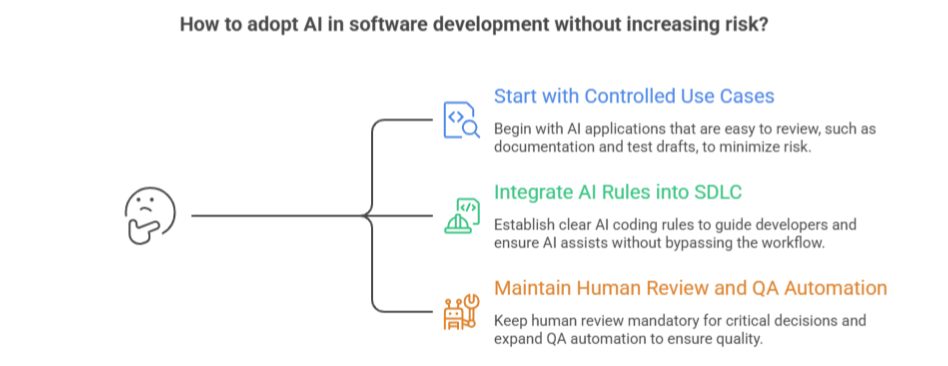
1. Start With Controlled Use Cases, Not Full Autonomy
AI should enter the software lifecycle where output is easy to review: documentation, test drafts, code explanation, API scaffolding, small refactors, and internal developer search. The risk rises when teams use AI for payment logic, healthcare workflows, permissions, pricing engines, or compliance-heavy systems without domain review.
Nearly 70% of CISOs, AppSec managers, and developers estimated that more than 40% of their organization’s code is AI-generated. That makes governance urgent because AI-generated code is already entering business systems at scale.
This is also where the custom vs off-the-shelf software decision matters. Custom systems give businesses more control over AI workflows, data rules, integrations, QA standards, and security checks, while off-the-shelf tools may limit how deeply AI can be governed.
2. Make AI Rules Part of the SDLC
Every business needs clear AI coding rules: what data developers can paste into AI tools, which tasks AI can support, what must be reviewed manually, and which code paths require senior approval.
Approx. 72% of organizations use AI for code generation and 67% use it for code documentation and review, which means AI is already touching multiple stages of the software development lifecycle.
The practical rule is simple: AI can assist the workflow, but it should not bypass the workflow.
3. Keep Human Review and QA Automation in the Loop
Human review should stay mandatory for architecture decisions, security-sensitive logic, data handling, and production releases. QA automation should also expand with AI adoption: unit tests, regression tests, security scans, dependency checks, and performance checks should run before AI-assisted changes move forward.
NIST’s AI Risk Management Framework is useful here because it frames AI risk around four functions: govern, map, measure, and manage. For software teams, that means policies, use-case mapping, measurable controls, and ongoing monitoring, not one-time approval.
A Practical Business Scenario
Imagine a SaaS company adding AI to speed up roadmap delivery. The safe path is not to let developers generate full features unchecked. A better rollout starts with AI-assisted documentation, test case creation, bug investigation, and small code changes. Once the team has review rules, QA coverage, and delivery metrics in place, AI can support more complex workflows.
For businesses comparing local, nearshore, or offshore software partners, the right development team should bring more than coding capacity.
Whether working with an offshore team or a software development company in Dallas, the priority should be the same: clear AI use cases, secure coding rules, QA automation, architecture review, and measurable delivery outcomes.
This is where Software Orca fits naturally. It helps businesses choose the right AI model, build secure workflows, add QA automation, and keep product engineering standards intact while adopting AI.
Conclusion
AI in software development is no longer a future trend. The statistics show strong adoption, real productivity gains, and growing business use across startups and enterprises. But the same data also points to a clear warning: faster coding does not automatically mean better software.
The companies that will benefit most from AI are the ones that use it with engineering discipline. That means choosing the right use cases, keeping human review in place, strengthening QA automation, checking security risks, and measuring delivery outcomes instead of tool activity.
For businesses, AI should not replace software development standards. It should make experienced teams faster, more precise, and better equipped to build reliable digital products.

FAQs
What percentage of developers use AI tools?
Stack Overflow found that 84% of developers use or plan to use AI tools, while 51% of professional developers use AI tools daily. Google’s research also reports 90% AI adoption among software development professionals. For businesses, this means AI is already part of engineering work, even if formal governance is still catching up.
Does AI improve software development productivity?
Yes, AI can improve software development productivity, especially in structured tasks like code generation, documentation, testing support, and refactoring. More than 80% of respondents believe AI increased their productivity, while developers completed a coding task 55.8% faster with AI assistance. Businesses should still measure release quality, defect rate, and delivery impact, not just code volume.
Is AI-generated code safe?
AI-generated code can be useful, but it should not be treated as production-ready without review. 45% of AI-generated code samples introduced OWASP Top 10 security vulnerabilities. That is why businesses need secure code review, automated testing, dependency checks, and human validation before shipping AI-assisted code.
How is AI changing software development for businesses?
AI is changing software development by speeding up coding, documentation, testing support, bug investigation, refactoring, and legacy modernization. It also helps teams search internal codebases and understand older systems faster. But the business impact depends on governance. Without QA, security review, architecture control, and delivery metrics, AI can increase code volume without improving software outcomes.
Should startups use AI in software development?
Yes, startups should use AI in software development, but with clear limits. AI can help small teams prototype faster, draft test cases, generate boilerplate, document features, and investigate bugs. The mistake is using AI to skip architecture, QA, security, or scalability planning. A fast MVP still needs a stable foundation if it is expected to become a production product.
What should CTOs track when using AI in software development?
CTOs should track AI through delivery outcomes, not tool usage. The right metrics include cycle time, accepted AI-generated code, defect rate, escaped bugs, pull request review time, security findings, release frequency, production stability, and customer-facing features shipped. Prompt volume, token usage, and generated lines of code do not prove real business value on their own.