Plenty of SaaS ideas look strong in a pitch deck, then get messy once customers start asking, “Can it do this?” “How much will it cost?” and “When can we use it?” If you are figuring out how to build a SaaS product in 2026, those questions need answers before the first sprint begins.
Statista projects worldwide SaaS revenue to reach $512.27 billion in 2026, which makes the opportunity exciting, but also crowded with products fighting for the same buyer attention.
The teams that move with confidence usually validate the pain early, keep the MVP focused, choose a practical SaaS app development approach, and work with custom software development services that can plan billing, security, integrations, and AI features before launch.
This guide gives you the roadmap to build with fewer assumptions and better product decisions from day one.
What Is SaaS App Development?
SaaS app development is the process of building cloud-based software that customers access through accounts, subscriptions, or usage-based plans. It includes the product interface, backend system, database, billing logic, user permissions, cloud hosting, security, analytics, and ongoing updates after launch.
The part many teams miss is that SaaS has to work as both a product and a recurring business model.
What Makes SaaS Different from a Normal Web App?
A SaaS application has to support recurring usage, multiple customers, and long-term product growth. The key differences usually include:
- Multi-user access
- Subscription or usage-based billing
- Cloud hosting
- User roles and permissions
- Continuous product updates
- Scalable backend architecture
- Data security and tenant separation
- Product analytics
- Customer onboarding and lifecycle management
Take Slack as a simple example. One company creates a workspace, invites employees, sets permissions, manages billing, and keeps its conversations separate from every other company. That same SaaS logic applies to B2B products in healthcare, logistics, real estate, finance, and education.
What Are Examples of SaaS Apps?
Common SaaS apps include Salesforce for CRM, Asana for project management, BambooHR for HR, QuickBooks Online for accounting, Shopify for ecommerce operations, and HubSpot for marketing automation.
The practical takeaway is simple: before building a SaaS product, define the workflow, customer account structure, user roles, billing model, and data rules. Those choices decide how well the product works once real customers start using it.
How to Build a SaaS Product from Idea to Launch?
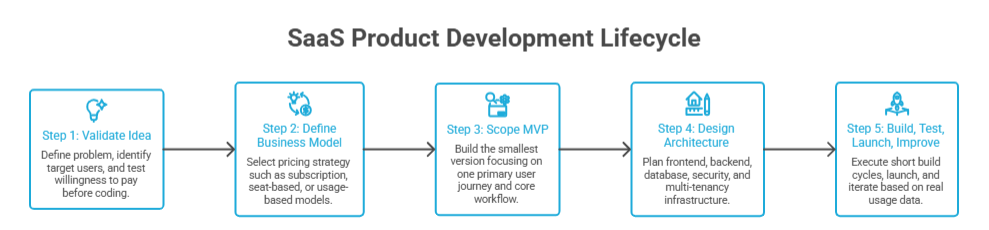
To build a SaaS product from idea to launch, move in this order: validate the problem, define the business model, scope the MVP, design the architecture, then build and improve from real usage. The sequence matters because SaaS mistakes compound.
A weak pricing model affects billing logic. Unclear user roles affect permissions. A vague workflow turns into expensive rework during development.
CB Insights analyzed 400+ startup post-mortems and lists lack of product-market fit among the top reasons startups fail, which is why validation has to come before serious SaaS development spend.
Step 1: Validate the SaaS Idea Before Writing Code
Start with the pain, not the feature list. Define the business problem, who feels it daily, who approves the budget, and who decides whether the product is worth adopting.
Before development starts, speak with potential customers, study competing SaaS products, and test willingness to pay. A landing page, clickable prototype, demo video, or concierge MVP can reveal whether people understand the value before the engineering team builds the full product.
Dropbox is the classic example here. Its early demo video helped grow the beta waiting list from about 5,000 to 75,000 users overnight, which gave the team stronger proof of demand before a polished product existed.
Step 2: Define the SaaS Business Model
The business model should be clear before the backend is planned. A B2B SaaS platform, B2C subscription app, vertical SaaS product, and horizontal SaaS tool each need different onboarding, pricing, support, permissions, and reporting.
Choose the model early:
- Subscription pricing
- Seat-based pricing
- Usage-based pricing
- Freemium
- Free trial
- Hybrid pricing
- Enterprise custom plans
For AI-heavy SaaS products, pricing needs extra care because usage can vary by tokens, API calls, compute time, agent actions, or document volume.
Metronome’s usage-based pricing report found that 85% of surveyed software companies had adopted usage-based pricing, and Stripe now supports LLM token billing models such as usage-based, fixed fee with included usage, credit packs, and hybrid plans.
Step 3: Choose the MVP Scope
A SaaS MVP should prove the core workflow, not cover every future use case. Pick one primary user journey and build the smallest version that helps that user complete the main job.
A focused MVP usually includes authentication, the core workflow, basic user roles, must-have admin controls, billing basics, essential reporting, and a feedback loop. Anything outside that should earn its place through customer demand, sales conversations, or usage data.
ProductLed’s benchmark study found that many PLG companies still fail to track key metrics consistently, with activation tracked only 34% of the time.
That is a useful warning: The MVP should include enough analytics to show whether users are reaching value, not just whether they are signing up.
Step 4: Design the SaaS Architecture
Architecture should match the product model. A SaaS platform needs a frontend, backend, database, cloud infrastructure, APIs, security layer, integrations, analytics, and a clear approach to multi-tenancy.
The practical questions are simple: Can each customer’s data stay separated? Can admins manage users? Can billing plans control access? Can the system support more accounts without breaking performance? Can future integrations connect without rebuilding the product?
These decisions are easier to make before development than after customers are already using the platform.
Step 5: Build, Test, Launch, and Improve
Once scope and architecture are clear, development should move through short build cycles with QA, DevOps, security checks, performance testing, and beta feedback. The first launch should prove whether real users can onboard, complete the workflow, understand the value, and return.
After launch, track activation, feature usage, retention, support issues, failed payments, performance, and churn signals. A SaaS product improves through release cycles, not one big launch. The teams that learn fastest from real usage usually make better product decisions than teams that try to perfect everything before launch.
Should You Build a SaaS MVP First or a Full SaaS Product?
Most teams should build a SaaS MVP first when the market, buyer, pricing, or feature demand is still uncertain. A fuller SaaS product makes sense when the workflow is already proven, customers are waiting, and the first version must meet enterprise-level requirements from day one.
| Decision Area | SaaS MVP | Full SaaS Product |
| Best for | Testing demand | Serving validated demand |
| Budget | Controlled | Higher |
| Timeline | Faster launch | Longer build cycle |
| Risk | Lower upfront risk | Higher upfront commitment |
| Feature depth | Core workflow only | Broader workflows and edge cases |
| Best proof | User feedback, pilots, early revenue | Customer rollout, compliance, scale |
When a SaaS MVP Is the Right Choice
A SaaS MVP is the right choice when the idea still needs proof. That usually applies to early-stage startups, founders working with limited budgets, teams entering an unvalidated market, or products where feature demand is still based on assumptions.
The MVP should answer one question: will the target user care enough to use this product repeatedly, and will the buyer see enough value to pay for it?
Dropbox is a useful case study. Before building a polished product for the wider market, the team used a simple demo video to explain the workflow and measure demand. The beta waiting list reportedly grew from about 5,000 to 75,000 users overnight, giving the team strong validation before scaling the product experience.
When a Fuller SaaS Product Makes Sense
A fuller SaaS version makes sense when the business already has evidence. This could be an existing customer base, a validated internal workflow, signed pilot customers, a proven revenue model, or enterprise buyers with strict requirements.
For example, a healthcare SaaS product may need stronger access controls, audit logs, compliance planning, and secure data handling from the first release. A logistics SaaS product may need real-time tracking, third-party integrations, customer-specific permissions, and reporting because the product cannot work without them.
The same applies to AI-heavy SaaS products. If usage is tied to tokens, API calls, documents, or compute time, pricing and billing logic should be planned early. Stripe now supports advanced usage-based and hybrid billing models for SaaS and AI businesses, including token-based pricing, credits, subscriptions with overages, and metered usage.
What Not to Put in the First SaaS Version
The first SaaS version should stay focused on the workflow that proves value. Avoid adding:
- Too many dashboards before you know which metrics users actually check
- Advanced automation before you have usage data
- Complex AI features without a clear workflow or cost model
- Mobile apps before the main product behavior is validated
- Over-customized admin panels for every possible customer type
- Enterprise-grade reporting before product-market fit
- Deep integrations that only one early customer requested
What Features Are Required When Building SaaS Applications?
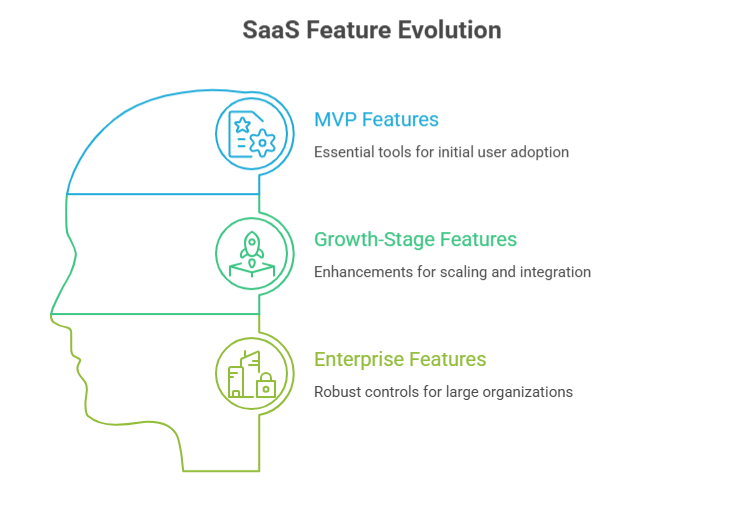
A growth-stage SaaS product needs automation, integrations, and reporting. An enterprise SaaS product needs stronger identity, compliance, governance, and reliability controls.
This matters because feature decisions affect architecture. If billing, permissions, tenant data, and analytics are added too late, the SaaS application becomes harder to scale and more expensive to fix.
Core SaaS MVP Features
A SaaS MVP should help one user group complete one important workflow with enough control, visibility, and security to test real adoption.
| Required SaaS MVP Feature | Why It Matters |
| User registration and login | Gives users secure access to the product. |
| Role-based access | Controls what admins, users, and managers can see or change. |
| User dashboard | Gives users a clear place to manage activity, data, and next steps. |
| Core product workflow | Delivers the main value users came for. |
| Admin panel | Helps the product owner manage users, accounts, content, and settings. |
| Subscription billing | Supports paid access, plan changes, renewals, and failed payment handling. |
| Notifications | Keeps users updated on important actions, approvals, reminders, or changes. |
| Basic analytics | Shows signups, activation, usage, and feature adoption. |
| Support/contact flow | Gives users a way to report issues or ask for help. |
| Security controls | Protects accounts, data, sessions, and sensitive actions. |
A practical example is a B2B project management SaaS MVP. The first version does not need advanced automation or complex forecasting. It needs account creation, team invites, project boards, task ownership, notifications, billing, admin controls, and basic usage tracking. If users do not complete projects inside the product, advanced features will not fix the core adoption problem.
Advanced SaaS Features for Growth-Stage Products
Growth-stage SaaS products need features that support larger teams, more data, and more complex workflows. Important growth-stage features include:
- Multi-tenant architecture
- API access
- Third-party integrations
- Audit logs
- Advanced reporting
- Team management
- Workflow automation
- AI assistant or recommendations
- Data export
- Customer success tools
Okta’s Businesses at Work report found that the average company now uses 101 apps, which explains why API access and third-party integrations matter in modern SaaS application development.
Buyers rarely want another isolated tool. They want software that connects with CRM, billing, support, analytics, communication, and data systems already inside the business.
A real example is HubSpot. Its value grows because teams can connect CRM, marketing, sales, support, reporting, automation, and external apps around one customer record.
Enterprise SaaS Product Features
Enterprise SaaS features are about control, trust, and operational fit. Enterprise-ready SaaS features usually include:
- Single sign-on
- SOC 2 readiness
- HIPAA or GDPR considerations where relevant
- Custom roles
- SLA monitoring
- Data governance
- Audit trails
- Permission hierarchy
- Dedicated environments
These features are not cosmetic. They often decide whether an enterprise buyer can approve the product. Cloud Security Alliance’s SaaS security report found that 58% of organizations struggle to enforce privileges, while 56% are concerned about overprivileged API access. That makes identity, permissions, audit trails, and API governance serious product requirements, especially for enterprise SaaS development.
Slack Enterprise Grid is a useful example of this shift. Small teams may only need channels, messages, and basic admin settings. Enterprise customers need organization-wide controls, workspace governance, compliance support, SSO, retention rules, and audit visibility. The same pattern applies when building SaaS applications for healthcare, fintech, logistics, real estate, and education.
What Is the Best Tech Stack to Build a SaaS MVP in 2026?
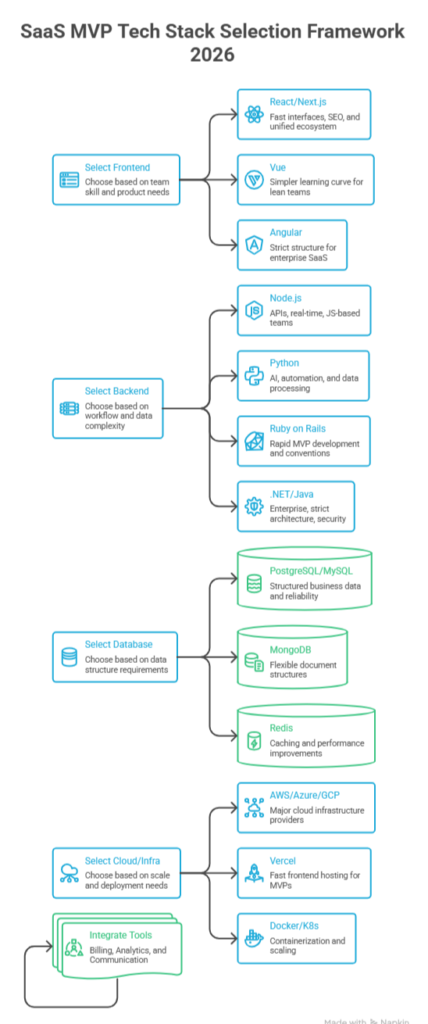
The best tech stack to build a SaaS MVP in 2026 is the one your team can ship, maintain, secure, and scale without slowing down the first launch.
Frontend Options
For most SaaS application development projects, React and Next.js are strong frontend choices because they support fast interfaces, reusable components, dashboards, account pages, and SEO-friendly public pages. Next.js works especially well when the SaaS product needs landing pages, documentation, pricing pages, and an app interface in one ecosystem.
Vue can be a good fit for lean teams that want a simpler learning curve and clean frontend development. Angular usually makes more sense for enterprise SaaS products where teams need stricter structure, long-term maintainability, and large internal development standards.
Backend Options
The backend should match the product’s workflow, data complexity, and team strength.
Node.js is a common choice for SaaS MVPs because it works well for APIs, dashboards, real-time features, and JavaScript-based teams. Python is useful when the product depends on AI, automation, data processing, or machine learning. Ruby on Rails can still work well for fast MVP development when speed and convention matter more than heavy customization.
For enterprise SaaS development, .NET and Java/Spring Boot are strong choices when the product needs strict architecture, complex business rules, integrations, and mature security patterns.
Stack Overflow’s data shows Node.js at 49.1% among professional developers, with ASP.NET Core, Angular, Vue.js, Spring Boot, FastAPI, Django, and Ruby on Rails also represented across professional web development stacks.
Database Options
For most SaaS MVPs, PostgreSQL is a safe starting point because it handles structured business data well: users, accounts, subscriptions, roles, invoices, workflows, and reporting. MySQL is also reliable for many traditional SaaS applications.
MongoDB can work when the product has flexible document structures, content-heavy workflows, or fast-changing data models. Redis is usually added for caching, sessions, queues, or performance improvements, not as the main database.
Cloud and Infrastructure Options
AWS, Azure, and Google Cloud are all valid choices for building SaaS applications. AWS is widely used, Azure is often preferred by Microsoft-heavy or enterprise environments, and Google Cloud can be strong for data, AI, and analytics-focused products.
For lean MVPs, Vercel or similar frontend hosting can help teams ship faster, especially with Next.js. Docker is useful for consistent development and deployment environments. Kubernetes should wait until the product has enough scale, complexity, or infrastructure needs to justify it.
Billing, Analytics, and Communication Tools
A SaaS MVP should not treat billing, analytics, and communication as afterthoughts. Common tools include:
- Stripe or similar billing platforms for subscriptions, trials, invoices, and usage-based plans
- Product analytics tools for activation, retention, feature usage, and funnels
- Email services for onboarding, verification, billing notices, and lifecycle messages
- In-app notifications for workflow updates and user actions
- CRM integrations for sales, support, and customer success visibility
How to Choose the Right SaaS Stack
The right SaaS development stack depends on the product, not the trend. Use these decision criteria before choosing the stack:
- Team expertise: Choose tools your team can build and maintain confidently.
- Product complexity: Match the stack to workflows, roles, integrations, and reporting needs.
- Compliance needs: Plan security, auditability, and data handling early for regulated industries.
- Integration needs: Choose technologies that support clean APIs and third-party connections.
- Expected traffic: Avoid enterprise infrastructure before the MVP proves demand.
- AI requirements: Plan model usage, data pipelines, latency, and billing controls.
- Long-term maintenance: Pick tools with strong communities, documentation, and hiring availability.
How Much Does It Cost to Build a SaaS Application in 2026?
A custom SaaS application in 2026 usually costs $40,000 to $300,000+, depending on product scope, user roles, backend complexity, integrations, compliance, and AI features. A lean validation prototype can cost much less, while an enterprise-grade SaaS platform with multi-tenancy, security, custom reporting, and integrations can move beyond $500,000.
SaaS Development Cost by Product Stage
| SaaS Stage | Typical Scope | Estimated Cost Range |
| Prototype | Clickable design, no-code demo, landing page, or validation flow | $5,000–$20,000 |
| SaaS MVP | Core workflow, login, user roles, billing, admin panel, basic analytics | $40,000–$120,000 |
| V1 Product | Customer-ready SaaS with polished UX, integrations, reporting, notifications, QA, and support flow | $120,000–$300,000 |
| Enterprise SaaS | Multi-tenancy, SSO, audit logs, compliance, advanced security, dedicated environments, complex integrations | $300,000–$750,000+ |
How Should You Integrate AI or LLM Features into a SaaS Product?
AI should be integrated into a SaaS product where it improves a specific workflow, reduces manual effort, or helps users make a better decision. AI in software development becomes valuable when it connects model capability with a measurable product outcome, such as faster support replies, cleaner reporting, smarter recommendations, or lower manual admin work.
McKinsey’s State of AI report found that 71% of organizations regularly use generative AI in at least one business function, which shows adoption is already mainstream.
The harder part is turning AI into product value, not just adding an AI button to the dashboard.
Start with a Business Use Case, Not an AI Feature
The best AI SaaS features usually begin with a repeated user problem. A sales manager does not need “AI.” They need call notes summarized, next steps suggested, risks flagged, and CRM fields updated without extra admin work.
Strong AI use cases in SaaS application development include:
- Summarizing customer data
- Automating support replies
- Recommending next actions
- Extracting insights from documents
- Generating reports
- Predicting churn or risk
Salesforce is a good real example.
Einstein Copilot connects AI assistance with CRM data so users can get customer insights and recommendations inside the workflow, while Salesforce emphasizes privacy, data governance, and avoiding the need for costly model training.
Common AI Features in SaaS Applications
Common AI features in SaaS products include AI chatbots, AI search, document intelligence, recommendation engines, workflow automation, smart alerts, and predictive analytics.
The useful pattern is simple: AI should reduce the number of steps between the user’s question and the next action. In a healthcare SaaS product, that might mean summarizing patient intake notes.
In a logistics SaaS product, it could flag delayed shipments. In a real estate SaaS platform, it may extract property details from documents or recommend leads most likely to convert.
AI SaaS Risks to Plan For
AI features introduce product, security, and cost risks that normal SaaS features do not always carry. Teams need to plan for data privacy, hallucinations, prompt injection, output validation, model cost, user permissions, logging, and monitoring before launch.
Major risks include prompt injection, insecure output handling, model denial of service, supply-chain vulnerabilities, and sensitive information disclosure.
For example,
An AI assistant inside a finance or healthcare SaaS platform should not freely answer from all company data. It needs permission-aware retrieval, safe output rules, audit logs, and clear limits on what it can summarize, recommend, or trigger. Without those controls, an AI feature can expose sensitive data or create compliance risk.
When Not to Add AI in the MVP
AI should stay out of the SaaS MVP when there is no clear user value, no reliable data, high inference cost, weak security controls, or the AI output creates more review work than it saves.
This happens often. A founder adds an AI chatbot before the product has enough documentation, clean data, or clear workflows. Users ask questions, the chatbot gives shallow or risky answers, and the team spends more time correcting responses than serving customers.
A better MVP approach is to launch the core SaaS workflow first, then add AI where usage data shows friction. If users repeatedly search, summarize, classify, compare, or write the same thing, AI may belong there. If the feature only sounds impressive in a demo, it should wait.
Why is Software Orca the Right SaaS Development Partner?
Software Orca helps founders, product teams, and growing businesses turn SaaS ideas into build-ready products with clear scope, scalable architecture, clean UX, secure development, and post-launch support.
A serious build may include web dashboards, mobile access, admin panels, customer accounts, subscription workflows, third-party integrations, AI readiness, QA, DevOps, and ongoing product improvements.
It is providing software and mobile app development services in Dallas, Houston, and many other regions in US and beyond. It brings product thinking and engineering execution together, so your SaaS platform is planned around real users, practical features, billing, integrations, AI readiness, and long-term growth from day one.
SaaS Product Development Checklist Before You Start Building
Before you build a SaaS product, confirm the business case, product scope, technical foundation, and launch plan. This checklist helps you avoid unclear requirements, weak MVP planning, missed security needs, and expensive rework during SaaS app development.
Business Checklist
- Clear target customer is defined
- Pain point is validated through research, interviews, or early demand
- Buyer persona is documented
- User, buyer, and decision-maker are clearly separated
- Competitor research is completed
- Pricing hypothesis is defined
- MVP success metric is selected
- Go-to-market plan is outlined
Product Checklist
Core user journey is mapped
MVP feature list is finalized
User roles are defined
Admin requirements are clear
Wireframes or clickable prototype are prepared
Product roadmap is prioritized
Feedback loop is planned for early users
Technical Checklist
Tech stack is selected
Cloud hosting plan is decided
Database structure is mapped
API requirements are documented
Security requirements are defined
Billing integration is planned
Analytics setup is included
QA plan is prepared
DevOps process is defined
Launch Checklist
Beta user group is selected
Onboarding flow is ready
Support process is planned
Monitoring tools are set up
Bug reporting process is clear
Product documentation is prepared
Post-launch iteration plan is ready
A practical way to use this checklist is to mark every item as ready, unclear, or not needed yet. Anything marked unclear should be resolved before development begins, especially pricing, user roles, billing, security, analytics, and the core workflow.
Wrapping it Up
Building a SaaS product in 2026 requires more than a good idea and a development team. The product has to solve a real workflow problem, support the right users, fit a clear pricing model, and scale without creating technical debt too early.
The smartest SaaS teams validate before they build, keep the MVP focused, choose a stack they can maintain, and plan billing, security, analytics, and integrations from the start. AI can add value, but only when it improves a real user action or decision inside the product.
If you are planning SaaS app development, start with the fundamentals: define the buyer, map the workflow, scope the MVP, estimate the cost honestly, and build around measurable product outcomes. That approach gives your SaaS application a stronger chance to launch, learn, and grow with real customers.
FAQs
How do I build a SaaS product from idea to launch?
To build a SaaS product from idea to launch, start by validating the problem, identifying the buyer, defining the SaaS business model, scoping the MVP, choosing the right architecture, and launching with real users. The goal is to prove the workflow before investing in advanced features.
A strong SaaS development process usually moves through five stages: validation, MVP planning, architecture design, development and testing, then post-launch improvement based on usage data.
How much does it cost to build a SaaS application in 2026?
A custom SaaS application in 2026 usually costs $40,000 to $300,000+, depending on scope, user roles, integrations, backend complexity, compliance, and AI features. A prototype may cost around $5,000 to $20,000, while an enterprise SaaS platform can exceed $500,000.
The biggest cost drivers are multi-tenancy, subscription billing, security controls, third-party integrations, AI usage, data migration, QA, DevOps, and post-launch support.
What features are required when building SaaS applications?
The core features required for a SaaS MVP include user registration, login, role-based access, a user dashboard, the main product workflow, an admin panel, subscription billing, notifications, basic analytics, support flow, and security controls.
Growth-stage SaaS products usually need API access, integrations, audit logs, advanced reporting, team management, workflow automation, data export, and customer success tools.
Should I build a SaaS MVP first or a full SaaS product?
Most teams should build a SaaS MVP first if the market, buyer, pricing model, or feature demand is still uncertain. An MVP helps validate whether users care enough to use the product repeatedly and whether buyers see enough value to pay.
A full SaaS product makes more sense when the workflow is already proven, customers are ready, and the first release must support enterprise requirements such as compliance, integrations, advanced permissions, or audit trails.
What is SaaS in app development?
In app development, SaaS means building cloud-based software that users access online through accounts, subscriptions, or usage-based plans. The product is hosted, maintained, updated, and secured by the SaaS provider instead of being installed by each customer.
SaaS apps often include user roles, billing, cloud infrastructure, analytics, security, admin controls, customer onboarding, and continuous updates after launch.
What is the best tech stack for SaaS development?
The best SaaS tech stack depends on product complexity, team expertise, compliance needs, integrations, AI requirements, expected traffic, and long-term maintenance. Common SaaS MVP stacks include React or Next.js for the frontend, Node.js or Python for the backend, PostgreSQL for the database, and AWS, Azure, Google Cloud, or Vercel for hosting.
Enterprise SaaS products may use .NET, Java/Spring Boot, stricter cloud architecture, advanced security controls, and more structured DevOps processes.
Is SaaS being replaced by AI?
SaaS is not being replaced by AI. AI is changing how SaaS products work by adding automation, recommendations, AI search, document intelligence, predictive insights, and workflow assistance.
The strongest AI SaaS features are tied to real user actions. They help users summarize information, reduce manual work, find answers faster, generate reports, or make better decisions inside the product.
Is ChatGPT considered SaaS?
ChatGPT can be considered a SaaS-style product because users access it online through accounts and subscription plans. However, it is more specifically an AI application delivered through a cloud-based software model.
For SaaS founders, ChatGPT is also a useful example of how AI products need usage management, pricing strategy, security controls, user experience design, and continuous product improvement.