AI is becoming a core part of how software gets built. McKinsey predicts that 88% of organizations now use AI in at least one business function, up from 78% just a year earlier. AI in app development refers to using artificial intelligence to build smarter mobile and web applications or to accelerate development through automation, intelligent features, and generative AI tools.
Yet many teams struggle to turn AI ambitions into successful products. They invest in trendy features without validating user needs, underestimate AI app development cost, or choose platforms that cannot support growth.
The teams that succeed take a different approach: they start with a clear use case, select the right AI app development solutions, and build around measurable outcomes.
Many also rely on experienced AI development services providers to accelerate implementation, avoid costly mistakes, and bring specialized expertise that may not exist in-house.
This guide will help you make those decisions with confidence.
AI in App Development in 2026 at a Glance
- AI in app development uses artificial intelligence to build smarter mobile and web applications or accelerate software development through automation, personalization, and generative AI.
- Common use cases include personalized recommendations, AI chatbots, code generation, predictive analytics, and intelligent search.
- Popular AI tools for app development include GitHub Copilot, Cursor, Claude Code, Vercel v0, Bolt.new, and APIs from OpenAI, Gemini, and Anthropic.
- AI app development platforms range from no-code tools like Bubble AI and FlutterFlow AI to enterprise platforms such as Mendix and OutSystems.
- Building an AI-powered app typically involves five steps: defining the use case, choosing the AI model, designing the architecture, building and testing the product, and continuously monitoring performance.
- AI app development cost usually ranges from $15,000 to $300,000+, depending on the project’s complexity, AI models, integrations, infrastructure, and long-term operational requirements.
- Successful AI apps focus on solving a specific problem, use AI where it adds measurable value, and continuously improve based on user data and feedback.
What is AI in App Development?
AI in app development means using artificial intelligence to make applications more capable or to make the development process itself more efficient. Depending on the goal, AI can sit inside the product as a feature, such as a chatbot, recommendation engine, or image recognition system, or behind the scenes.
This distinction matters because many teams still approach AI as a feature hunt rather than a business decision. The first question should not be, “How do we add AI?” It should be, “Where can AI remove friction, improve decisions, or create a better user experience?” The answer shapes everything that follows, from architecture choices to long-term operating costs.
Modern AI app development typically combines several technologies:
- Large language models (LLMs) for conversational interfaces, content generation, and search.
- Machine learning models for predictions, recommendations, and pattern recognition.
- Computer vision systems for image and video analysis.
- Speech AI for voice assistants and transcription.
- AI coding assistants that help engineering teams write, review, and test code faster.
How Is AI Used in App Development?
AI is used in app development in four major ways: personalizing user experiences, automating customer interactions, accelerating software engineering, and embedding intelligent capabilities into mobile applications. Each use case addresses a different business objective, but they share a common goal; help users achieve more with less effort.
AI for Personalized User Experiences
Personalization is one of the earliest and most successful applications of AI. Modern apps analyze browsing behavior, purchase history, engagement patterns, and contextual signals to recommend products, adapt content, and predict user preferences.
The business impact is substantial. Netflix estimates that more than 80% of the content watched on its platform comes from recommendations powered by machine learning.
Users increasingly expect apps to understand their needs and reduce decision fatigue.
AI-Powered Chatbots and Virtual Assistants
AI-powered chatbots have evolved from answering simple FAQs to handling customer support, guiding users through workflows, and assisting employees internally. Large language models have made conversational interfaces more flexible, allowing businesses to offer faster and more natural interactions.
The results are already visible at scale. Klarna reported that its AI assistant handled around two-thirds of customer service chats while maintaining customer satisfaction levels comparable to human agents.
Companies investing in conversational AI are often looking beyond cost savings. They want to deliver consistent support that scales with growth.
AI for Code Generation and Development Automation
AI is influencing how applications are built as much as how they behave. Development teams now use AI for app development to generate code, create tests, identify bugs, review pull requests, and draft technical documentation.
GitHub found that developers using GitHub Copilot completed coding tasks up to 55% faster than those without AI assistance. Productivity gains like these are pushing engineering leaders to rethink workflows, team structures, and delivery timelines.
The strongest teams use AI to reduce repetitive work while keeping architecture, security, and product decisions firmly in human hands.
AI in Mobile App Development
AI in mobile app development is increasingly focused on creating smarter, more responsive experiences. Voice assistants, image recognition, predictive text, and intelligent notifications are now common features across consumer and enterprise applications.
Another important shift is happening behind the scenes. More AI workloads are moving directly onto smartphones and edge devices, reducing latency and improving privacy.
Apple’s recent investment in on-device AI reflects growing demand for applications that are intelligent, fast, and capable of processing sensitive data locally.
| AI Capability | App Example | Business Benefit |
| Recommendation engine | Netflix | Personalized experiences and higher engagement |
| AI chatbot | Banking apps | Faster customer support and lower service costs |
| Computer vision | Retail apps | Visual search and quicker product discovery |
| Predictive analytics | Fitness apps | Improved retention and more relevant user journeys |
What Are the Best AI Tools for App Development?
The best AI tools for app development fall into three categories: AI coding assistants that improve engineering productivity, AI app builders that generate web and mobile applications, and AI APIs and frameworks that power intelligent features inside products.
The right choice depends on whether you’re optimizing for speed of development, product scalability, or AI capability depth.
AI Coding Assistants
AI coding assistants have become a standard part of modern development workflows. They help developers write code, explain unfamiliar libraries, generate tests, and troubleshoot issues directly inside their IDEs.
- GitHub Copilot: Best for teams already working within the GitHub ecosystem. It offers strong code completion and broad language support. Pricing starts at around $10 per user/month, though generated code still requires careful review for security and maintainability.
- Cursor: Popular among startups and product teams building AI-powered products. Its strength lies in understanding entire codebases and enabling natural-language edits. Pricing starts at $20/month, but heavy reliance on AI suggestions can sometimes reduce visibility into implementation details.
- Claude Code: Suited for large codebases and complex reasoning tasks. Developers often use it for refactoring, architecture discussions, and debugging. Pricing varies based on API usage, making costs less predictable for larger teams.
- Gemini Code Assist: Strong option for organizations invested in the Google ecosystem. It integrates with Google Cloud and supports enterprise workflows, though some advanced features are still evolving compared to more established coding assistants.
Choosing among these tools is rarely about finding the most capable model. It’s about finding the workflow that helps your team ship reliable software faster.
AI Tools for Web App Development
A new category of AI tools is reducing the time it takes to move from idea to working product. These platforms generate interfaces, write backend logic, and handle deployment with minimal manual coding in web app development.
- Vercel v0: Focuses on frontend generation. Developers describe interfaces in plain language and receive production-ready components built with React and modern UI frameworks.
- Bolt.new: Combines frontend, backend, and deployment in a single environment. It’s well suited for rapid prototyping and MVP development, particularly for startups testing new ideas.
- Lovable: Targets founders and non-technical teams who want to build applications quickly. It excels at turning product requirements into working interfaces, though customization options are more limited than traditional development.
- Replit: Offers a broader development environment with AI-assisted coding, hosting, and deployment support. Its collaborative features make it attractive for small teams building and shipping applications from a single workspace.
These platforms are changing expectations around development speed. A prototype that once required weeks can now be assembled in days or even hours. The tradeoff is flexibility.
AI APIs and Frameworks
Most AI app development projects rely on APIs and frameworks rather than training models from scratch. These tools provide access to language models, orchestration layers, and retrieval systems that power modern AI applications.
- OpenAI APIs: Widely used for chatbots, content generation, search, and AI agents. They offer powerful models and extensive documentation, making them a common starting point for AI-powered apps.
- Gemini API: Provides access to Google’s multimodal models and integrates naturally with the Google Cloud ecosystem. It’s particularly useful for applications combining text, images, and structured data.
- Anthropic API: Gaining traction among enterprises that prioritize safety, long-context reasoning, and reliable outputs. Many teams use Claude models for customer-facing assistants and internal knowledge systems.
- LangChain: Helps developers orchestrate prompts, tools, memory, and workflows. It’s valuable for building AI agents but can introduce additional complexity for smaller projects.
- LlamaIndex: Specializes in retrieval-augmented generation (RAG). Teams use it to connect large language models with private documents, databases, and enterprise knowledge sources.
For most businesses, the question isn’t which AI API or framework is objectively best. The better question is which combination aligns with your product requirements, data strategy, and long-term operating costs.
| Tool | Best For | Pricing | Limitations |
| GitHub Copilot | Code completion and developer productivity | From $10/user/month | Requires code review and human oversight |
| Cursor | AI-assisted coding and codebase understanding | From $20/month | Heavy AI use can obscure implementation details |
| Vercel v0 | Frontend generation | Usage-based | Limited backend capabilities |
| Bolt.new | Full-stack prototyping | Subscription-based | Less flexibility for complex architectures |
| OpenAI APIs | Chatbots, agents, and generative AI apps | Usage-based | Ongoing inference costs |
| LangChain | AI workflows and agents | Open-source | Steeper learning curve |
What Are the Best AI App Development Platforms?
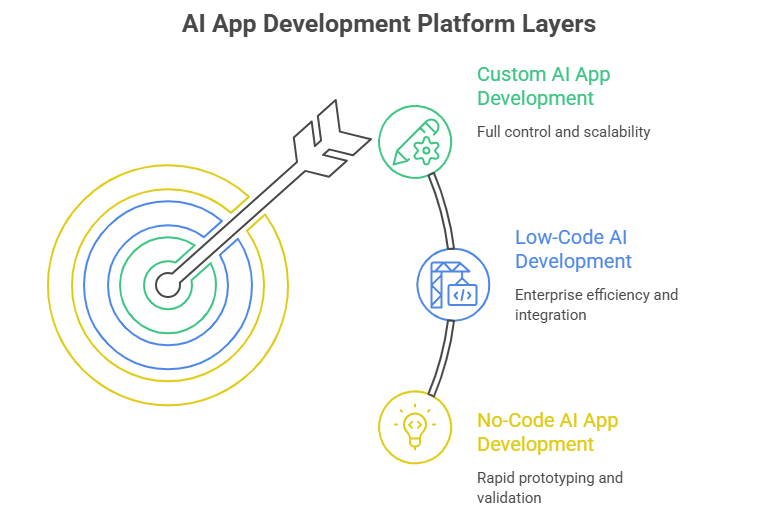
AI app development platforms fall into three practical layers: no-code platforms for speed, low-code platforms for enterprise efficiency, and custom development approaches for full control. The right choice depends less on tooling preference and more on how much flexibility, ownership, and scalability your product actually needs.
The real decision is trade-off-driven: faster launch versus long-term architectural control.
No-Code AI App Development Platforms
No-code AI platforms are designed for rapid product validation. They allow teams to build functional applications without deep engineering resources, making them useful for early-stage testing and internal tools.
- Bubble AI — Strong for building full web applications with logic, workflows, and database structures without writing code. Best suited for startups validating product-market fit.
- FlutterFlow AI — Focused on mobile and cross-platform apps using a visual builder with AI-assisted UI generation. Works well when teams want both speed and native-like app performance.
- Softr — Ideal for turning Airtable or structured data into simple web applications and client portals. Limited in complexity but effective for fast deployment.
Best for:
- MVP development
- Startups testing ideas quickly
- Non-technical teams building internal tools or lightweight apps
The limitation is scalability. As product complexity grows, most teams eventually hit constraints in customization, performance tuning, and backend flexibility.
Low-Code AI Development Platforms
Low-code platforms sit between rapid prototyping and full engineering control. They are widely used in enterprise environments where speed matters, but governance and scalability cannot be compromised.
- Mendix — Enterprise-grade low-code platform designed for complex business applications. Strong workflow automation and integration capabilities with existing systems.
- OutSystems — Known for performance optimization and scalability in enterprise app environments. Often used for large internal systems and digital transformation projects.
Best for:
- Enterprise applications
- Internal business tools
- Process-heavy workflows requiring system integrations
These platforms reduce engineering load but still require technical oversight. They are most effective when IT and business teams collaborate closely on architecture decisions.
Custom AI App Development Solutions
Custom AI app development is the most flexible and scalable approach. It involves building applications from the ground up using AI APIs, frameworks, and dedicated engineering teams.
This typically includes:
- Designing custom system architecture
- Integrating AI models via APIs (OpenAI, Gemini, Anthropic)
- Building proprietary workflows and data pipelines
- Fine-tuning models for domain-specific use cases
- Maintaining dedicated engineering and AI teams
This approach gives full control over performance, data handling, and product differentiation, but it requires higher investment and longer development cycles.
Best for:
- Complex, high-scale applications
- Regulated industries such as finance, healthcare, or logistics
- Products built around proprietary AI capabilities or data advantage
When Should You Choose Custom AI App Development?
Custom AI development is justified when AI is a core product capability. CTOs typically move in this direction when business constraints exceed what no-code or low-code platforms can support.
✓ Complex workflows that off-the-shelf tools cannot model.
✓ Proprietary or sensitive data that requires full control.
✓ Strict security, compliance, or regulatory requirements.
✓ Need for long-term scalability and performance optimization.
✓ Industry-specific logic that cannot be generalized.
How Do You Build an AI-Powered Mobile or Web App?
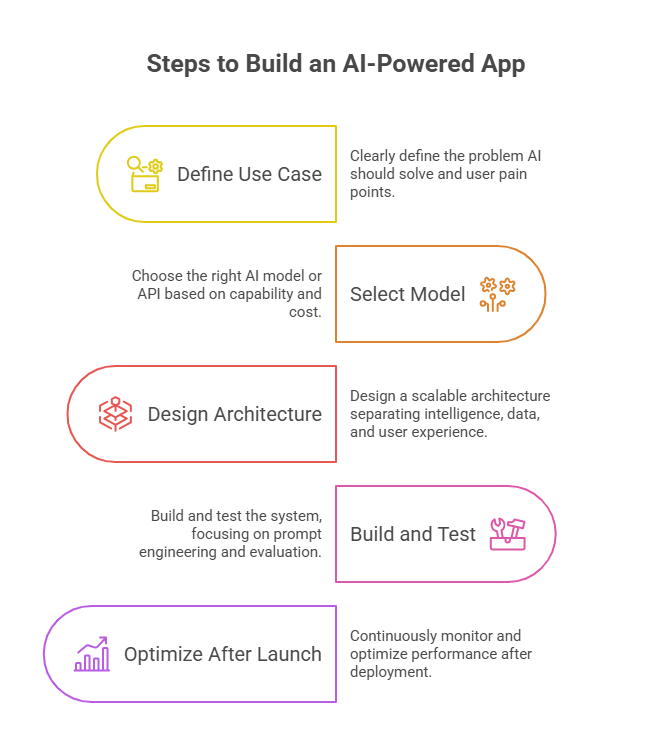
You build an AI-powered mobile or web app in five steps: define a focused AI use case, select the right model or API, design a scalable architecture, build and test the system, and continuously monitor performance in production.
Each step directly impacts cost, scalability, and product success, especially when AI is part of the core user experience. This is why choosing an experienced mobile app development company with AI expertise can significantly reduce implementation risks and accelerate time to market.
Step 1: Define the AI Use Case
Every successful AI app starts with a clearly scoped problem rather than a technology choice.
Focus on:
- Problem to solve: What task should AI improve or automate?
- User pain points: Where do users struggle, repeat actions, or drop off?
- Success metrics: What defines impact, like conversion, retention, cost reduction, or time saved?
Most failed AI products skip this step and jump directly into model selection, which leads to features that don’t align with business outcomes.
Step 2: Select the Right AI Model or API
Once the use case is clear, choose the model based on capability, cost, and deployment needs.
Common options include:
- GPT models: Strong for reasoning, chat interfaces, and general-purpose generation.
- Gemini models: Useful for multimodal apps combining text, image, and structured data.
- Claude models: Preferred for long-context reasoning and enterprise-grade assistants.
- Open-source models: Best when cost control, privacy, or self-hosting is required.
Most teams start with APIs to validate quickly, then optimize model strategy as usage scales.
Step 3: Design the Architecture
AI applications require a layered system where intelligence, data, and user experience are separated.
Core components:
- Frontend: Interface where users interact with AI features.
- Backend: Business logic, authentication, and request handling.
- AI layer: Model integration, prompt workflows, or agent orchestration.
- Data pipelines: Storage, retrieval, and processing of structured or unstructured data.
Architecture decisions here directly affect latency, cost per request, and system scalability.
Step 4: Build, Test, and Monitor
AI systems are probabilistic, which means testing must go beyond traditional QA.
Key practices:
- Prompt engineering: Structuring inputs for consistency and accuracy.
- Evaluation: Testing outputs using real-world user scenarios.
- Guardrails: Preventing unsafe, irrelevant, or incorrect outputs.
- Monitoring: Tracking latency, cost per request, error rates, and user satisfaction.
Without continuous evaluation, AI systems degrade in quality as user behavior evolves.
Step 5: Optimize After Launch
After deployment, optimization becomes an ongoing engineering and product responsibility.
Focus on:
- Reducing inference costs at scale
- Improving response quality through prompt or model tuning
- Enhancing data pipelines for better context retrieval
- Refining features based on real user behavior
The strongest AI products are not fully “built” at launch. They are continuously improved through feedback loops.
How Much Does AI App Development Cost?
AI app development typically costs between $15,000 and $300,000+, depending on product complexity, AI architecture, data requirements, and whether the system relies on pre-trained APIs or custom-built models. The biggest cost driver is ongoing model usage, infrastructure, and system scalability once the product goes live.
For most companies, the real decision is not how much it costs to build, but how expensive it becomes to operate at scale.
What Factors Affect AI App Development Cost?
Several variables directly shape total development and long-term operational cost:
- Complexity of the AI system: Simple chatbot workflows cost far less than multi-agent systems, recommendation engines, or real-time predictive systems.
- AI model strategy: API-based models (GPT, Claude, Gemini) reduce upfront investment, while fine-tuned or custom models increase both engineering and infrastructure costs.
- Team structure: Costs increase with AI engineers, backend developers, DevOps specialists, and data engineers required for production-grade systems.
- Training and data pipelines: Collecting, cleaning, labeling, and maintaining domain-specific data is often underestimated but critical for accuracy.
- System integrations: Connecting AI with CRMs, ERPs, payment systems, or internal databases adds engineering overhead.
- Infrastructure and scaling: GPU usage, vector databases, and inference scaling can become major recurring expenses.
A Gartner report on AI project outcomes found that only 48% of AI projects make it from pilot to production, with failure largely driven by unclear use cases and misaligned feature design decisions that increase redevelopment costs.
AI App Development Cost by Project Type
| Project Type | Estimated Cost |
| AI MVP (API-based features, limited scope) | $15,000 – $50,000 |
| AI Chatbot / Assistant App | $25,000 – $100,000 |
| AI SaaS Application (multi-feature, scalable backend) | $60,000 – $180,000 |
| Enterprise AI Platform (custom models, compliance, scaling infra) | $180,000 – $300,000+ |
Hidden Costs Businesses Often Miss
Many AI projects go over budget not during development, but after deployment:
- API inference costs: Usage-based pricing grows with active users and query volume.
- Vector database infrastructure: Required for retrieval-augmented generation (RAG) systems and persistent memory.
- Monitoring and observability tools: Needed to track model accuracy, latency, drift, and failures in production.
- Fine-tuning and optimization cycles: Improving model accuracy requires ongoing experimentation and compute resources.
- Compliance and governance: Especially critical in healthcare, finance, and regulated enterprise systems.
- Ongoing maintenance: Prompt updates, model upgrades, and data pipeline maintenance become continuous operational costs.
According to the Stanford AI Index Report, inference and deployment costs can exceed training costs in real-world AI systems once they reach production scale, especially in applications with high user interaction such as chatbots and recommendation systems.
How to Reduce AI Development Costs Without Sacrificing Quality
Cost optimization in AI systems is primarily about architecture decisions, not feature reduction.
- Start with API-based models instead of training or fine-tuning early.
- Build a narrow MVP scope focused on one high-value AI use case.
- Use open-source models selectively for non-critical or cost-sensitive workloads.
- Prioritize features based on measurable business impact instead of technical novelty.
The most cost-efficient AI products are more disciplined in what they choose to build first.
What Does Successful AI App Development Look Like?
Successful AI app development is defined by how consistently it improves a real business outcome. In practice, the strongest AI products behave like well-designed systems: they solve one clear problem, rely on high-quality data, and improve continuously based on usage feedback rather than assumptions.
A strong example of successful AI app development is Duolingo Max, the AI-enhanced version of the Duolingo mobile and web application.
Duolingo introduced AI features powered by GPT-4 to enhance language learning experiences through interactive explanations and roleplay conversations inside the app. According to Duolingo’s 2024 investor updates, AI-driven features contributed to faster feature adoption and supported a 54% year-over-year growth in subscription revenue for its premium tiers during early rollout phases.
Characteristics of Successful AI Apps
Successful AI applications share a small set of consistent traits that directly impact performance and long-term cost efficiency.
- Solve a specific problem
The product is built around one clear workflow, such as support automation, search relevance, or decision assistance, rather than trying to apply AI broadly across unrelated features. Focus reduces both model complexity and operational cost.
- Use AI only where it adds value
Mature AI products do not force AI into every feature. Instead, they reserve it for tasks involving prediction, language understanding, personalization, or automation where deterministic logic fails.
- Prioritize data quality over model complexity
In production systems, data quality often determines output quality more than model choice. Even advanced models degrade when trained or prompted with inconsistent or incomplete data.
- Continuously improve after launch
Successful AI apps are not static. They evolve through user feedback, prompt refinement, model updates, and dataset improvements. This iteration loop is where most performance gains actually come from.
Questions Businesses Should Ask Before Investing
Before committing to AI app development, product leaders should evaluate whether AI is genuinely necessary and economically justified.
- Is AI necessary for this problem, or is it adding unnecessary complexity?
Many workflows can be solved more efficiently with traditional logic or automation.
- What data do we actually have, and is it usable for AI systems?
AI performance is directly tied to data quality, structure, and availability, not just volume.
- How will success be measured beyond technical performance?
Strong AI products define success in business terms such as reduced cost per user, improved retention, or faster task completion.
- What are the long-term operational costs after deployment?
AI systems introduce ongoing costs such as inference usage, monitoring, updates, and infrastructure scaling, which often exceed initial development expectations.
Why Choose Software Orca for AI App Development?
Building an AI app requires more than integrating a model or adding a chatbot. Success depends on choosing the right use case, designing scalable architecture, controlling costs, and ensuring the product delivers measurable business value.
Software Orca helps businesses develop AI-powered mobile and web applications tailored to their goals. The team combines AI expertise with full-cycle product development, covering strategy, UI/UX, backend engineering, model integration, and post-launch optimization.
Whether you’re building an AI MVP, an intelligent SaaS platform, or a custom enterprise solution, Software Orca focuses on practical AI implementation, using the right models, frameworks, and architectures to create applications that are scalable, secure, and aligned with real business outcomes.
From app development services in Dallas to AI and custom software development in US, UAE, and other regions, Software Orca is a one-stop development partner.
Wrapping it Up
AI app development is about building systems that solve real business problems efficiently. From cost structure to tool selection and platform choice, every decision impacts scalability and long-term performance.
The companies that succeed are those that treat AI as a product layer. With the right architecture, data strategy, and use case clarity, AI can significantly improve user experience, operational efficiency, and business growth over time.
FAQs
1. Can AI build an app from scratch?
AI can generate interfaces, write code snippets, create tests, and assist with debugging, but it cannot independently build and maintain production-grade applications. Human expertise is still required for architecture, security, business logic, and long-term scalability.
2. Is AI app development more expensive than traditional app development?
It depends on the use case. AI apps often have higher operational costs due to model inference, monitoring, and infrastructure requirements. However, they can reduce long-term costs by automating workflows, improving efficiency, and reducing manual effort.
3. Which industries benefit the most from AI-powered apps?
Healthcare, fintech, eCommerce, education, logistics, and SaaS are among the biggest beneficiaries. These industries generate large amounts of data and rely heavily on personalization, automation, and predictive decision-making.
4. Should startups use AI APIs or build custom AI models?
Most startups should start with APIs such as GPT, Claude, or Gemini. APIs reduce development time and upfront investment. Custom models become worthwhile only when companies require proprietary capabilities, strict data control, or significant cost optimization at scale.
5. What skills are required for AI app development?
Successful AI app development requires a mix of software engineering, data engineering, machine learning, prompt engineering, and product design. Teams also need expertise in APIs, cloud infrastructure, and AI evaluation frameworks.
6. How long does it take to build an AI-powered app?
A simple AI MVP can take 1–3 months, while a production-grade AI SaaS application may require 4–9 months. Enterprise AI systems often take longer due to integrations, compliance requirements, and extensive testing.
7. What is the biggest mistake companies make when building AI apps?
The most common mistake is implementing AI without a clearly defined use case. Companies often focus on the technology itself instead of identifying where AI can create measurable business value.
8. How do you measure the success of an AI application?
Success should be measured using business and user metrics such as retention, conversion rate, task completion time, customer satisfaction, cost savings, or revenue growth, not just model accuracy.