The best enterprise AI solutions are the ones that fit your data, your systems of record, and your risk limits, not the ones with the loudest launch.
Adoption is no longer the hard part. Stanford’s 2026 AI Index reports organizational AI adoption of 88%, yet McKinsey’s 2026 survey found that only 37% of respondents attribute any EBIT impact to AI, and just 6% qualify as high performers.
This guide helps you decide which platform category to buy, where AI pays for itself, how to secure and govern agents, and how to measure return.
Let’s have a look at them!
What Are Enterprise AI Solutions?
Enterprise AI solutions are AI systems, bought or built, that run business workflows at organizational scale under the identity, security, integration, and governance controls a large company requires.
A working solution has five layers: models, data and retrieval, orchestration, integration with systems of record, and governance with monitoring. A model alone is not an enterprise AI solution. The layers around it are what make it deployable.
These terms are often used interchangeably, and mixing them up leads to bad purchases:
- Generative AI is a capability: models that produce text, code, images, or analysis. It is one ingredient.
- An enterprise AI platform is the infrastructure and tooling to build, run, evaluate, and govern AI applications, such as a cloud agent platform or a data platform with AI services.
- An enterprise AI assistant or chatbot is a conversational interface for employees or customers, usually grounded in company content.
- Enterprise AI agents pursue a goal by planning steps and calling tools or APIs, which means they can change records, not only answer questions.
- Custom AI applications are workflow-specific products you build on a platform when packaged tools do not fit your process.
The distinction that matters most is between answering and acting. An assistant that drafts a reply carries content risk. An agent that issues a refund carries financial and security risk, so it needs a different level of control.
What Are the Best Enterprise AI Platforms in 2026?
The right enterprise AI platform choice depends on where your data and workflows already live. The options below are grouped into four categories and judged against the same five criteria: integration with systems you already run, agent identity and governance, deployment and data residency, model choice, and pricing model.
Vendor claims are labeled as vendor claims. AI agent enterprise news in 2026 has also been about renaming and repackaging, so older reviews of AI tools for enterprise may use outdated product names.
1. Enterprise assistants: ChatGPT Enterprise and Microsoft 365 Copilot
a). ChatGPT Enterprise
ChatGPT Enterprise is the quicker route to a general-purpose assistant for knowledge workers. OpenAI’s admin guidance lists SSO, SCIM provisioning, compliance logging, Enterprise Key Management, and data or inference residency where available.
Its release notes show workspace agents arriving for Enterprise workspaces in 2026, off by default until an administrator enables them. It governs usage inside OpenAI’s workspace well, but it is not a control plane for agents built elsewhere.
b). Microsoft 365 Copilot
Microsoft 365 Copilot fits organizations whose work already runs through Word, Excel, Outlook, Teams, and SharePoint. In 2026 Microsoft said Agent 365, its agent governance layer, and the Microsoft 365 E7 bundle were generally available.
The trade-off is dependence on tenant hygiene: Copilot is only as accurate and as safe as the content and permissions it can reach. Gemini Enterprise and Claude Enterprise also belong on an assistant shortlist.
2. AI development Platforms
Choose a development platform when you are building custom agents and need model choice plus runtime controls.
a). Amazon Bedrock
Amazon Bedrock pairs model access with AgentCore for running agents. AgentCore Policy, which controls what actions an agent may take, became generally available in 2026, and Bedrock Guardrails joined policy evaluation, enforced at the gateway outside the agent’s code. It rewards AWS-centric teams with engineering depth.
b). Google’s Gemini Enterprise Agent Platform
Google’s Gemini Enterprise Agent Platform is the new name for Vertex AI. Google announced it on April 22, 2026 as the evolution of Vertex AI, combining model selection, model building, and agent building with orchestration and security features.
Expect naming overlap with the separate Gemini Enterprise employee app, and check each governance feature’s release status before committing.
c). Microsoft Foundry
Microsoft Foundry (formerly Azure AI Foundry) issues each agent an Entra identity and, since June 2026, lets teams publish governed agents to Microsoft 365 Copilot and Teams.
Microsoft’s documentation describes agent identities with owners and sponsors. It suits Azure shops, but in my assessment the control plane spans Foundry, Entra, and Agent 365, so budget time to integrate them.
3. Data-centric AI: Databricks and Snowflake
Choose these when governed data is your main asset and agents mostly reason over it.
a). Databricks
Databricks now groups its AI capabilities, including Mosaic AI, under the Agent Bricks umbrella. Its Unity AI Gateway governs models, tools, and agents together, with per-user and per-group budgets.
b). Snowflake
Snowflake renamed Snowflake Intelligence to CoWork and Cortex Code to CoCo at its June 2026 summit and made AI Agent Identity generally available, so an agent’s access is not inherited from the user who launched it.
Its Cortex AI Gateway extends governance to outside agents such as Claude Code and Cursor. Confirm whether the features you need are generally available or still in preview.
4. Agents and workflow automation: Salesforce Agentforce and ServiceNow
a). Salesforce Agentforce
Salesforce Agentforce is strongest where the workflow lives in Salesforce. Salesforce made its Help Agent generally available in July 2026 with a library of workflow actions and pricing tied to autonomous resolutions.
b). ServiceNow
ServiceNow positions AI Control Tower as the layer to discover, observe, govern, secure, and measure AI agents wherever they run, including a kill switch for agents that exceed their permissions, with general availability expected in August 2026. That makes it relevant even when the agents are not ServiceNow’s own.
Comparison of Best Enterprise AI Platforms
| Platform | Best fit | Controls to verify in a pilot | Watch for |
| ChatGPT Enterprise | Fast company-wide assistant for knowledge work | SSO, SCIM, role-based access, compliance logs, key management, residency options | Governance covers its own workspace, not agents built elsewhere |
| Microsoft 365 Copilot with Agent 365 | Microsoft 365 centered organizations | Tenant permissions, agent oversight through Agent 365 | Output quality tracks SharePoint hygiene; per-seat cost |
| Amazon Bedrock with AgentCore | AWS teams building custom agents | Gateway policy, Guardrails, identity, observability | Requires engineering skill to assemble |
| Gemini Enterprise Agent Platform | Google Cloud and Workspace shops | Agent building, orchestration, and security features announced April 2026 | Naming overlap and migration from Vertex tooling |
| Microsoft Foundry | Azure shops publishing agents into Copilot and Teams | Entra agent identity, governed publishing, role-based access | Control plane spans several Microsoft products |
| Databricks Agent Bricks | Lakehouse-centered data and ML teams | Unity Catalog, Unity AI Gateway budgets | Strongest when data already lives in Databricks |
| Snowflake Cortex AI, CoWork, CoCo | Warehouse-centered analytics and data apps | AI Agent Identity, Cortex AI Gateway | Gateway features may be in preview; verify status |
| Salesforce Agentforce | CRM, sales, and service workflows | Action library, resolution-based pricing | Value depends on CRM data quality; “resolved” is defined by the vendor |
| ServiceNow AI Platform | IT, HR, and service workflows; governing mixed agents | Control Tower discovery, observability, kill switch | Confirm which Control Tower features are generally available |
Which Enterprise AI Solutions Are Best for Your Business?
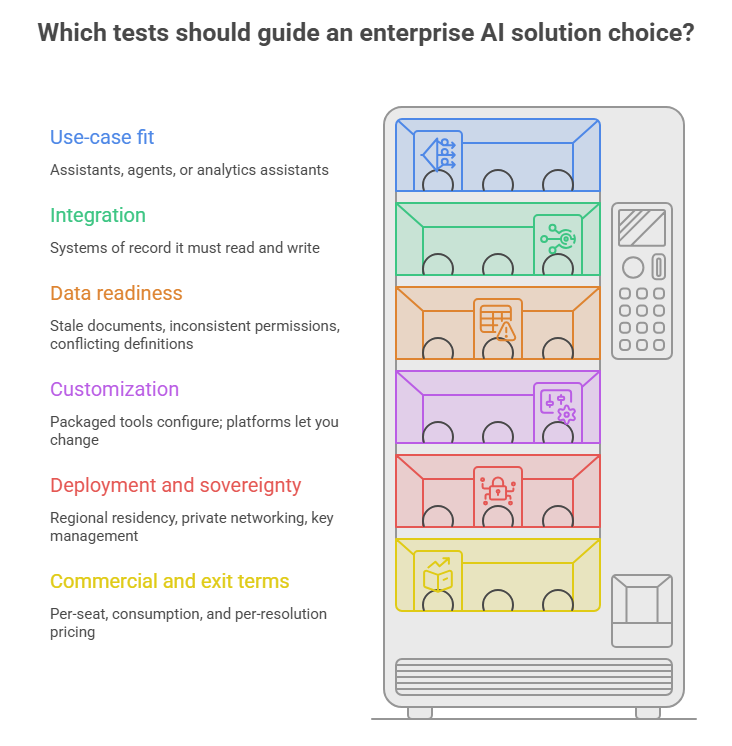
The best enterprise AI solution is the one that matches your highest-value workflow, sits closest to the data that workflow needs, and can be governed with controls you already operate. Any credible enterprise AI strategy starts from the workflow, not the vendor, and applies six tests.
1. Use-case fit
Assistants suit open-ended knowledge work. Agents suit bounded, high-volume processes with clear success criteria. Analytics assistants suit governed data.
2. Integration
Count the systems of record the solution must read and write. Enterprise AI integration, not model quality, usually drives the schedule, because each system adds identity mapping, API limits, and failure modes.
3. Data readiness
Stale documents, inconsistent permissions, and conflicting definitions defeat any model. Gartner’s data and analytics predictions call a universal semantic layer a must-do for leaders supporting AI.
4. Customization
Packaged tools configure; platforms let you change retrieval, tools, evaluation, and models. Choose the least customization that meets the requirement.
5. Deployment and sovereignty
Check regional residency, private networking, key management, and which model providers process your data.
6. Commercial and exit terms
Per-seat, consumption, and per-resolution pricing behave differently at scale. Buyers of AI solutions for large enterprise estates should negotiate exit and data-portability terms up front.
Buy, Extend, or Build Enterprise AI Solution?
Buy for commodity workflows such as meeting summaries, IT service desks, and email drafting. Extend a platform when your data or process is a differentiator. Build only what your team can operate and evolve.
The evidence points in two directions. In McKinsey’s 2026 survey, nearly a third of respondents decided against buying a software product because agentic coding tools could build the function in-house.
Meanwhile Gartner forecasts that 70% of enterprises will abandon agentic AI built by vendor forward-deployed engineering by 2028, because costs rise and they cannot evolve the system themselves.
Now, what to do? Build in-house or with a partner, like Software Orca, but write knowledge transfer into the contract.
What Are the Most Valuable Enterprise AI Use Cases?
The most valuable enterprise AI use cases combine high volume, a measurable baseline, and a tolerable error profile. Five enterprise AI use cases including customer service, document processing and knowledge search, software development and IT operations, sales and business operations, and analytics and decision support, are analyzed.
Each case below states who did what, when, and how strong the evidence is. Every outcome is vendor-reported or company-reported, and none is independently audited.
1. Customer service and chatbots: Salesforce Help
Salesforce’s help site draws more than 60 million visits a year and roughly two million support requests.
The company put Agentforce on the site in October 2024 as a first line of support, available in seven languages. In June 2026 Salesforce reported 4.3 million inquiries handled, with 70% resolved without a human.
Salesforce is both vendor and customer, and its own figures have shifted with time and definition: 63% on an earlier page and 84% in a 2025 retrospective.
2. Document processing and enterprise knowledge search: Cactus Life Sciences
Cactus Life Sciences’ scientific writing and project management teams carried heavy manual document work under strict pharmaceutical data-security requirements.
The company deployed Microsoft 365 Copilot plus more than 30 custom agents for document review, structured data extraction, and information retrieval, backed by a central knowledge repository and human quality review. The company reports efficiency gains of roughly 35% to 50% in structured data extraction.
3. Software development and IT operations: HubSpot and ASM
HubSpot found that AI coding assistants sped up code creation while manual pull request review lagged.
Engineers built Sidekick, an internal multi-model review agent, plus a second “judge agent” that filters comments before they are posted. In March 2026, roughly 90% faster time to first feedback and 80% engineer approval, across tens of thousands of pull requests.
On the IT side, semiconductor supplier ASM says Security Copilot cut incident triage time by 68%.
4. Sales and business operations: Chow Tai Fook
The jewelry retailer wanted frontline staff to reach product expertise, inventory data, and recommendations instantly.
It deployed more than 400 customized agents supporting over 24,000 employees on Microsoft Foundry and related services. Business-process efficiency gains above 70% and sales conversion improvements of up to 57%.
5. Analytics and decision support: Novo Nordisk
Researchers needed faster, more quantitative decisions in pharmaceutical R&D.
Working with Microsoft’s forward-deployed engineering team, Novo Nordisk built a governed reasoning agent on Azure over proprietary data that includes more than 200,000 patient-years of harmonized clinical trial data. Per the same July 2026 roundup, the team’s capacity rose from evaluating 5 to 10 strong ideas per quarter to more than 50. The expected drop in time to insight from weeks to minutes is a forecast, not a measured result.
How to Implement Enterprise AI Solutions
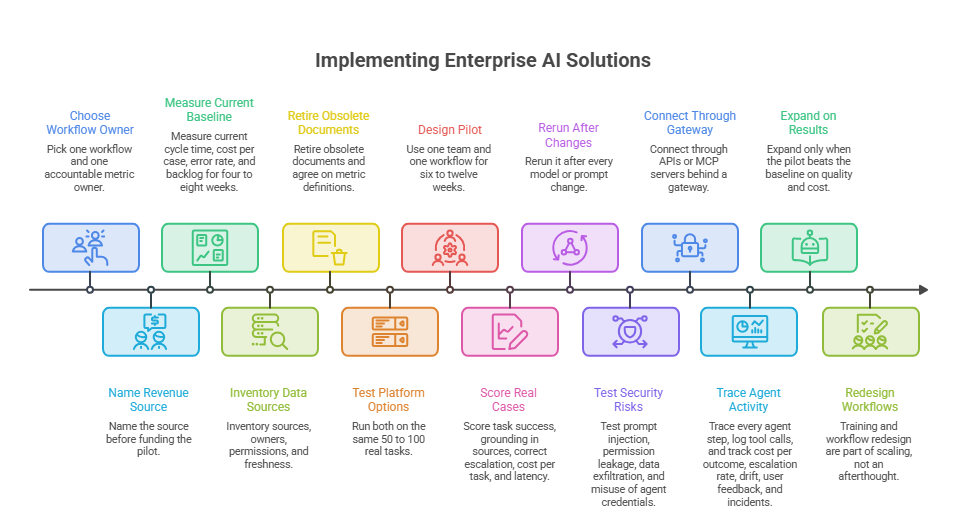
Implement in ten steps, in this order: business objective, baseline, data readiness, platform selection, pilot design, evaluation, security testing, integration, monitoring, and scaling. Skipping the baseline is the most common reason ROI cannot be proven later.
1. Business objectives
Pick one workflow and one accountable metric owner. IBM’s survey of 2,007 executives found that 79% expect AI to contribute significantly to revenue by 2030, yet only 24% have a clear view of where that revenue will come from. Name the source before funding the pilot.
2. Baseline metrics
Measure current cycle time, cost per case, error rate, and backlog for four to eight weeks before anything changes.
3. Data readiness
Inventory sources, owners, permissions, and freshness. Retire obsolete documents and agree on metric definitions.
4. Platform selection
Shortlist two options with the weighted criteria above and run both on the same 50 to 100 real tasks.
5. Pilot design
Use one team and one workflow for six to twelve weeks, with a control group, stop conditions, and human review in the loop.
6. Evaluation
Build a test set from real cases with expected answers. Score task success, grounding in sources, correct escalation, cost per task, and latency, and rerun it after every model or prompt change.
7. Security testing
Test prompt injection through documents and emails, permission leakage between users, data exfiltration through tools, and misuse of agent credentials.
8. Integration
Connect through APIs or MCP servers behind a gateway, with least-privilege service identities, retries, and rollback paths.
9. Monitoring
Trace every agent step, log tool calls, and track cost per outcome, escalation rate, drift, user feedback, and incidents.
10. Scaling
Expand only when the pilot beats the baseline on quality and cost. PwC’s 2026 CEO survey of 4,454 CEOs found that those reporting both cost and revenue gains were two to three times more likely to have embedded AI extensively across products, demand generation, and decision-making.
Training and workflow redesign are part of scaling, not an afterthought.
What Do Enterprise AI Solutions Require for Security, Architecture, and Governance?
Enterprise AI solutions require four things at minimum: an architecture that routes every model and tool call through controlled layers, an identity for every user and every agent, runtime monitoring with audit trails, and human oversight scaled to each agent’s authority.
Governance is where most programs lag. Only 21% of the 3,235 leaders in Deloitte’s State of AI in the Enterprise survey report a mature governance model for agentic AI, and Gartner forecasts that by 2027, 40% of enterprises will demote or decommission autonomous agents because governance gaps surface only after production incidents.
Architecture and APIs
A sound enterprise AI architecture separates five layers: channels, orchestration, a model and tool gateway, retrieval and data services, and systems of record. Expose business capabilities through versioned APIs rather than direct database access, so every action is authenticated, rate-limited, and logged.
Put policy enforcement in the gateway, outside agent code, as AWS does with AgentCore Policy and Databricks does with Unity AI Gateway. Decisions about enterprise AI infrastructure, such as regions, private networking, encryption keys, and GPU capacity, belong in this layer too.
RAG Where Appropriate
Use retrieval-augmented generation when answers must reflect changing internal documents and cite sources. Apply the asking user’s permissions at retrieval time so the model never sees content that person could not open. Do not fine-tune a model to memorize facts that change weekly, and do not expect retrieval to repair poor source content.
Access Controls and Data Privacy
Require single sign-on, least privilege, defined retention, customer-managed keys where the data warrants them, residency that matches your regulatory obligations, and contractual terms on any training use of your data.
Agent Permissions
Give each agent its own identity, a named human sponsor, scoped tools, spending limits, and approval gates for irreversible actions. Microsoft’s agent identities carry owners and sponsors, and Snowflake’s model gives each agent access that is not inherited from the user who launched it.
Proportional governance that classifies agents by autonomy level instead of treating every agent as either locked down or fully trusted. An agent that advises needs lighter controls than one that transacts.
Monitoring, Responsible AI, and Human Oversight
Log prompts, retrievals, tool calls, and outputs, alert on anomalies, and keep a tested way to revoke an agent’s credentials, such as the kill switch ServiceNow describes. Responsible AI in the enterprise is operational work: documented intended use, accuracy and bias testing, incident response, named accountability, and human review for decisions that affect customers or employees.
A recognized framework such as the NIST AI Risk Management Framework gives auditors a common reference.
How Much Do Enterprise AI Solutions Cost, and How Do You Measure ROI?
Enterprise AI costs range from 20–30 per user per month for assistant add-ons to 280K–460K in year one for a mid-complexity custom build. But it always has seven cost components, and licensing is often not the largest: licenses or platform fees, model usage, infrastructure and data, integration, development and evaluation, governance and security, and maintenance plus training.
A transparent ROI formula.
ROI (%) = (annual net benefit − total annual cost) ÷ total annual cost × 100
Annual net benefit = (hours freed × loaded hourly cost × redeployment rate) + incremental gross margin + avoided external spend − cost of errors and rework
Total annual cost = licenses or platform fees + model usage + infrastructure and data + integration and development + governance and security + maintenance and evaluation + training and change management
Payback (months) = one-time costs ÷ monthly net benefit
The redeployment rate is the share of freed hours that becomes output or avoided hiring. Most programs overstate it, so measure it rather than assume it.
What to measure
Compare against the pre-pilot baseline and a control group: cost per resolved case or completed task, cycle time, quality (errors, reopens, escalations), adoption (weekly active use), and risk events. Report cost per outcome, not tokens consumed.
When Should You Hire Software Orca For Enterprise AI Development?
Hire an enterprise software development expert when the workflow is a differentiator, the integration is complex, and you lack the engineering, evaluation, or governance capacity to run it in production. Do not hire one to configure a packaged assistant your own administrators can set up. Enterprise AI consulting fits earlier decisions such as strategy, vendor selection, and governance design.
Custom development fits agents, retrieval systems, workflow-specific enterprise AI applications, and an enterprise AI chatbot development service that needs escalation paths and CRM integration.
Evaluate prospective partners on five capabilities:
- Architecture depth: Gateway, identity, retrieval, and tool design, shown through a reference architecture rather than slides.
- Evaluation practice: How they build test sets, measure accuracy, and prevent regressions.
- Security and governance: Agent identity, least privilege, red-teaming, and audit logging.
- Integration record: Proven work with your ERP, CRM, or data platform.
- Commercial clarity: Separate pricing for build and run phases, plus exit terms.
If you need a partner for custom agents, integration, or governance design, see our custom software development services in Dallas.
Wrapping it Up
Select enterprise AI solutions by workflow, data location, and governance, not by brand. Validate every candidate with a baseline, a control group, and a test set built from your own cases. Scale only when quality and cost beat the baseline, and keep human oversight proportional to each agent’s authority.
The gap between 88% reported adoption and 37% reported EBIT impact is a gap in operating discipline, and that is the part you control.
FAQs
What is the difference between enterprise AI and generative AI?
Generative AI is a model capability, while enterprise AI is the full system that makes it usable at scale: data access, integration, identity, security, monitoring, and governance. A company can use generative AI in a chat window without having an enterprise AI solution.
Which AI is best for enterprise use?
No AI is best for every enterprise. Copilot is the natural start for Microsoft 365 centered work, ChatGPT Enterprise or Gemini Enterprise for a fast cross-functional assistant, a cloud platform for custom agents, and Agentforce or ServiceNow for CRM and IT workflows. Test two finalists on your own tasks before deciding.
Are enterprise AI solutions secure?
They can be, but security depends on configuration and governance more than on the vendor. The main threats are prompt injection, sensitive data exposure, and over-permissioned agents. Gateway-level guardrails, such as those AWS describes for AgentCore, reduce risk but do not replace access reviews, testing, and monitoring.
What is the difference between an enterprise AI platform and an AI agent?
A platform is the environment where AI applications are built, run, and governed. An agent is one application on it: software that plans steps and uses tools to complete a goal. One platform usually hosts many agents.
How long does enterprise AI implementation take?
It takes weeks for a configured assistant, eight to sixteen weeks for a scoped agent pilot, and six to twelve months or more for enterprise-wide rollout.
Should a business build or buy an enterprise AI solution?
Buy commodity workflows, extend a platform for differentiating ones, and build custom only where you can operate and evolve the system. Whichever route you take, keep the evaluation set, prompts, and integration code under your control.