Most Android users first notice Android System Intelligence when it appears unexpectedly in battery stats, storage settings, or app permission lists. It runs silently, carries no app icon, and has no settings page of its own, yet it touches nearly every intelligent feature you use daily.
That combination of invisibility and ubiquity is exactly why it generates so much confusion.
This guide explains what Android System Intelligence actually is, how it works, whether you should worry about it, and how to fix the most common problems it causes.
What Is Android System Intelligence?
Android System Intelligence (ASI) is a pre-installed system component, introduced with Android 12, that delivers on-device machine learning capabilities across the Android operating system. It is developed by Google and ships on Pixel devices by default. Unlike a traditional app, it has no launcher icon and operates as a background service that other system components and apps depend on.
Google introduced ASI to solve a structural problem: Android’s intelligent features, things like predicting which app you’ll open next or suggesting a reply to a message, had previously depended on a patchwork of cloud calls, Google Play Services hooks, and app-level implementations.
ASI consolidates that intelligence into a single, versioned system component that can be updated independently via the Play Store without requiring a full OS update.
On Pixel devices, ASI ships as part of the core system image. On other Android OEM devices, a similar function may be served by the manufacturer’s own AI platform, though Google’s ASI is increasingly available across Android 12+ devices.
What Does Android System Intelligence Do?
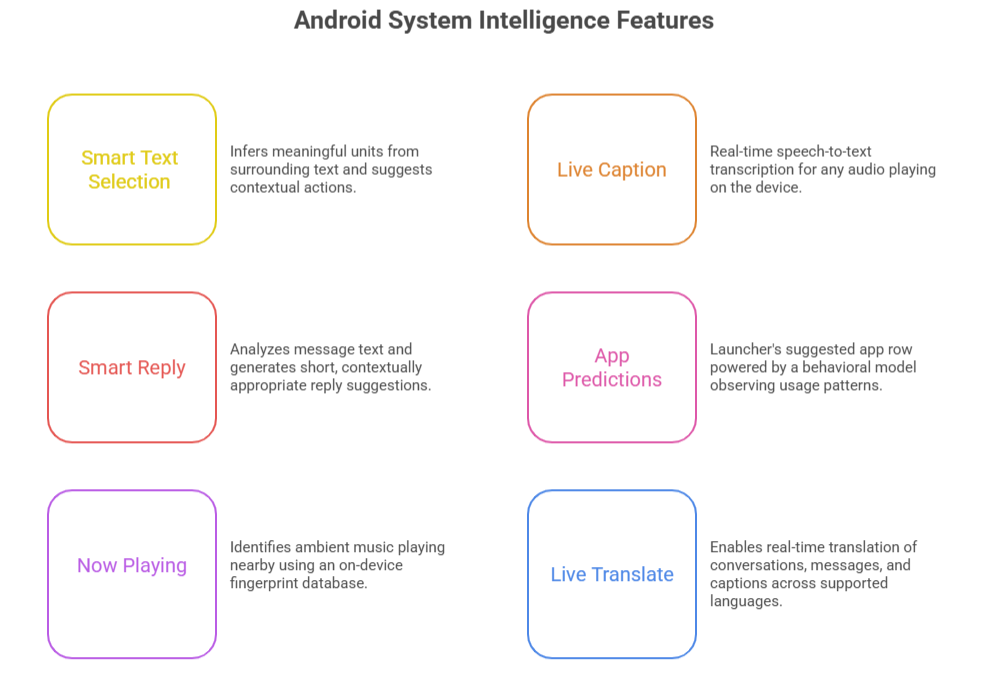
Android System Intelligence powers a range of intelligent, context-aware features built into Android. These include Smart Text Selection, Live Caption, Smart Reply, App Predictions, Now Playing, and Live Translate. Critically, all of these run using on-device machine learning models, no data is sent to a server to generate these suggestions.
Here is what each feature actually does in practice:
1. Smart Text Selection
When you double-tap a word to select it, ASI uses a language model to infer whether the surrounding text forms a meaningful unit: a phone number, address, email, or date. Instead of selecting just one word, it highlights the entire entity and surfaces a contextual action (call, map, calendar). This is a neural text classifier running locally.
2. Live Caption
ASI drives real-time speech-to-text transcription for any audio playing or recorded on the device. It works offline and in any language the model supports. The transcript appears as an overlay with no audio data leaving the device.
3. Smart Reply
When a notification arrives with a message, ASI analyzes the text and generates short, contextually appropriate reply suggestions. These suggestions appear directly in the notification tray. The model runs locally, which is why suggestions sometimes appear even in airplane mode.
4. App Predictions
The launcher’s suggested app row is powered by ASI’s behavioral model, which observes patterns in when and where you open certain apps, like time of day, location, connected accessories, and ranks predictions accordingly. This model updates continuously on-device.
5. Now Playing
Exclusive to Pixel devices, this feature identifies ambient music playing nearby using an on-device fingerprint database of millions of songs. It matches audio snippets against the database entirely offline.
6. Live Translate
ASI enables real-time translation of conversations, messages, and captions across supported language pairs, again using locally stored language models.
The unifying design principle across all of these features is that the intelligence stays on the device. ASI is the runtime that makes that possible.
How Android System Intelligence Works
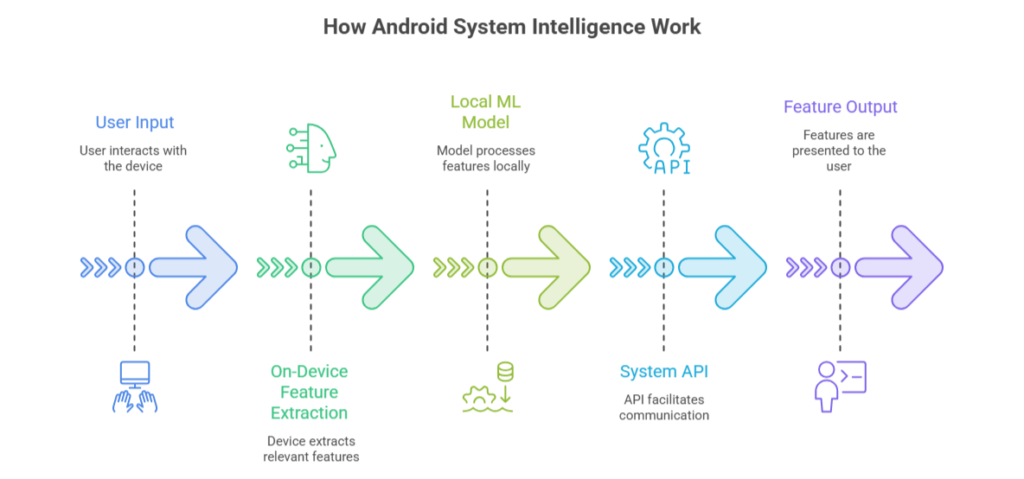
Android System Intelligence uses on-device machine learning to run inference directly on the device’s CPU, GPU, or dedicated Neural Processing Unit (NPU). It relies on TensorFlow Lite and Android’s ML Kit runtime to execute compact, quantized models that are efficient enough for mobile hardware. No raw user data is transmitted to external servers.
The architecture works roughly like this:
- Sensor/input layer: Audio, text, touch, location, and usage events are collected locally.
- Feature extraction: ASI preprocesses raw inputs into feature vectors suitable for the model.
- On-device inference: A quantized neural network runs against the features using the device’s available compute (NPU preferred for efficiency).
- Output delivery: The result, a caption, a suggested reply, a predicted app, is surfaced through Android’s standard UI APIs.
- Local model update: Models can be updated silently via the Play Store without requiring an OS patch.
This design reflects a broader industry shift toward edge AI: running AI workloads on end-user hardware instead of centralized servers. For Android, this has two practical benefits. First, latency drops to near-zero because there is no network round-trip. Second, privacy improves because raw inputs, your voice, your messages, your location, never leave the device.
Curious How Android Compares to iPhone Security?
If you’re wondering how Google’s on-device AI, app sandboxing, and permission controls compare with Apple’s privacy-first ecosystem, our in-depth comparison breaks down the strengths, trade-offs, and real-world differences between both platforms.
Is Android System Intelligence Safe?
Yes, Android System Intelligence is a legitimate, Google-developed system component. It is not spyware, adware, or malware. It requests permissions (microphone, accessibility, notifications) because those are technically required for features like Live Caption and Smart Reply to function, not because it is harvesting data.
Several common misconceptions are worth addressing directly:
1. ASI is tracking me.
ASI does observe usage patterns, but the behavioral model is stored and processed locally. Google’s privacy documentation for these features consistently states that the input data (what you say, what you type, where you go) does not leave the device. The on-device model improves through local learning, not through uploading raw data.
2. ASI has too many permissions.
The permissions ASI requests are scoped to the features it enables. Microphone access supports Live Caption. Accessibility access supports Smart Text Selection and Smart Reply in third-party apps. If you disable these permissions, the corresponding features stop working, which is expected behavior, not a red flag.
3. I should disable ASI for better privacy.
Disabling ASI removes on-device processing and may push some functions to cloud-based alternatives or remove them entirely. On-device processing is generally the more privacy-preserving option, not the less private one.
4. Can you uninstall or disable it?
On most devices, ASI is a system app and cannot be uninstalled by the user. It can be force-stopped or disabled through Developer Options, but doing so will break features like Live Caption, Smart Reply, and app predictions. There is rarely a good reason to do this.
Battery usage
ASI does run in the background and consumes CPU when inference is active, for example, when Live Caption is transcribing audio. If you see unexpectedly high battery usage from ASI, the most common cause is Live Caption being left active with audio playing, or an inference loop triggered by a misbehaving notification.
Clearing the app cache (Settings → Apps → Android System Intelligence → Storage → Clear Cache) usually resolves this.
Common Android System Intelligence Problems (and How to Fix Them)
High Battery or CPU Usage
This is the most frequently reported issue. Live Caption is the usual culprit. It runs continuous speech recognition, which is computationally expensive. Check whether Live Caption is active and disable it when not needed. If battery usage persists without Live Caption running, a stuck inference process is likely.
Fix: force-stop ASI, then restart the device.
Android System Intelligence Keeps Stopping
This error typically appears after a failed system update or a corrupted app cache. Steps to resolve:
- Go to Settings → Apps → Show System Apps → Android System Intelligence.
- Tap Storage, then Clear Cache.
- If the crash persists, tap Clear Data (this resets learned preferences but does not delete personal content).
- Restart the device. If the error continues, a system update is likely pending — check for updates in Settings → System → System Update.
Storage Issues
ASI stores on-device ML models, learned behavioral data, and cached captions. On devices with limited storage, this can grow to several hundred megabytes. Clearing the cache reclaims this space without affecting core functionality.
Permission Problems
If Smart Reply or Smart Text Selection stops working in third-party apps, check that ASI still has accessibility permissions enabled (Settings → Accessibility → Downloaded Apps or Installed Services). These permissions are sometimes reset after OS updates.
App Crash After Update
A partial Play Store update to ASI can occasionally leave the component in an inconsistent state. Clearing the cache and data, then checking for a follow-up update, resolves this in most cases.
Android System Intelligence vs Google Play Services vs Gemini
These three components are frequently confused because they all relate to Google’s intelligence infrastructure on Android, but they have distinct responsibilities.
| Android System Intelligence | Google Play Services | Gemini | |
| Primary role | On-device ML runtime and feature engine | Core Android API layer and Google account bridge | Conversational AI assistant |
| AI type | Edge AI, on-device inference | Minimal AI; primarily API/auth infrastructure | Cloud-based large language model |
| Processing location | Fully on-device | Mostly cloud, some on-device | Primarily cloud |
| User-facing features | Live Caption, Smart Reply, App Predictions, Now Playing | Google account sync, Find My Device, Push Notifications | Natural language conversations, generative tasks |
| Updateable via Play Store | Yes | Yes | Yes |
| Can be disabled by user | Technically yes, but breaks features | No — system-critical | Yes |
| Requires internet | No (for core features) | Yes | Yes |
The key distinction: Google Play Services is the infrastructure layer that lets Android communicate with Google’s cloud services. ASI is the intelligence layer that performs ML inference locally. Gemini is a product that sits on top of both, using cloud compute for generative AI tasks that are too large to run on a phone.
Why Android System Intelligence Matters for the Future of Android
Android System Intelligence represents Google’s commitment to privacy-preserving, on-device AI as a first-class Android feature. As mobile hardware becomes more capable, particularly with dedicated NPUs, ASI is positioned to run increasingly sophisticated models locally, reducing dependence on cloud connectivity while improving responsiveness and privacy.
Several trends make this significant:
1. Federated learning integration.
Google is expanding the use of federated learning in Android, where models improve based on aggregated, anonymized signals from devices without any individual’s data leaving their phone. ASI is the on-device component that makes this architecture possible.
2. NPU utilization.
Modern Android flagship SoCs, like Qualcomm Snapdragon, Google Tensor, MediaTek Dimensity, include dedicated neural processing units. ASI is being progressively updated to target these accelerators, which run inference at a fraction of the power cost of the CPU.
3. Expanding feature surface.
Features currently in preview or limited release, on-device Gemini Nano, expanded Live Translate language support, real-time visual search, all depend on ASI’s infrastructure. As these features mature, ASI’s role becomes more central, not less.
For Android developers, whether freelancing or working at a mobile app development company, ASI simplifies access to several AI-powered platform features. Instead of building custom ML pipelines for common tasks like entity detection or reply generation, developers can often rely on Android APIs while the system handles much of the underlying inference. This reduces APK size, improves consistency, and eliminates the need to ship or update models within the app itself.
Frequently Asked Questions
Is Android System Intelligence the same as Google Assistant?
No. Google Assistant (and its successor, Gemini) is a cloud-based conversational product. Android System Intelligence is a local system component that runs machine learning models on-device. They can work together, such as Gemini uses Android APIs that ASI helps power, but they are architecturally distinct.
Does Android System Intelligence send my data to Google?
The on-device features ASI powers do not transmit raw input data (audio, text, location) to Google servers. Model updates are downloaded from Google, but they flow one way, to the device, not from it. Some aggregate, anonymized signals may be used for federated model improvement, subject to your device’s privacy settings.
Why did Android System Intelligence suddenly appear in my battery stats?
This usually coincides with a system update that expanded its feature set, or with Live Caption being activated. If battery usage is high, check whether Live Caption or another continuous inference feature is running.
Can Android System Intelligence be removed to free up storage?
It cannot be fully uninstalled on most devices. You can clear its cache and data to reclaim storage temporarily, but the app itself will persist as a system component.
Does Android System Intelligence work without an internet connection?
Yes. Its core features, such as Live Caption, Smart Reply, Smart Text Selection, App Predictions, Now Playing, are designed to work fully offline. This is by design: on-device processing is the entire architectural point.
Is Android System Intelligence available on all Android phones?
It ships by default on Pixel devices running Android 12 and later. Availability on other OEM devices depends on the manufacturer’s Android implementation. Some Samsung and other OEM devices use proprietary alternatives for similar functionality.
Why does Android System Intelligence need accessibility permissions?
Accessibility permissions allow ASI to read on-screen text in any app, which is necessary for Smart Reply to work in third-party messaging apps and for Smart Text Selection to function across the OS. Without this access, these features are limited to apps that explicitly support them.
What happens if I disable Android System Intelligence?
Live Caption, Smart Reply, Smart Text Selection, App Predictions, and Now Playing will stop working. The device will otherwise function normally. Re-enabling ASI restores these features, though the behavioral model (app predictions, suggestion personalization) will need to relearn from your usage patterns.