Schools are adopting AI faster than they can govern it. According to the Ipsos poll of 545 K-12 teachers, 54% used AI at least weekly for lesson planning or administrative work, yet only 33% said their school has a formal policy on student AI use. Tools are in daily use while structure lags.
That gap is what well-planned EdTech software development closes: governance, accessibility, and data protection live inside the product, not in a policy memo.
If you’re evaluating EdTech software development in Dallas, this guide covers what you can build, how the process works, what drives cost, and how to choose the best software development company in Dallas for your project.
Education or Edtech Software Development in Dallas (Quick Overview)
- EdTech software development covers LMS platforms, eLearning apps, assessment tools, virtual classrooms, and analytics dashboards for schools, universities, and training providers.
- Build vs. buy: Configure an existing LMS for standard needs, extend it for minor gaps, and go custom only when your learning or business model can’t fit available platforms.
- Cost range: An EdTech MVP costs roughly 20,000–80,000; a full platform runs 100,000–300,000+, plus 15–20% of build cost annually for maintenance.
- Timeline range: Simple products take 10–16 weeks; mid-complexity LMS and assessment platforms take 16–22 weeks; AI-driven or SIS platforms take 20–32 weeks.
- Must-have MVP features: Role-based access, course management, progress tracking, assessments, notifications, SSO/SIS integrations, and WCAG 2.1 AA accessibility.
- Compliance is non-negotiable: FERPA, COPPA, Texas Education Code Chapter 32, and the DOJ’s WCAG 2.1 AA rule all apply to EdTech products serving schools.
- Top cost drivers: User roles, integrations, mobile/offline support, security and accessibility testing, AI capabilities, and content migration.
- Choose a partner on evidence: Live products, verifiable references, architectural clarity, secure development practices, and contract terms guaranteeing code and data ownership.
What Is EdTech Software Development?
EdTech software development is the practice of designing, building, and maintaining software that supports teaching, learning, assessment, or education administration. Its customers include schools, universities, training providers, corporate learning teams, and startups selling learning products directly to consumers.
Typical products are learning management systems (LMS), eLearning platforms, assessment tools, virtual classrooms, and student-facing mobile apps.
The key decision is custom versus existing. An off-the-shelf LMS gets you running quickly, but your workflow bends to the product. Custom EdTech software development starts from your learners, content model, and existing systems, which matters when you need proprietary assessment logic or tight integration with a student information system.
Many teams take a middle path: configure an established platform, then build custom modules around it.
Demand is broad.
The OECD’s Digital Education Outlook reports that 37% of lower secondary teachers used AI in their jobs. Educators now arrive with expectations shaped by consumer tools.
What Types of EdTech Software Can You Build?
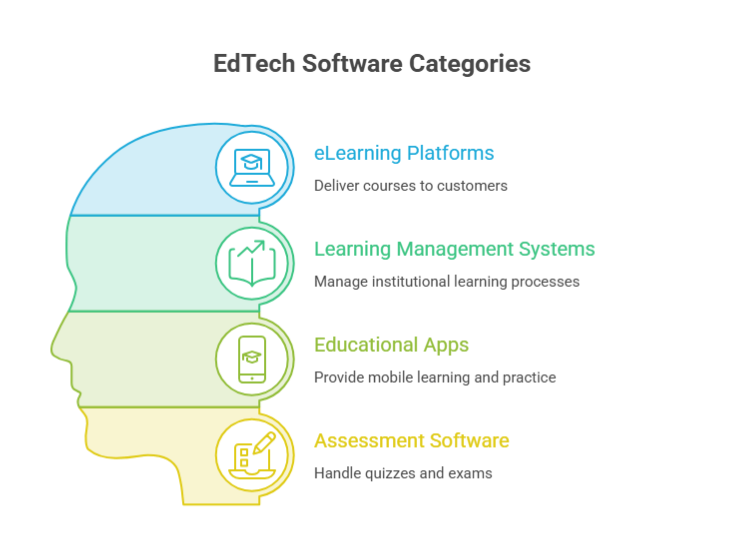
Most EdTech products fall into four categories, and successful ones often combine two or three. LMS and eLearning platforms usually anchor the roadmap because they hold the learner records everything else depends on.
1. eLearning Platforms and Online Course Software
eLearning platforms deliver courses to learners, often customers rather than enrolled students. Core ingredients are a content library, enrollment and payments, progress tracking, and certificates.
Build one when the course catalog is your business, such as a professional-training company or certification body, and you need control over pricing, branding, and the learner experience.
2. Learning Management Systems (LMS)
An LMS manages the institutional side of learning: course shells, rosters, grading, communication, and reporting. Custom LMS development makes sense when standard products can’t model your programs, such as competency-based pathways, apprenticeship tracking, or one system serving several schools.
Build on open standards like LTI and OneRoster so it exchanges data cleanly with other tools.
3. Educational Apps and Virtual Classrooms
Educational apps cover mobile practice, language learning, tutoring, and microlearning; virtual classrooms add live video, whiteboards, and breakout rooms. Offline support and low-bandwidth performance often matter more than feature count, because many learners study on phones with unreliable connections.
4. Assessment, Testing, and Learning Analytics Software
Assessment tools handle quizzes, exams, rubrics, and item banks; analytics turns results into signals for instructors. Expect authenticity to become a buying criterion.
According to Pew Research Center’s report found 54% of U.S. teens had used AI chatbots for schoolwork, and 59% thought AI cheating happens at least somewhat often at their school.
Case study: Analytics need process, not just software
Ithaka S+R independently evaluated MAAPS, a randomized trial of analytics-supported advising across 11 public universities. It found significant effects on secondary outcomes at Georgia State, the lead institution, which had advising infrastructure in place beforehand; elsewhere, delivery grew complicated, and no other campus continued after grant funding ended.
EdTech Software Development Services You Can Get
A capable partner should cover the whole lifecycle, from the first workshop to long-term maintenance. These EdTech software development services matter most:
- Discovery and strategy: stakeholder interviews, user research, scope definition, and a prioritized roadmap.
- Custom platform development: backend services, learner and content data models, and APIs.
- UX/UI design: learner, instructor, and administrator flows, with accessibility checked from the first wireframe.
- Web and Edtech app development: responsive web apps, plus native or cross-platform apps when offline use or push notifications matter.
- LMS customization: themes, plugins, and workflows on an existing platform such as Moodle or Canvas.
- Integrations: single sign-on, student information systems, video, payments, and analytics, using standards like LTI, OneRoster, SCORM, and xAPI.
- Testing: functional, accessibility, performance, and security testing before release.
- Deployment: cloud infrastructure, automated pipelines, monitoring, and data migration.
- Maintenance and support: patches, dependency updates, release management, and service-level agreements.
Discovery is where most budget risk gets retired. Expect it to produce user journeys, a prioritized backlog, an architecture outline, an integration inventory, and a risk list you can use to compare proposals.
For custom LMS development, also ask how existing courses and learner records will be migrated, and whether the team builds on an open-source foundation or from scratch; each choice changes your long-term maintenance obligations.
Ask every prospective partner which of these they deliver in-house and which they subcontract. A general guide can’t vouch for any firm’s capabilities, so verify claims through references and working examples, as the selection section below explains.
How to Build EdTech Software (6-Step Edtech Software Development)
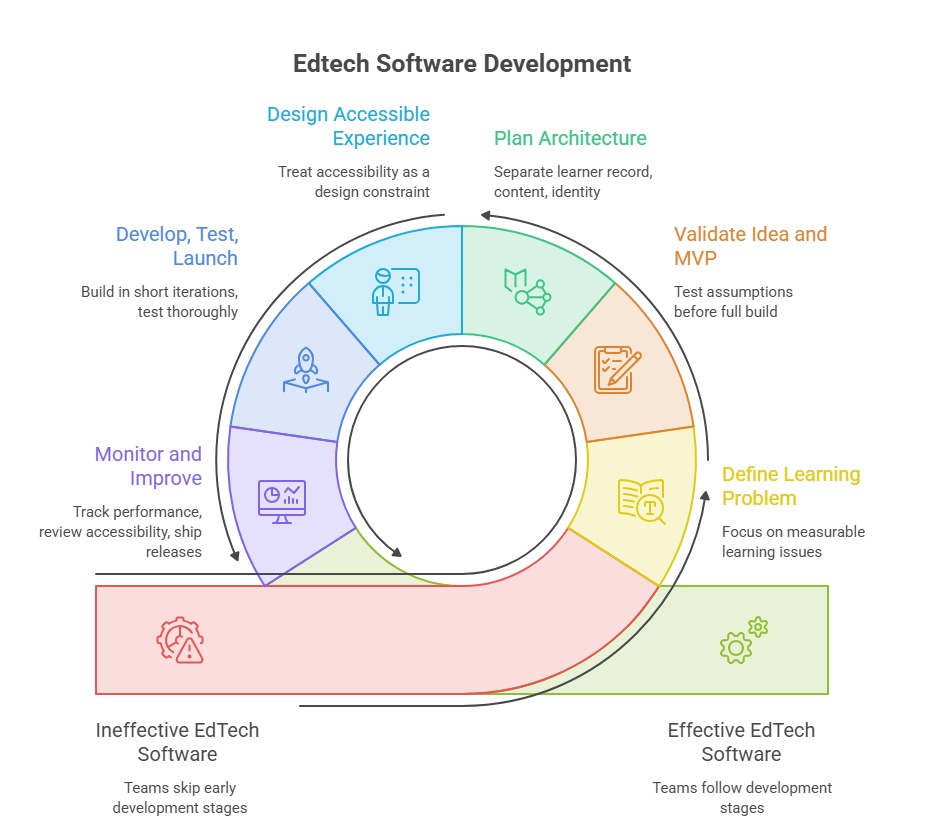
Building EdTech software is a six-stage cycle: define the learning problem, validate and build an MVP, plan architecture, design for accessibility, build and launch, then monitor and improve. Teams that skip the early stages usually pay for it in rework.
1. Define the Learning Problem and Target Users
Start with a measurable problem, such as low course completion or slow grading, rather than a feature list. List every role (learners, instructors, administrators, parents) along with their devices and connectivity.
A common mistake is designing for the administrators who buy the product while neglecting the instructors who must use it daily.
2. Validate the Idea and Scope the MVP
Test assumptions with interviews, clickable prototypes, and a pilot cohort before committing to a full build. An MVP should prove one learning loop end to end: enroll, learn, assess, report. Defer advanced analytics and AI tutoring until usage proves the loop works, and settle content ownership and migration questions early because they reshape scope.
3. Plan Architecture, Data Flows, and Integrations
Keep the learner record, content, and identity services separable, even inside a modular monolith. Map data flows to your student information system, single sign-on provider, and video tools, and use standards instead of one-off connectors.
EDUCAUSE‘s Students and Technology Report, published March 2026, found that 46% of students encountered a security threat during the past academic year, so design identity, least-privilege roles, and audit logging now.
4. Design an Accessible Learning Experience
Treat accessibility as a design constraint, not a late audit. Target WCAG 2.1 Level AA, the standard the U.S. Department of Justice’s Title II rule adopted for public entities’ web content and mobile apps.
Test with keyboard-only navigation and screen readers, caption all media, and check color contrast in design files. Retrofitting finished components costs more than designing them correctly.
5. Develop, Test, and Launch
Build in short iterations with automated tests and a staging environment, and load-test against real peaks such as enrollment week or exam day. Pilot with one cohort, train staff, and keep a rollback plan. The classic mistake is launching on devices and networks you haven’t tested.
6. Monitor Performance and Improve
After launch, track uptime, load times, error rates, and learner behavior such as drop-off points and assessment completion. Review accessibility and security continuously, and ship small releases on a predictable cadence.
Add features that usage data and instructor feedback support, not ones competitors happen to have, and budget for dependency updates and periodic penetration testing.
Essential Features of EdTech and eLearning Software
Essential features let learners learn, instructors teach, and administrators show it happened; everything else can wait. A realistic MVP includes:
- Role-based access for learners, instructors, and administrators
- Course management and content delivery
- Learner dashboards with progress tracking
- Assessments, grading, and reporting
- Notifications
- WCAG 2.1 AA accessibility and mobile-responsive design
- Integrations such as single sign-on and student information systems
- Data protection: encryption, audit logs, and retention rules
Reporting deserves more attention than it usually gets. Instructors need to see who is falling behind this week, and administrators need exports for accreditation or funding reports. Decide early which metrics matter, because data you didn’t capture can’t be recovered later.
AI tutoring, adaptive pathways, and predictive analytics should follow once the core loop works. Students are already ahead of institutions.
HEPI’s 2026 survey of 1,054 UK undergraduates found 95% used AI in some form, yet fewer than half felt supported by their teaching staff.
The OECD adds that completing a task with generative AI does not automatically produce learning, so design AI features around hints and questioning.
Case study: Accessibility depends on vendors
New America’s 2026 review of all 50 states and territories, plus interviews with district leaders, advocates, and state officials, found that schools often have little control over a vendor’s system once contracts are signed, and that vendor compliance was among the hardest parts of meeting WCAG 2.1 AA. The interviews are not representative.
Custom EdTech Software vs. an Existing LMS
Configure an existing LMS when your needs are standard, extend one when only a few gaps remain, and build custom when your learning model or business model can’t be expressed in available platforms.
| Configure existing | Extend existing | Build custom | |
| Flexibility | Limited to settings | Plugins within platform limits | Full control |
| Effort | Lowest | Moderate | Highest |
| Integrations | Vendor connectors | Custom connectors via platform APIs | Built for your systems |
| Ownership | Vendor owns product | You own custom code; platform dependency remains | You own code if the contract says so |
| Maintenance | Mostly vendor | Shared; extensions need retesting on upgrades | Entirely yours |
| Total cost | Recurring fees | Fees plus development | Highest upfront; ongoing engineering |
Whichever path you take, insist on documented APIs and data export. The real cost of a platform decision often appears at exit, when courses and learner records have to move elsewhere. Budget for instructor training too, which, as the case below shows, can rival the software work.
How Much Does EdTech Software Development Cost in Dallas?
An EdTech MVP roughly costs $20,000 to $80,000 and a full platform at $100,000 to $300,000 or more, with maintenance adding about 15–20% of build cost each year. These are vendor-published ranges, not independent research, and they depend heavily on where the team is based, so use them to frame a budget rather than to judge a quote.
| Product | MVP | Edtech Software Development Cost |
| Custom LMS | $40,000 – $80,000 | $120,000 – $200,000+ |
| E-learning app | From $40,000 | $250,000+ |
| Education app | From $35,000 | Up to $250,000 |
| E-learning app | $20,000 – $50,000 | $100,000 – $500,000 |

Estimated Edtech Software Development Timeline
| Product type | Duration |
| Basic LMS (courses, users, progress) | 12–16 weeks |
| Mid-complexity LMS (roles, reporting, integrations) | 16–22 weeks |
| Assessment platform | 16–20 weeks |
| Corporate training platform (SCORM, certificates) | 14–18 weeks |
| Learning analytics dashboard | 10–14 weeks |
| Student information system | 20-28 weeks |
| Virtual lab or simulation | 20–28 weeks |
| Learning experience platform (AI recommendations) | 22–32 weeks |
| AI tutoring platform | 20–30 weeks |
The main cost drivers are:
- Product scope and user roles: every role adds screens, permissions, and test cases.
- Integrations: each connected system needs design, testing, and ongoing upkeep.
- Mobile: native apps and offline modes cost more than responsive web.
- Security and accessibility: conformance testing, penetration testing, and privacy reviews.
- AI capabilities: model usage fees, evaluation, and guardrails.
- Content migration: cleanup and conversion of existing courses.
- Maintenance: patches, upgrades, hosting, and support continue after launch.
Security, Accessibility, and Integrations in EdTech Software Development
Treat security, accessibility, and interoperability as product requirements, and know which are legal obligations and which are engineering best practice.
An education survey, collected January–March 2026 from 226 education respondents, found identity-based techniques in 85% of ransomware attacks.
Best practice: single sign-on with multi-factor authentication, role-based access, encryption in transit and at rest, audit logs, retention limits, and standards-based integrations.
Legal (consult counsel): FERPA lets schools share records with vendors only under conditions such as direct school control and purpose-limited use. The amended COPPA Rule’s compliance date was April 22, 2026.
Texas Education Code Chapter 32 restricts targeted advertising, profiling, and sale of student data by operators serving schools. The DOJ’s Title II rule requires WCAG 2.1 AA, with deadlines extended one year in April 2026.
Integrations are where leaks and outages tend to appear. Each third-party tool that receives learner data should be covered by a data-processing agreement, limited to the minimum fields, and reviewed periodically. Prefer standards like LTI and OneRoster over custom scripts, and log every data exchange.
Case study: PowerSchool
Texas’s attorney general alleges a breach of the vendor’s systems exposed data on more than 880,000 Texas students and teachers, and that the company overstated its security. The allegations are unproven.
How to Choose an EdTech Software Development Company in Dallas
Choose the custom software development company based on evidence: shipped products in your category, clear architectural thinking, demonstrable security practices, and contract terms that give you ownership and documentation. Use these checks:
- Portfolio evidence: ask for live products and references you contact yourself. A vendor-written success story is a claim, not proof.
- Relevant experience: LMS builds, standards-based integrations, and K-12 or higher-ed compliance.
- Architecture: ask how they would structure your data model and integrations, and read a sample design document.
- Communication: one accountable lead, regular demos, written status, and clear escalation paths.
- Security: a secure development lifecycle, penetration-testing practices, and any certifications they claim, verified.
- Code ownership and documentation: IP assignment in the contract, repositories in your account, and runbooks.
- Ongoing support: service levels, response times, and who handles upgrades.
Watch for red flags, like fixed bids with no discovery, reluctance to share architecture details, no automated testing, one developer holding all project knowledge, and references limited to marketing pages.
Ask what happens if the team changes midway, and consider a small paid pilot before a large contract.
Dallas has a few genuine, modest advantages. It sits in the Central Time zone, which overlaps with working hours across the continental U.S., and the Dallas–Fort Worth area has many universities and school districts, so in-person workshops with stakeholders are practical. Neither makes a firm competent; judge the evidence.
Conclusion
Good EdTech software development comes down to a few early decisions: which learning problem you’re solving, whether to configure, extend, or build, and how seriously you treat accessibility, privacy, and security from day one.
Start small with a scoped MVP, a pilot cohort, and a contract that gives you ownership of code and data, then iterate on evidence. Write down your success metrics before development starts, such as completion rates or grading time, so the first release can be judged against something concrete.
If you’re considering EdTech software development in Dallas, bring your learning goals, user roles, and integration list to a discovery conversation; a good partner will challenge your scope before quoting it.

Related Guides
- Enterprise Software Development in Dallas: How large organizations modernizing legacy tech stacks can build scalable, high-security enterprise systems within the Dallas business ecosystem.
- Top Software Development Companies in Dallas: A vetted evaluation of leading local software engineering agencies, detailing technical capabilities, hourly rate tiers, and regional industry expertise.
- How to Choose a Software Development Company: A step-by-step buyer’s guide covering technical vetting frameworks, code quality audits, communication SLAs, and contract structure evaluations.
- How to Outsource Software Development: An operational guide on managing dedicated external dev teams, establishing IP protection guardrails, and setting up effective offshore/nearshore workflows.
- Real Estate Software Development: How to design and code custom PropTech platforms, featuring real-time MLS/IDX data integration, property management automation, and tenant portals.
FAQs
Who owns the intellectual property in custom EdTech software?
Ownership is set by your contract, not by who paid. Require a written assignment of copyright, repositories in your own account, and a list of open-source components, which keep their own licenses. Also confirm who owns any data or models derived from your learners. Have counsel review the terms.
Can an existing course library be migrated to a new platform?
Usually, yes. Standard packages such as SCORM or Common Cartridge move more easily than proprietary formats. Start with a content audit, expect cleanup and restructuring, and test migrated courses with real instructors.
Can an EdTech product support multiple languages?
Yes, if internationalization is built in from the start: externalized text, Unicode, right-to-left layouts, and locale-aware dates and numbers. Translating content, captions, and support materials is separate work.
How can an education platform handle increased enrollment?
Design for peaks, not averages. Autoscaling cloud infrastructure, caching, a content delivery network for media, and queue-based background jobs help, but only load tests modeled on enrollment week or exam day prove it.
What ongoing maintenance does EdTech software require?
Plan for security patches, dependency and operating-system updates, browser and mobile compatibility checks, accessibility re-testing, backup and restore drills, monitoring, and user support.