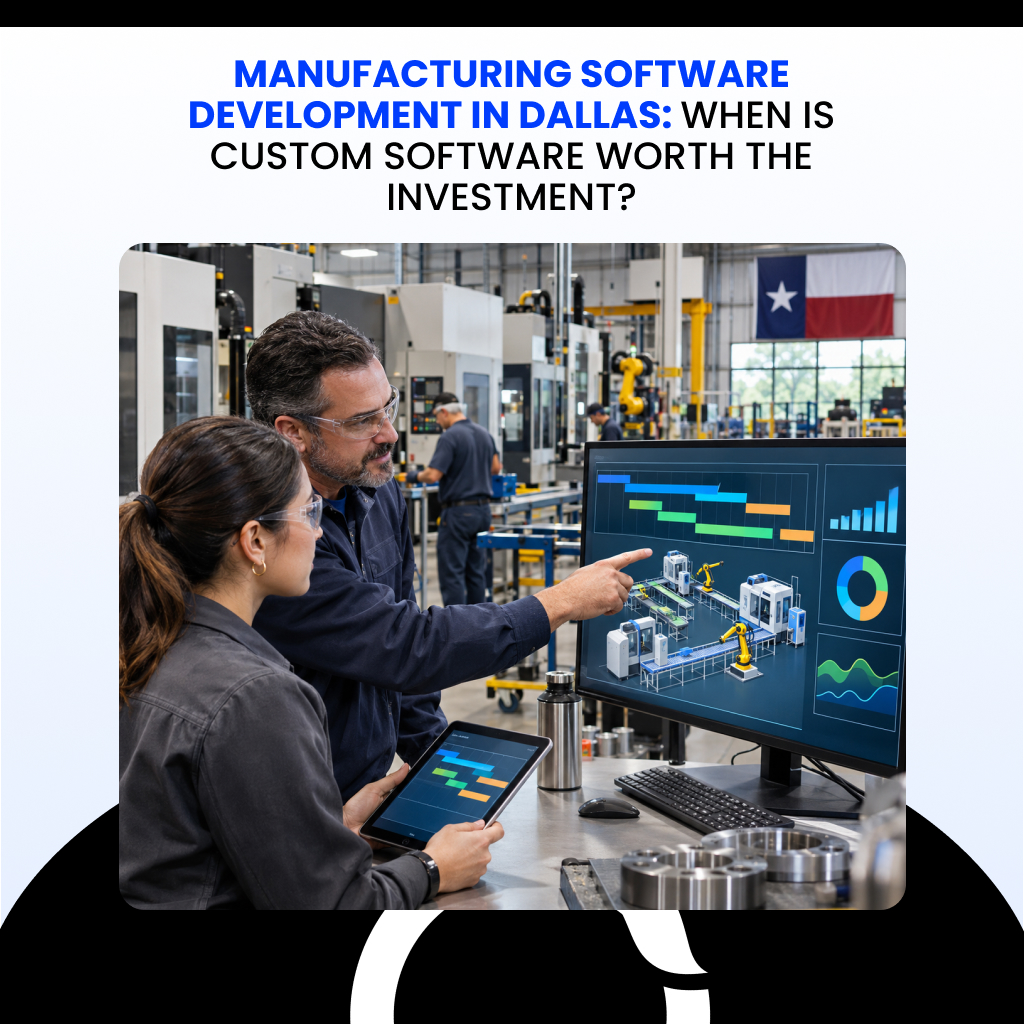
Manufacturing software development in Dallas is worth the investment when one specific, expensive problem keeps costing you money and no packaged product fixes it without painful workarounds. If your processes look like most plants in your industry, a configured off-the-shelf system is usually cheaper and safer.
Picture a scheduler retyping ERP orders into a spreadsheet because the planning system and the shop floor never share data. That gap is common: 37% of manufacturers named poor data interoperability a top-three smart factory roadblock in the Manufacturing Leadership Council‘s 2026 survey, up from 22% a year earlier.
This guide shows how to judge whether your gap justifies custom software, what it costs, and how to build it without wasting money.
Manufacturing Software Development in 2026 (Quick Overview)
- Build custom only when the math works. Custom manufacturing software development pays off when a measurable problem costs more each year than the software costs to build and maintain, and no commercial product fixes it.
- Use the four-way rule: buy commodity functions, configure standard workflows, extend near-fits, and build only what is unique to your plant.
- Fix the basics first. Clean data, better configuration, and training can beat new code: one manufacturer reportedly cut lead times from 12 to 14 weeks to 5 by correcting ERP routings.
- Build manufacturing software in seven steps: baseline, system audit, scope, approach, build and integrate, test, then pilot and support.
- Budget realistically. Agency guides put an MVP development at about $15,000 to $80,000, an ERP starter at $40,000 to $100,000, and full custom builds at $50,000 to $300,000+, plus 15 to 20% after launch. No Dallas-specific data exists.
- Calculate ROI before you commit: ROI (%) = [(Financial benefits − Total costs) ÷ Total costs] × 100.
- Pick a partner on proof: manufacturing integration experience, security practice, testing, code ownership, and support.
What Is Manufacturing Software Development? How ERP, MES, SCADA, and IIoT Fit Together
Manufacturing software development is the work of designing, building, and connecting software that plans, runs, and measures production. It covers brand-new custom applications and extensions or integrations for systems a plant already owns.
A plant runs on several systems with different jobs. Think of an office, a shop-floor supervisor, and a control room:
| System | Plain-English role | Question it answers |
| ERP | The back office: orders, purchasing, inventory, finance | What did we sell, and what must we buy? |
| MES | The shop-floor supervisor: tracks each work order, operator, and quality check as it happens | What is running right now, and is it within spec? |
| SCADA | The control room: monitors and controls equipment through controllers such as PLCs | Is this machine running within its limits? |
| Industrial IoT | Sensors and edge devices that stream machine data | What are the machines telling us? |
| Integration layer | The plumbing between the systems above, often built on standards such as ISA-95 and OPC UA | Does everyone see the same numbers? |
Case study: Stainless Works (Ohio)
This exhaust maker had long lead times. A Manufacturing Extension Partnership center found inaccurate routings in its ERP, corrected them, and set up work centers for scheduling. Reported lead times fell from 12 to 14 weeks to 5. The fix was configuration, not custom code, which shows that bad data defeats any software.
When Is Custom Manufacturing Software Development in Dallas Worth the Investment?
Custom software is worth it when a measurable problem costs more each year than the software costs to build and maintain, and no commercial product closes the gap. If a configured ERP or MES can do the job, buy it.
| Lean toward custom when… | Lean toward off-the-shelf when… |
| Your workflow is a competitive advantage, such as a proprietary changeover or inspection method | Your processes follow standard industry practice |
| Staff spend many hours rekeying data between systems | A commercial module already covers the task |
| Machines and business systems cannot exchange data | Prebuilt connectors exist for your equipment |
| Quality escapes or traceability gaps keep recurring | You need to go live quickly with low risk |
| The annual cost of the problem is large and measurable | The problem is small or hard to quantify |
Rule out cheaper fixes first. Better configuration, cleaner data, or training on your current system often closes the gap, as the Stainless Works example shows. Write down the dollar cost of the problem and why each cheaper option failed. That record is your business case.
Texas manufacturers are still early on this path. In the Dallas Fed‘s 2026 survey, 56.8% of responding Texas manufacturers used AI, yet only 15% of those users said many employees use it regularly (about 40 responses). Broad but shallow adoption is why a clear business case matters more than the technology.
Case study: Ford Otosan
Ford’s Yenikoy commercial vehicle site faced rising customization demands and market volatility. It deployed more than 60 in-house digital solutions on a unified data architecture. The World Economic Forum reports it doubled production volume, raised labor productivity 44%, and improved quality 6%. A large automaker with deep engineering resources is not a typical mid-market plant, and the results cover the whole transformation, not one application.
What Types of Manufacturing Software Solutions Can Dallas Manufacturers Build?
Manufacturers can build software for almost any operational gap, but no plant needs all of it. Pick the application that targets your largest measured loss.
| Application | Problem it solves |
| Production scheduling | Handles changeovers, constraints, and rush orders that generic ERP schedulers miss |
| Inventory management | Fixes stock accuracy, lot tracking, and reorder rules |
| Quality management | Records inspections, nonconformances, and corrective actions in one place |
| Shop-floor dashboards | Show live status, downtime, and output to supervisors |
| ERP extensions | Add approvals, fields, or reports without modifying the core ERP |
| MES integrations | Connect machine and work-order data to enterprise records |
| Traceability apps | Link materials, operators, and equipment to finished lots for recalls and audits |
| Predictive maintenance | Flags likely equipment failures from sensor trends, and needs reliable data |
Start with one or two, prove the result in a pilot, then expand. Each added module brings its own integration, testing, and support burden.
How to Build Manufacturing Software in Dallas: A 7-Step Manufacturing Software Development Process
Build manufacturing software in seven stages: set a baseline, audit your systems, define scope, choose your approach, build and integrate, test, then pilot and support. The cheapest place to fix a mistake is the earliest stage, so do not rush steps one to three.
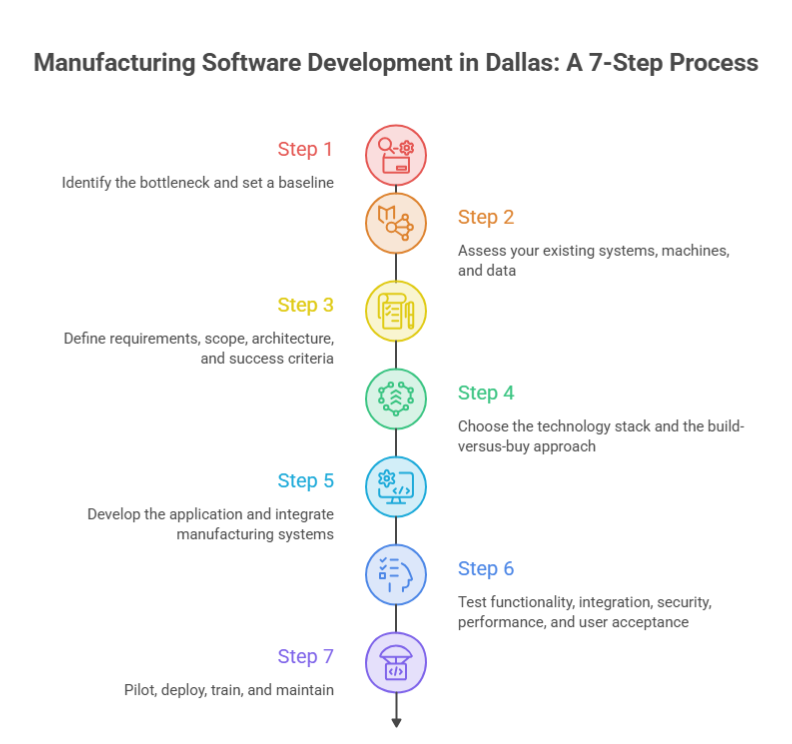
Step 1: Identify the bottleneck and set a baseline
Pick one problem with a dollar value, such as scrap, changeover time, late orders, or hours spent on manual reporting. Measure it for several weeks before you design anything, recording units, hours, and cost. Without a baseline you cannot prove the software worked.
Output: a one-page problem statement with a current number and a target, for example “cut manual reporting from 25 hours a week to 5.”
Step 2: Assess your existing systems, machines, and data
List every system involved: ERP version, MES, spreadsheets, machine controllers, network layout, and who owns each. Check how machines can communicate. Newer controllers may offer OPC UA or Ethernet, while older ones may need gateways or added sensors. Audit data quality too, because duplicate part numbers or wrong routings will break any application built on them.
Dallas-area plants can get a neutral outside view from the Texas Manufacturing Assistance Center at UT Arlington, which offers no-cost and low-cost services to small and mid-sized manufacturers.
Output: a system and data map.
Step 3: Define requirements, scope, architecture, and success criteria
Write requirements by role: what an operator, supervisor, planner, and quality engineer each need to do. Decide the integration points, uptime needs across shifts, and what happens when the network drops. Plan security now by separating plant networks from office IT and asking vendors how they apply standards such as IEC 62443 and NIST SP 800-82. Tie success criteria to your baseline.
Output: a scope document, an architecture diagram, and signed acceptance criteria.
Step 4: Choose the technology stack and the build-versus-buy approach
Apply one rule to each function:
- Buy commodity functions such as payroll.
- Configure a commercial platform for standard production workflows.
- Extend it when it nearly fits.
- Build only where the workflow gives you an advantage or no product fits.
Favor open standards (OPC UA, REST APIs, SQL databases) and technology your team or partner can support for years. Choose on-premises or cloud hosting based on latency and how reliable your plant’s connectivity is.
Output: a short decision memo for each function.
Step 5: Develop the application and integrate manufacturing systems
Build in small increments and demo each one to operators on real data. Integrate through documented interfaces, and start read-only: read from machines and the ERP before writing back, because a bug that only reads cannot stop a line. Keep a test environment that mirrors production.
Expect this step to take the largest share of budget; one agency’s model puts core logic and integrations at roughly 50 to 60% of a build .
Output: working software in a test environment, connected to real or simulated systems.
Step 6: Test functionality, integration, security, performance, and user acceptance
Test each layer:
- Functional: does each feature work as specified?
- Integration: does data flow correctly to and from real machines or simulators?
- Security: are access controls and network separation holding?
- Performance: does it cope with peak shift load?
- User acceptance: can operators run real jobs without help?
Test failure modes on purpose: network outages, duplicate scans, and bad data.
Output: a signed test report.
Step 7: Pilot, deploy, train, and maintain
Pilot on one line or cell for a set period and compare results with your baseline. Train people by role, schedule go-live around production calendars, and keep a rollback path for the first weeks. After launch, name an owner, set support response times, and plan patching, backups, and monthly metric reviews.
People decide whether the system works. In a PwC and Manufacturing Institute survey published in March 2026 (fielded in Q3 2025), 45% of respondents said excluding frontline leaders from design and rollout contributed to unsuccessful AI initiatives. Involve supervisors from step one.

Manufacturing Software Development Services in Dallas: What a Development Partner Delivers
A good partner delivers the full path from requirements to support, not just code. Typical services include:
- Custom application development: new tools for needs no product meets.
- System integration: connecting ERP, MES, machines, and data.
- ERP extensions: custom approvals, reports, and fields on your ERP.
- Production dashboards: live output, downtime, and quality views.
- Inventory and quality management systems: purpose-built tracking and records.
- Legacy modernization: replacing or wrapping aging systems while keeping their data.
- Ongoing support: fixes, patches, and enhancements after launch.
Know which category each deliverable falls into, because the category sets cost, ownership, and upkeep:
- Developing means writing new code, which your contract should say you own.
- Configuring means adjusting settings inside a commercial product.
- Integrating means connecting separate products through interfaces.
- Licensing means paying to use a finished product on the vendor’s update schedule.
Custom Manufacturing Software vs. Off-the-Shelf Manufacturing Software: Which Is Better?
Neither wins by default. Off-the-shelf software is faster and cheaper to start, while custom software fits your workflow exactly but costs more and puts maintenance on you.
| Factor | Custom | Off-the-shelf |
| Initial cost | Higher development spend | Lower upfront, ongoing fees |
| Implementation time | Longer, depends on scope | Shorter for standard needs |
| Customization | Fits your workflow | Limited to configuration |
| Integration | Built for your systems | Prebuilt connectors, with gaps |
| Maintenance | You or your partner | Vendor patches |
| Scalability | Depends on architecture | Proven in common cases |
| Upgrades | Planned and funded by you | Vendor roadmap |
| Vendor dependency | On the developer | On the software vendor |
Case study: Advance Products & Systems
Needing process improvement, this manufacturer took a supply chain assessment that led to coaching on how to better use its existing ERP. Training on the current system, rather than new software, produced a reported $605,000 in cost savings. The cheapest option is sometimes the software you already own, so fix usage gaps before building. Also remember that heavy customization of a commercial product can complicate its future upgrades.
Manufacturing Software Development Cost in Dallas: MVP and Full-Build Price Ranges
A manufacturing software MVP typically costs about $15,000 to $80,000 for a generic app and $40,000 to $100,000 for an ERP starter, while full custom manufacturing builds run $50,000 to $300,000 or more in Dallas. These are US-dollar planning estimates from software agencies, not independent studies.
| Project type | Reported cost (USD) |
| Generic software MVP | $15,000 to $80,000 |
| ERP starter or MVP, core modules | $40,000 to $100,000 |
| Quality, compliance, and traceability | $40,000 to $100,000+ |
| Inventory and materials management | $40,000 to $120,000+ |
| ERP extension for manufacturing | $50,000 to $120,000+ |
| IIoT and shop-floor data platform | $50,000 to $140,000+ |
| MES | $60,000 to $150,000+ |
| Custom planning and scheduling | $80,000 to $200,000+ |
| Full custom manufacturing build | $50,000 to $300,000+ |
| MES-to-ERP integration | $25,000 to $150,000 |
Custom Manufacturing Software ROI: How to Calculate the Return on Your Investment
Calculate ROI by converting each operational gain to dollars and comparing the total with the full cost to build and run the software. Measure labor hours saved times loaded hourly cost, scrap reduced times material and processing cost, downtime hours avoided times lost margin per hour, plus inventory accuracy and throughput.

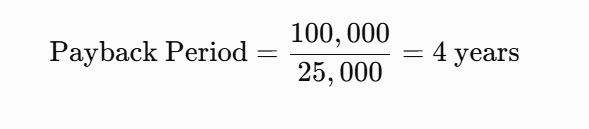
Payback assumes the benefit is positive and reasonably stable. Value labor carefully: BLS reported 522,000 manufacturing job openings and 332,000 hires in August 2026 (preliminary), so hours you free up may be hard to refill by hiring.
Hypothetical example (not a real project; all figures are assumptions in US dollars):
| Item | Amount (USD) |
| Development and integration | 185,000 |
| Gateways | 15,000 |
| Training | 20,000 |
| Initial licensing | 10,000 |
| Initial investment | 230,000 |
| Annual operating and maintenance cost | 45,000 |
| Annual scrap reduction | 100,000 |
| Annual labor savings (2,500 hours at $36) | 90,000 |
| Annual avoided downtime | 50,000 |
| Annual benefits | 240,000 |
Over three years, benefits are $720,000 and costs are 365,000(230,000 plus three years of $45,000), so ROI is [(720,000 − 365,000) ÷ 365,000] × 100 = 97.3%. Net annual benefit is $195,000, so payback is $230,000 ÷ $195,000 = 1.2 years. This assumes full benefits from day one, which is optimistic.
How to Choose a Manufacturing Software Development Company in Dallas
Choose a software development in Dallas by testing evidence, not promises: manufacturing experience, integration skill, security practice, testing discipline, and long-term support. A Dallas address helps with plant visits and fast response, but it says nothing about competence.
| Area | Ask | A strong answer |
| Manufacturing experience | Which systems and protocols have you integrated? | Named MES, ERP, and PLC work, plus a reference you can call |
| Architecture | Can we see your documentation? | Diagrams, interface specs, and separated IT and plant networks |
| Security | How do you manage access, patching, and credentials? | Role-based access, a patch process, and reference to IEC 62443 or NIST SP 800-82 |
| Testing | What runs before go-live, and who signs off? | Integration tests on real or simulated machines, plus operator acceptance |
| Project management | How do you scope, estimate, and report? | Phased milestones, written assumptions, regular demos |
| Ownership | Who owns the code and deployment access? | Written rights assignment and handover documents |
| Support | What happens after launch? | Defined response times and a maintenance plan |
Security evidence matters. Dragos, an operational technology security vendor, tracked 119 ransomware groups targeting industrial organizations in 2025, up from 80 in 2024, and reported that manufacturing made up more than two-thirds of victims. Treat vendor statistics cautiously, but the trend justifies probing how a partner secures the link between IT and plant systems.
Verify references independently and do not rely on a vendor’s own success stories. A short paid discovery phase shows how a team communicates and estimates before you commit. The best partners will tell you when a commercial product would serve you better.
How to Get Started With Manufacturing Software Development in Dallas
Start small and measure:
- Pick one high-value problem, such as scrap or manual reporting.
- Record its baseline in units, hours, and dollars.
- Audit the systems, machines, and data involved.
- Compare build, buy, configure, and integrate options against that problem.
- Scope a pilot on one line or cell.
- Define success criteria, such as hours saved, scrap rate, or on-time delivery, before any code is written.
If you are a manufacturer weighing these options, reach out to Software Orca and talk through your software requirements. No commitment is needed.
Wrapping it Up
The best manufacturing software is not the most advanced. It is the software that removes a measurable loss from your plant. Find one costly bottleneck, prove its cost with a baseline, rule out cheaper fixes, and pilot on a single line before scaling. Do that, and manufacturing software development in Dallas becomes a controlled investment, not a gamble.

Related Guides
How to Build an Enterprise Software in Dallas: A strategic guide on building scalable corporate architectures, legacy system modernizations, and cloud-native infrastructure for Dallas enterprises.
Top Software Development Companies in Dallas: An evaluation framework analyzing top-rated local software development firms, hourly rate benchmarks, and key market differentiators.
Choose a Software Development Company: A practical playbook detailing vendor vetting criteria, technical interview standards, contract structures, and red flags to avoid.
Outsourcing Software Development: A step-by-step roadmap for selecting engagement models (dedicated team vs. fixed price), protecting IP, and managing offshore and nearshore engineering teams.
How to Build a Real Estate Software: A guide to engineering custom PropTech solutions, detailing MLS/IDX database integrations, tenant management portals, and automated valuation models.
Software Development Methodologies: A technical comparison breaking down Agile, Scrum, Kanban, and Waterfall frameworks to determine the right delivery pipeline for your project architecture.
FAQs
Can custom software connect to older machines that lack modern interfaces?
Often, yes. Common routes include protocol gateways, edge devices, and retrofitted sensors, while newer equipment may support standards such as OPC UA, which is also standardized as IEC 62541. Feasibility depends on the controller model and firmware, so test one machine before committing to the full scope.
What makes data migration difficult?
Legacy records are often inconsistent, with duplicate part numbers, missing units, and free-text fields. Plan a separate effort to audit, clean, and map data before migration. Run trial loads, reconcile counts against the old system, and assign someone in operations to approve the results.
Who maintains custom software after launch?
Someone must handle bug fixes, security patches, library updates, and changes when machines or ERP versions change. Decide in the contract whether your team or the developer does this, what response times apply, and how documentation and knowledge transfer will work if the relationship ends.
Who owns custom software code?
Do not assume you do. Under U.S. copyright law, an independent contractor’s work can qualify as work made for hire only in specific categories and with a signed written agreement, per the U.S. Copyright Office. Contracts therefore commonly include an explicit assignment of rights. Have an attorney review the terms.