Logistics operations run on coordination. A truck leaves the yard, a dispatcher reassigns a stop, a warehouse team picks an order, and a customer waits for a delivery window that keeps changing.
When these steps live across spreadsheets, phone calls, and disconnected systems, small delays compound into missed deliveries, duplicate data entry, and blind spots that often surface only after something goes wrong. According to Descartes, 81% of shippers and logistics providers now view transportation management as a competitive differentiator.
Logistics app development brings these workflows into a connected system, giving drivers, dispatchers, fleet managers, warehouse teams, and customers access to the operational data they need.
This article explains how logistics app development works, from identifying the workflow and defining core features to choosing the technology stack, integrating ERP, TMS, and WMS systems, handling security, and estimating development costs.
What Does a Logistics App Actually Need to Manage?
A logistics app needs to manage the full movement of a shipment: from order creation through dispatch, transit, delivery, proof of completion, and reporting. Everything else in the app exists to support this chain.
That chain typically looks like this:
order → dispatch → driver → vehicle → route → shipment → delivery → proof → reporting
An order is created, assigned to a driver and vehicle, routed to its destination, tracked in transit, delivered, confirmed, and reflected in reporting so the business can measure how it performed.
Five groups of users interact with this chain, each with different needs:
- Drivers, who need simple, fast tools that work in the field.
- Dispatchers, who need visibility across every active job and the ability to reassign quickly.
- Fleet managers, who need data on vehicles, drivers, and performance.
- Warehouse operators, who need to know what’s ready to ship and what has arrived.
- Customers, who need accurate status and delivery windows.
This is the starting point for any logistics app project. The app’s architecture and feature set should be determined by the specific logistics workflow being digitized, not a generic template.
A last-mile delivery operation, a freight brokerage, and a warehouse-to-store distribution network all move goods, but their steps, data, and users differ enough that copying a competitor’s feature list rarely produces the right product.
What Are the Different Types of Logistics Apps?
Logistics apps generally fall into a handful of categories, and the right type depends on which part of the operation needs digitizing. Most businesses build toward one primary workflow rather than covering all of them at once.
- Fleet management apps (track vehicle location, condition, and utilization).
- Delivery management apps (handle order assignment, routing, and delivery confirmation).
- Driver management apps (focus on scheduling, compliance, and performance for drivers).
- Freight and transportation apps (coordinate loads, carriers, and shipments across longer transport networks).
- Warehouse management apps (manage inventory, picking, packing, and stock movement inside a facility).
- Last-mile delivery apps (built around the final leg of delivery, where speed, accuracy, and customer communication matter most).
Many businesses need capabilities from more than one category; a regional delivery company might layer last-mile features on top of basic fleet management. Identifying the primary workflow first prevents the product from becoming a bloated app that serves every use case poorly.
What Features Should a Logistics App Have?
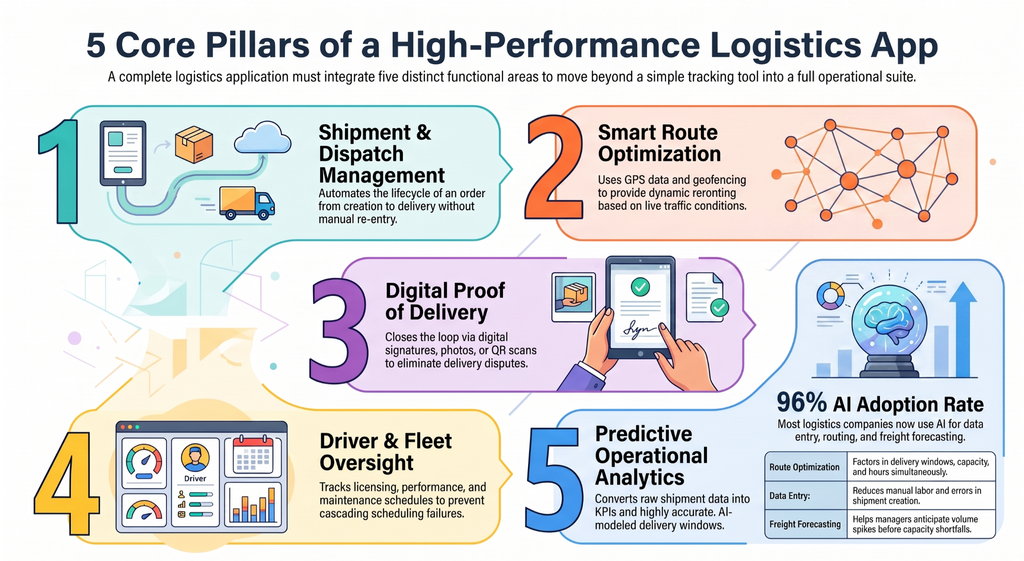
A logistics app should combine shipment and dispatch management, GPS tracking and route optimization, driver and fleet management, delivery execution tools, and operational analytics. The exact combination depends on the workflow, but most logistics applications need capability in each area to function as a complete operational tool.
1. Shipment, Order, and Dispatch Management
This is the operational core: order creation, shipment status tracking, dispatch assignment, delivery scheduling, and status updates that move automatically as a shipment progresses.
An order should be assignable to a driver and vehicle without manual re-entry, with status updating as it moves through pickup, transit, and delivery. Without this foundation, every other feature is disconnected from the actual work being done.
2. GPS Tracking, Navigation, and Route Optimization
A logistics app uses GPS data to determine where a vehicle actually is, route optimization to plan an efficient sequence of stops, and geofencing to trigger automatic actions, like an arrival notification, when a vehicle enters a defined area.
Traffic-aware routing adjusts a route to current road conditions, and dynamic rerouting recalculates mid-trip. These work together: location data feeds routing decisions, routing determines ETAs, and ETAs drive the status updates dispatchers and customers see.
3. Driver and Fleet Management
Driver profiles hold licensing, availability, and performance history. Scheduling tools assign drivers to routes based on availability and hours. Vehicle information tracks maintenance schedules, mileage, and fuel data.
This breakdown mid-route creates a cascading scheduling problem. Driver performance data, like on-time rates and safety events, gives fleet managers a factual basis for coaching decisions instead of guesswork.
4. Delivery Execution and Communication
Proof of delivery is a digital signature, photo, or barcode/QR scan confirming the right item was delivered. It closes the loop on a shipment and reduces disputes about whether delivery happened. Push notifications keep customers informed of delivery windows and changes.
Direct communication between drivers and dispatchers matters because field conditions change constantly, and a driver who can’t quickly reach a dispatcher ends up deciding alone.
5. Analytics, Automation, and AI
Operational dashboards turn raw shipment and driver data into KPIs, on-time delivery rate, failed delivery rate, that managers can act on. Predictive ETA models use historical and live data for a more accurate delivery window than a static estimate. Demand forecasting helps fleet managers anticipate volume spikes before they cause a capacity shortfall.
The practical application of AI in app development shows up here: extending basic routing by factoring in delivery windows, vehicle capacity, and driver hours simultaneously.
AI-assisted route optimization extends basic routing by factoring in delivery windows, vehicle capacity, and driver hours simultaneously, difficult to do manually once a fleet grows past a handful of vehicles. 96% of logistics companies are using generative AI, with the top use cases being data entry, route optimization, and freight forecasting.
How to Develop a Logistics App From Scratch?
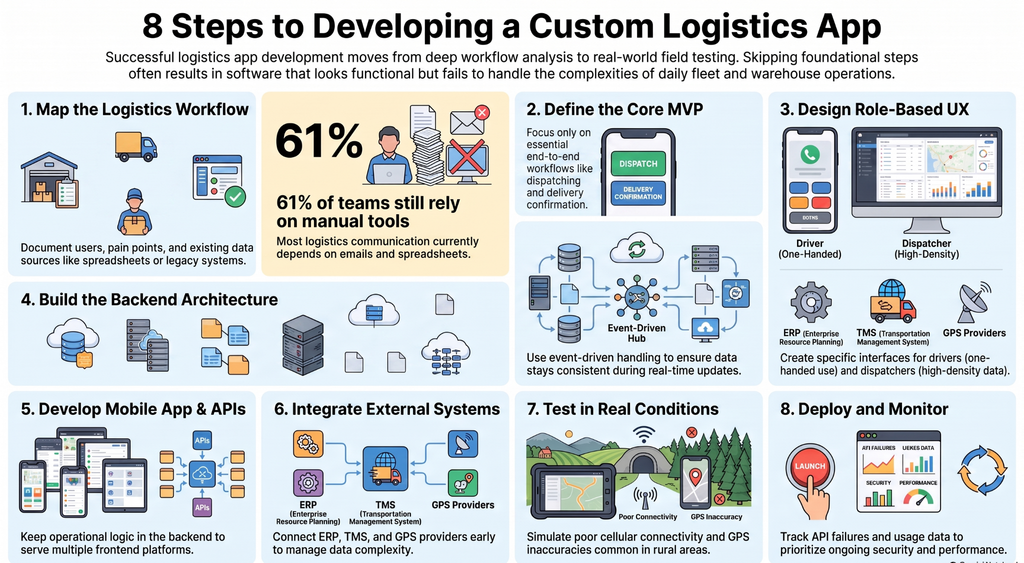
Logistics app development follows eight stages: mapping the workflow, defining the MVP, designing role-based UX, building the backend and data architecture, developing the mobile app and APIs, integrating external systems, testing under real operating conditions, and deploying with ongoing monitoring.
Skipping the early stages usually produces an app that looks complete but doesn’t match how the operation actually works.
1. Map the Logistics Workflow
Before writing a feature list, document who does what, in what order, and where the current process breaks down: users, the sequence of operational steps, pain points, the KPIs the business tracks, and where the relevant data currently lives. This includes spreadsheets, a legacy TMS, paper logs.
61% of logistics teams still depend on emails and spreadsheets to manage communication with overseas partners. Requirements should come from this real workflow, not a generic checklist, because two operations that look similar on paper can have very different bottlenecks.
2. Define the MVP
An MVP for a logistics app is not “fewer features.” It’s the smallest set of workflows that lets the business run its core operation end to end, usually order creation, dispatch, basic tracking, and delivery confirmation.
Advanced analytics, AI forecasting, and multi-warehouse support can wait. Every feature added increases integration points and time to launch, so scope decisions should tie directly to which workflows the business cannot operate without.
3. Design Role-Based UX/UI
Drivers, dispatchers, fleet managers, warehouse staff, and customers need different interfaces because they work under different conditions. A driver’s interface has to work one-handed, in bright sunlight, with minimal typing, since it’s used in a moving vehicle or on a loading dock.
A dispatcher’s interface needs to show many active jobs at once and support fast reassignment. Designing one interface for all users usually means it works poorly for most of them.
4. Design the Backend and Data Architecture
The backend needs APIs for every connected system, a database structured around the logistics workflow rather than a generic schema, role-based authentication, and infrastructure that handles real-time data, location updates, status changes, without lag.
Event-driven handling, where a status change automatically triggers downstream updates, keeps data consistent as it flows between the mobile apps, backend, and connected systems. This is what lets the app scale from a pilot fleet to hundreds of vehicles without a rebuild.
5. Build the Mobile App and APIs
The mobile app is the interface; it doesn’t hold the operational logic. It calls backend APIs, the backend processes and stores data, and those same APIs push updates back to other clients, like a dispatcher’s web dashboard, in near real time.
This separation lets the backend serve multiple front ends from one source of truth instead of duplicating logic across platforms.
6. Integrate External Logistics Systems
Most logistics apps connect to an ERP for order and billing data, a TMS for transportation planning, a WMS for warehouse data, GPS and mapping providers, telematics systems, and sometimes payment processors.
Each integration adds complexity because it introduces a system the app doesn’t control, like different data formats, reliability, and update frequency. These requirements should be scoped early, since they often affect the backend architecture decided in the previous stage.
7. Test Under Real Logistics Conditions
Logistics apps fail in the field for reasons that don’t show up on a stable office network: poor cellular connectivity in rural delivery areas, inaccurate GPS near tall buildings, inconsistent behavior across older Android devices common in driver fleets, failed data sync after a connectivity gap, and background location tracking the operating system kills to save battery.
Testing needs to simulate these conditions directly rather than relying on standard QA alone. This is where apps that work well in a demo often start failing in production.
8. Deploy, Monitor, and Improve
After launch, the work shifts to monitoring: tracking performance, watching for API failures or sync errors, applying security updates, and using real usage data to prioritize improvements. A logistics app is not a one-time build, such as operational needs shift as fleet size, routes, and integrations change, and the app has to keep pace.
How Software Orca Improved Tech Transit’s Package Tracking
Tech Transit’s tracking system displayed technical status codes that meant little to the average recipient. Without clear visibility into their deliveries, users called support for updates, turning a simple tracking function into a costly operational drag.
Software Orca, a mobile app development company in Dallas, redesigned the experience from the ground up. They replaced opaque codes with plain-English status updates, added visual route mapping, and built an AI chatbot that guided users through claim submissions step by step. The solution used React Native and Node.js, connecting seamlessly to Tech Transit’s legacy databases.
Within the first month, support ticket volume dropped 60%. The tracking system stopped generating calls and started delivering the one thing recipients actually wanted: clarity.
Which Tech Stack Is Best for Logistics App Development?
There is no single best tech stack for logistics app development. The right choice depends on platform requirements, how much real-time data the app handles, which systems it integrates with, expected scale, and the technology already in use at the business. According to Research and Market, the smart and mobile supply chain solutions market is projected to grow from $23.6 billion in 2025 to $63 billion by 2034, at 11.5% CAGR.
Mobile Development
Native iOS and Android development gives the most control over device-level features like background location tracking and camera access, which matters for driver apps that rely heavily on both.
React Native and Flutter let a single codebase serve both platforms, speeding up development for dispatcher or customer-facing apps with lighter device needs. For driver apps in poor-connectivity, battery-sensitive conditions, native development is often preferable because it offers more reliable control over background processes.
Backend and APIs
Node.js is a common choice for logistics backends because it handles many simultaneous real-time connections well, suiting GPS tracking and live status updates. Python is often used where the backend also handles analytics or machine learning, like predictive ETAs. Java and .NET remain common in enterprise environments already built on those ecosystems.
Database and Real-Time Infrastructure
PostgreSQL suits structured operational data, like orders, shipments, driver records, where relationships matter. MongoDB suits more flexible or rapidly evolving data structures. Redis is commonly used for caching fast, temporary data like live vehicle positions.
WebSockets, a method that keeps a connection open so data pushes to a device the instant it changes, are what make live tracking feel instant. An event-driven architecture becomes useful once multiple systems need to stay in sync.
Maps, Location, Cloud, and AI
Google Maps and Mapbox both provide routing, geocoding, and mapping data; the choice usually comes down to pricing and specific routing features. AWS, Azure, and Google Cloud offer the infrastructure and managed services logistics apps typically need, and the choice is often driven by what the business already uses elsewhere.
AI and machine learning services become relevant specifically for predictive ETAs, demand forecasting, or route optimization. They belong in the stack because a feature requires them, not by default.
How Do You Integrate a Logistics App With ERP, TMS, and WMS?
Integrating a logistics app with ERP, TMS, and WMS systems means building a data exchange layer so the app can send and receive operational data from those systems instead of operating as a separate, disconnected tool.
Without this, staff end up re-entering the same data in multiple places, which introduces errors and delays.
ERP Integration
An ERP (enterprise resource planning system) typically holds order data, customer records, inventory levels, and billing information. Integrating with it lets the logistics app pull order details automatically when a shipment is created and push delivery confirmations back so billing and inventory update without manual entry.
TMS and WMS Integration
A TMS (transportation management system) supports transportation planning, including assigning loads to carriers, planning routes across a network. A WMS (warehouse management system) manages inventory, picking, and packing inside a facility.
A logistics app connected to a TMS can pull load and carrier assignments directly; connected to a WMS, it can confirm when an item has been picked and packed and is ready for pickup, keeping shipment status accurate from the warehouse floor through delivery.
GPS and Telematics Integration
Telematics systems collect vehicle-level data, such as location, mileage, fuel usage, and sensor data like harsh braking events. Integrating this data gives fleet managers a single view of vehicle health and driving behavior alongside delivery performance, rather than a separate telematics portal.
API-Based Data Synchronization
Most integrations follow the same path:
source system → API/integration layer → logistics backend → mobile/web clients.
Some data needs real-time synchronization, like GPS location, delivery status, while other data, like billing records, can sync in batches.
The integration layer also needs authentication with each external system, retry logic for failed requests, and a clear rule for resolving conflicting data when two systems disagree. Webhooks, automated messages sent from one system to another when a specific event occurs, are commonly used to trigger updates without constant polling.
How Should a Logistics App Handle Security and Compliance?
A logistics app needs security controls across authentication, data encryption, API access, location data handling, and audit logging, because it manages operational, driver, customer, and shipment data simultaneously.
Specific compliance obligations vary by application type, industry, and jurisdiction, so they should be confirmed with legal counsel rather than assumed from a generic list.
Authentication and Role-Based Access
Every user type, driver, dispatcher, fleet manager, customer, should only access data and actions relevant to their role. A driver app, for instance, doesn’t need access to fleet-wide financial data.
Encryption and Data Protection
Data should be encrypted both in transit (as it moves between the app, backend, and connected systems) and at rest, particularly for location, customer, and billing information.
API and Integration Security
Every external connection, to an ERP, TMS, telematics provider, or payment processor, is a potential entry point, so each integration needs its own authentication, rate limiting, and monitoring rather than shared, blanket access.
Location and Operational Data Protection
Continuous GPS tracking of drivers and vehicles is sensitive by nature. Access to raw location history should be limited to roles that need it, with retention policies defining how long that data is kept.
Audit Logs and Monitoring
Logging who accessed or changed what data, and when, supports both security investigations and operational accountability, particularly for disputes about delivery status.
What Are the Biggest Logistics App Development Challenges?
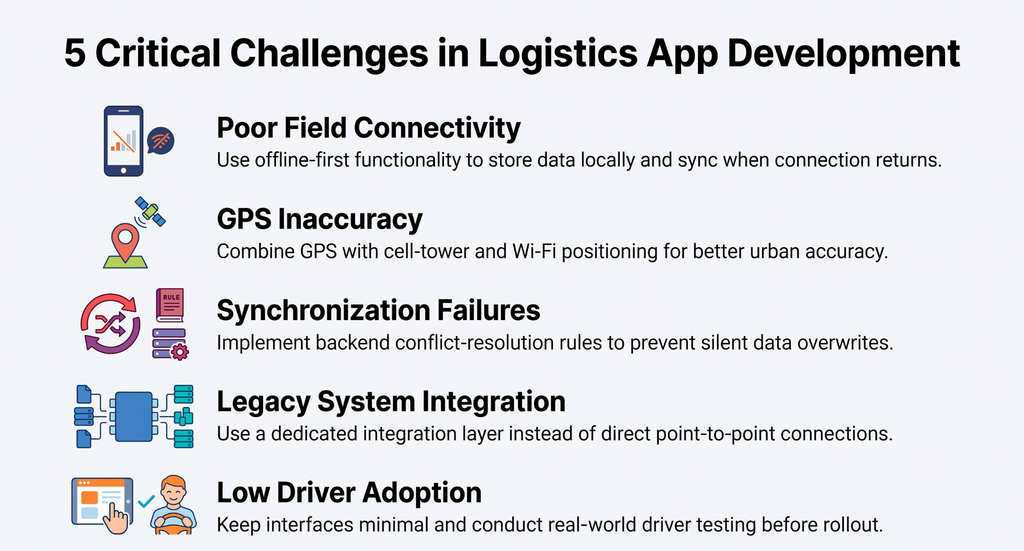
The most common logistics app development challenges are poor field connectivity, GPS inaccuracy, real-time synchronization failures, legacy system integration, and driver adoption. Each with a practical mitigation rather than a perfect fix.
Poor Connectivity
In rural or industrial delivery areas, it causes data loss if the app assumes a constant connection; offline-first functionality, where actions are stored locally and synced once connectivity returns, mitigates this directly.
GPS Inaccuracy
Near tall buildings or in dense urban areas, it can be reduced by combining GPS with cell-tower and Wi-Fi positioning rather than relying on GPS alone.
Synchronization Failures
These happen when multiple devices update the same record; a clear conflict-resolution rule in the backend prevents data from silently overwriting itself.
Legacy System Integration
With an older ERP or TMS often means working with limited APIs, which usually calls for a dedicated integration layer rather than direct point-to-point connections.
Driver Adoption
It fails when an app is too complex for field use; keeping the driver interface minimal and testing it with real drivers before rollout addresses this more reliably than adding features after launch complaints.
How Much Does Logistics App Development Cost?
Logistics app development typically costs $25,000 to $150,000+, depending on the app’s complexity, number of user roles, platforms, real-time tracking requirements, and integrations.
- Basic logistics app: $25,000–$50,000
- Mid-level logistics app: $50,000–$100,000
- Advanced logistics platform: $100,000–$150,000+
Features such as AI-powered optimization, telematics, real-time tracking, and ERP, TMS, or WMS integrations can increase the cost. The best way to control the budget is to define the core workflow and MVP first, then add advanced capabilities in later phases.
What Makes a Logistics App Successful?
A successful logistics app fits the actual operational workflow, provides reliable real-time data, gives each user role an interface built for their conditions, integrates cleanly with existing business systems, and scales without requiring a rebuild. Success shows up in operational metrics, not app store reviews.
Useful KPIs to track after launch include on-time delivery rate, fleet utilization, delivery cycle time, failed delivery rate, route efficiency, and driver productivity. If on-time delivery improves and failed deliveries drop after rollout, the app is doing its job.
If drivers avoid using it or dispatchers still rely on phone calls to confirm status, it hasn’t actually replaced the manual process it was built to fix. No matter how complete its feature list looks on paper.
Conclusion
A logistics app is not simply a mobile interface bolted onto existing operations. It’s an operational system that connects people, vehicles, shipments, and business systems around the same real-time data.
Getting there requires mapping the actual workflow first, scoping an MVP around the operations that matter most, designing for each user role separately, and building the integrations and security controls that let the app function as part of the business, not alongside it.
The technology choices, like mobile framework, backend, database, integrations, follow from those decisions, not the other way around.
FAQs
1. How long does it take to build a logistics app?
Development timelines typically range from 3 to 9 months, depending on complexity, integrations, and the number of user roles. A basic MVP with core tracking and dispatch features can take 3 to 4 months. Adding ERP, TMS, or WMS integrations, AI capabilities, or multi-platform support extends the timeline accordingly.
2. Do I need both a driver app and a customer app?
Yes, in most cases. Drivers and customers have fundamentally different needs. Drivers require offline functionality, barcode scanning, and one-handed operation, while customers need status visibility and delivery windows. Building separate interfaces for each role, even within a single codebase, is standard practice.
3. Can a logistics app work without an internet connection?
Partially. A well-built app supports offline-first functionality. Drivers can view assigned routes, scan packages, and capture proof of delivery without connectivity. Data syncs automatically once the connection returns. However, real-time tracking and live dispatcher visibility require an active connection.
4. What’s the difference between a logistics app and a TMS?
A TMS, or Transportation Management System, is a planning tool. It handles load optimization, carrier selection, and long-term route planning at a strategic level. A logistics app is an execution tool. It manages day-to-day operations like dispatch assignment, real-time tracking, delivery confirmation, and driver communication. Many logistics apps integrate with a TMS but serve different purposes.