Ask five Dallas development companies for a custom app quote and you’ll get five different numbers. None are lying. Because a loyalty app isn’t a marketplace, and pricing them the same way is how founders end up with contradictory quotes.
What actually moves the number: hourly rates, engineering effort, and delivery model.
This guide walks through the math the way an app development company in Dallas actually builds an estimate, not the way a national article guesses at one.
You’ll get real budget bands, current developer rates, a worked cost example, and what you’ll spend after launch.
Custom App Development Cost in Dallas (Quick Overview)
| Project Type | Typical Dallas Cost Range | Timeline |
| MVP / Simple App | $15,000 – $40,000 | 2–4 months |
| Mid-Complexity App | $40,000 – $120,000 | 4–8 months |
| Enterprise / Complex App | $120,000 – $200,000+ | 8–14 months |
- Dallas teams bill $100 to $200 an hour on average, with offshore and nearshore alternatives running well below that.
- What actually swings your estimate is user roles, backend depth, integrations, and whether you’re asking for real-time features, AI, or compliance work.
- Budget 15% to 25% of your build cost every year after launch just to keep the thing running.
- No matter what rate someone quotes you, remember it’s not the total: rate times hours is the total, and hours are the part worth interrogating.

What Determines the Size of a Custom App Project?
Size comes down to how much the app actually has to do under the hood, not how many screens are in the Figma file. We’ve seen ten-screen apps take longer to build than thirty-screen apps, because the ten screens were coordinating live data across three user types and the thirty screens were mostly static content with a shared template.
A few things reliably drive that difference, and any experienced estimator is running through this list before they touch a calculator.
1. User Roles and Core Workflows
One user type is simple. The moment you add a second (say, staff alongside customers) or a third (add an admin), you’re not just adding a screen, you’re adding permission logic, separate views of the same data, and new paths to test. Roles multiply complexity faster than most founders expect going in.
2. Frontend and Backend Requirements
Frontend work scales with how much of the interface is custom-designed versus built from standard patterns. Backend work scales with how much logic and data modeling sits behind those screens. A content app is mostly frontend. A booking or marketplace platform lives or dies on the backend, and that’s where the hours go.
3. Integrations and Admin Systems
Every integration, whether it’s Stripe, a mapping API, a CRM, or a hospital’s EHR system, costs you setup time now and maintenance time forever. Admin panels get underestimated constantly because they’re invisible to end users, but someone still has to design and build the tools your internal team uses to manage the app day to day.
4. Real-Time Functionality, AI, and Scalability
Real-time chat, live tracking, and live notifications need different architecture than a standard app that just responds to requests. AI features add model integration and data pipeline work that doesn’t show up on a feature list the way “search bar” does. Compliance requirements like HIPAA, and any scalability target beyond a modest user base, push effort up before a single screen gets designed.
How Much Do App Developers Cost in Dallas?
App developers in Dallas bill somewhere between $75 and $250 an hour depending on seniority and delivery model, and most professional teams in this market land between $100 and $200.
That’s a labor rate, full stop.
It tells you nothing about your total project cost until you know how many hours your app actually needs.
Here’s where that range comes from. According to Glassdoor, senior developers or architects’ median salary in Dallas is around $156k, before you add benefits, overhead, and margin.
That salary data reflects a deep and growing talent pool.
Dallas-Fort Worth ranks #8 among North American tech talent markets, adding 37,230 tech jobs between 2022 and 2025, nearly 19% growth. AI-specialty talent in the region grew by at least 45% over the past year, with nearly 30,000 specialized AI workers now in DFW.
That supply of talent is exactly why Dallas rates stay competitive while delivering coastal-quality work.
| Role or Delivery Model | Typical Dallas Hourly Rate |
| Junior developer (in-house equivalent) | $40 – $65 |
| Mid-level developer | $65 – $110 |
| Senior developer / architect | $110 – $175 |
| UX/UI specialist | $75 – $150 |
| Dallas development agency (blended team rate) | $100 – $200 |
| Independent Dallas freelancer | $50 – $150 |
| Offshore or nearshore team | $25 – $75 |
Agencies bill a higher blended rate than solo freelancers for a reason: that number is covering project management, QA, and design collaboration, not just one person typing code. A dedicated team runs frontend, backend, and QA in parallel, which usually costs more per hour but finishes faster than a single freelancer working every discipline in sequence.
Here’s the thing we try to get every founder to internalize before they compare quotes: rate is not cost.
A senior architect at $200 an hour who avoids three weeks of rework because they designed the data model correctly the first time can end up cheaper than a $60-an-hour developer who has to redo the same feature twice.
If you’re only comparing hourly numbers across quotes, you’re comparing the wrong thing.
What Should a Custom App Development Cost Quote Include?
A real custom app development cost quote accounts for every phase of getting the app built and shipped, not just a lump sum for “development.” If a quote hands you one number with no breakdown, that’s your cue to ask what’s actually in it before you sign anything.
A quote worth trusting will itemize, even if it’s ultimately priced as one project total:
- Discovery and requirements, documenting what the app actually needs to do.
- Architecture planning for how the frontend, backend, and database fit together.
- UX/UI design, including wireframes and design iterations.
- Frontend development for what users see and touch.
- Backend development for the logic and data behind it.
- Integration work for any third-party services.
- QA and testing across devices and operating systems.
- Deployment to the App Store, Google Play, or your hosting environment.
- Project management for the length of the engagement.
- Documentation of the codebase and how systems connect.
What’s usually billed separately, and should be called out explicitly rather than buried, are third-party and external costs: Apple’s Developer Program fee ($99 a year), Google Play’s one-time $25 registration, cloud hosting, and any paid APIs the app depends on for maps, messaging, or payments.
Post-launch support terms belong in the quote too. What’s covered under warranty, and what kicks you into a separate maintenance agreement? If a quote doesn’t answer that, you can’t budget past launch day.
How Is a Custom App Development Cost Estimate Calculated?
The math behind an estimate is estimated hours times team rate, plus external costs. Simple formula. The hard part isn’t the arithmetic, it’s getting the hours right.
Estimated development hours × team rate + external costs = estimated project cost
Hours get estimated by breaking the app into individual workflows and sizing each against similar past work. A login system is a known quantity for a team that’s built one before. A custom matching algorithm isn’t, and it needs a wider range to account for that.
Team composition matters here too: a blended team spends senior hours only where judgment calls actually matter, which keeps the average rate down without sacrificing the decisions that need experience.
Complexity compounds rather than adds. One integration on a simple app might cost 40 hours. That same integration on an app that already has three user roles and real-time features can cost 100, because now it has to be tested against more states and more edge cases.
Contingency, usually 10% to 20% of estimated hours, should be built into the number from the start. It’s there to absorb the unknowns every build surfaces once work actually begins, rather than showing up later as a change order nobody budgeted for.
Custom App Development Example Using Dallas Assumptions
Take a mid-complexity app: two user roles, one payment integration, a standard admin dashboard, built by a Dallas team at a blended rate of $140 an hour.
- Discovery and architecture: 80 hours.
- UX/UI design: 120 hours.
- Frontend development (iOS and Android): 320 hours.
- Backend development and integration: 280 hours.
- QA and testing: 100 hours.
- Project management: 100 hours.
- Subtotal: 1,000 hours × $140/hour = $140,000.
- Contingency (15%): $21,000.
- External costs (developer accounts, initial hosting setup): $500.
- Estimated total: approximately $161,500.
Notice that nothing in this math came from counting features. That’s the point. A checklist of ten features says nothing about how many of them touch shared backend logic or require entirely new UI patterns.
Hours built on real workflow breakdowns are what a number you can actually trust looks like.
What Will You Spend After the Custom App Launches?
Plan on 15% to 25% of your original development cost every year to keep the app running, secure, and current. That’s a recurring bill, separate from the check you wrote to build the thing, and it doesn’t stop just because the app shipped.
Here’s what that ongoing spend usually covers:
- Maintenance and bug fixes: the stuff that only surfaces once real users are hitting the app at real volume.
- OS and platform updates: Apple and Google ship new OS versions every year, and your app needs to keep pace or risk breaking or getting pulled from stores.
- Hosting and cloud infrastructure: AWS, Google Cloud, or Azure costs that scale with your users and data, running from a few hundred dollars a month for a lean app up to several thousand for one with heavy media or high traffic.
- API and third-party service fees: the recurring cost of whatever mapping, messaging, or payment services the app leans on.
- Security updates: patching vulnerabilities and staying compliant where that applies.
- Monitoring and technical support: catching problems before your users report them
- Future enhancements: new features scoped and budgeted on their own, separate from maintenance
We’d frame the distinction this way: development cost buys the app. Ownership cost keeps it alive inside a platform ecosystem that keeps shifting underneath it.
The founders who get blindsided post-launch are almost always the ones who budgeted only for the build and never for the years after it.
What Do Our Projects Tell About Custom App Development Cost?
Here’s a real project Software Orca built.
PawConnect, an app development project in Dallas, is a mobile-first pet adoption platform connecting adopters with shelters. Shelters were using outdated systems; families couldn’t find pets easily.
Software Orca helped the client make a critical early decision: build cross-platform with React Native instead of building two separate native apps.
The client saved an estimated 40–50% in development time by choosing React Native.
The client came to us with a rough concept and no technical team. We guided them through the three-week planning phase to define scope, prioritize features, and establish a realistic timeline before any code was written.
- What drove the scope: Location-aware search, image-heavy pet listings, structured backend logic for shelters and adopters, and cross-platform testing on both iOS and Android.
- Timeline: 6 months from concept to launch.
- Stack: React Native, Node.js, MongoDB, AWS, Figma.
- Results: 40% increase in pet adoption rates. 15+ shelters connected. 96% customer satisfaction.
How Can You Reduce Custom App Development Cost Without Cutting Critical Features?
You bring cost down by controlling scope and sequencing, not by stripping out the features that make the product worth building. The idea is spending hours on what proves the product’s value right now, and pushing everything else down the road.
As Forbes noted recently, AI-assisted development has compressed delivery timelines so significantly that the build-vs-buy equation is shifting. It’s now often cheaper to build custom software than to adapt a commercial platform to your needs. But that doesn’t mean you should build everything at once.
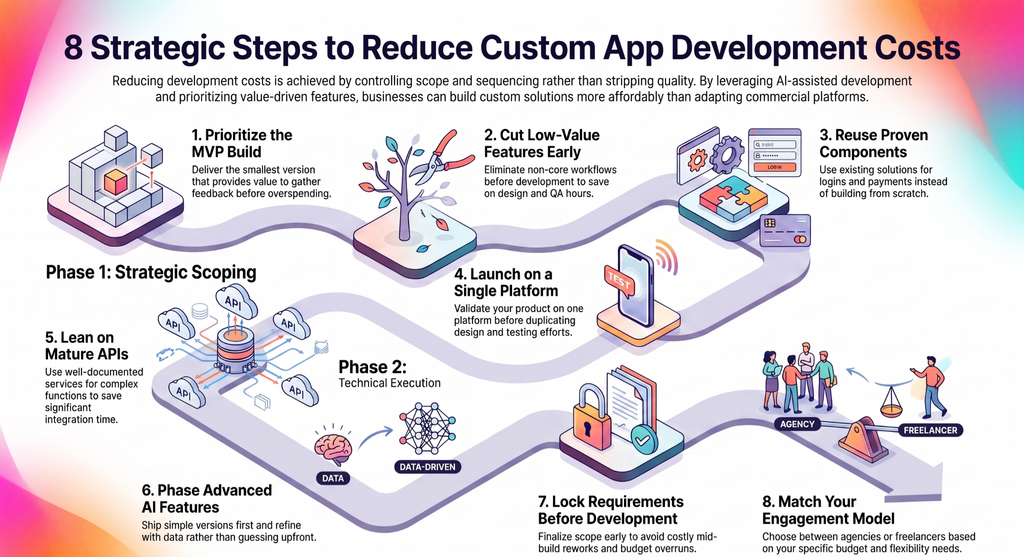
1. Prioritize the MVP
Build MVP (the smallest version) that actually delivers value first. It cuts your initial hour count and gets you real user feedback before you sink budget into features that might change once you see how people actually use the thing.
2. Cut low-value features before development, not after
Anything not tied to a core workflow costs design, build, and QA hours whether or not it ends up mattering. Cutting it early means you never paid for it in the first place.
3. Reuse proven components instead of custom-building everything
Login, payments, notifications: mature solutions already exist for all of these. Building them from scratch adds hours without adding anything users will notice.
4. Skip extra platforms until you’ve validated the first one
Launch on one platform, prove it out, then expand. Building both at once from day one usually just duplicates design and testing work you haven’t earned the need for yet.
5. Lean on mature, well-documented APIs over custom integrations
A payment processor or mapping service with solid docs and existing libraries integrates in a fraction of the time it takes to build the same functionality yourself.
6. Phase advanced AI features instead of shipping them all at once
AI often improves with real usage data. Ship a simpler version first, then expand it once you have data worth tuning against, instead of guessing upfront.
7. Lock requirements before development starts
Scope changes mid-build are one of the most reliable ways to blow a budget, because in-progress work often has to be reworked, not just extended.
8. Match your engagement model to your actual constraints
A fixed-scope agency, a dedicated team, and a freelancer each trade cost against flexibility differently. Pick the one that fits your timeline and budget, not the one that sounds most impressive.
Wrapping it Up
Custom app development cost in Dallas doesn’t have to be an unpredictable one. When you look beyond flat hourly rates and focus on how engineering hours are calculated, estimated, and managed, you gain full control over your project’s scope and budget.
By prioritizing your MVP, leveraging cross-platform frameworks, and choosing a Dallas-based team that aligns with your operational goals, you can ship coastal-quality software without paying coastal markups.
The right app development partner will help you map out the total cost of ownership so your product can scale reliably for years to come.
Related Guides
Logistics App Development — A step-by-step technical guide on how to code, build, and deploy custom logistics and fleet management software.
Healthcare App Development — How to develop secure medical applications from scratch while ensuring full HIPAA compliance and EHR integration.
Telemedicine App Development — A complete engineering walkthrough on how to build a real-time virtual care platform with video calling and e-prescriptions.
Yoga-Go App Cost — How to estimate development costs, calculate backend infrastructure fees, and build a fitness app like Yoga-Go.
Android System Intelligence — An overview of Android’s built-in background component, detailing how on-device AI powers features like Live Caption and Smart Reply.
FAQs
What is the minimum budget for a custom app development in Dallas?
A basic MVP with limited core functionality typically starts around $15,000 in Dallas. Anything below that usually means reduced scope, an offshore team, or a no-code build rather than fully custom development.
How long does custom app development take?
Simple MVPs usually run 2 to 4 months, mid-complexity apps 4 to 8 months, and enterprise builds 8 to 14 months. Timeline tracks scope and team size, not what category of app you’re building.
How much should I budget for app maintenance?
Plan on 15% to 25% of your original build cost, every year, for maintenance, hosting, security updates, and OS compatibility work. Budget it from day one, because it doesn’t stop after launch.
Is app development in Dallas cheaper than other U.S. cities?
Yes. Dallas agencies bill $100–$150/hour compared to $150–$250 in California and $130–$220 in New York. On a $100,000 project, that translates to $30,000–$50,000 in savings for equivalent quality. Dallas offers coastal-quality talent at a lower cost without sacrificing time zone alignment or communication speed.
Why should I build my app in Dallas instead of offshore?
Dallas developers cost more per hour ($100–$150) than offshore teams ($25–$75), but offshore savings often disappear into project management friction and revision cycles. Dallas teams like Software Orca share your time zone, respond within hours instead of overnight, and understand U.S. business culture and user expectations.